

Classic DNSDB API Version 1 vs the Newer DNSDB API Version 2 (DNSDB APIv2): What Are YOU Using?


Introduction
DNSDB is the gold standard collection of Passive DNS information. It is a historical database that provides a unique, fact-based, multifaceted view of the configuration of the global Internet DNS infrastructure as viewed from DNS queries. A primary way to access data from DNSDB is via our APIs. Many users of DNSDB Passive DNS API have no idea that there are actually two versions of DNSDB API:
- The “classic” version of DNSDB API, aka “Version 1” or “v1”, is deprecated but still in use by some non-updated programs, and
- The newer and recommended version of DNSDB API: Version 2, sometimes shortened to “DNSDB APIv2”.
This article’s message is simple: it’s time to move to DNSDB API Version 2 if you haven’t done so already.
“DNSDB Has Multiple Versions? What?!? When Did That Happen?”
Version 2 was announced for DNSDB API users in Fall 2020, and became available for DNSDB Export (“DNSDB on Premises”) customers in the summer of 2021. We empathize that there were many other things happening globally during this timeframe, like COVID. We also haven’t talked much about it since that time, but we think the time’s now ripe for us to revisit this topic. 2023 is truly the “Year of DNSDB API Version 2.”
Here are some of the articles we published around the original release of DNSDB APIv2:
- “Farsight Security Revolutionizes DNS Search for Cybersecurity Teams with DNSDB 2.0“
- “Introducing DNSDB 2.0“ (originally published 8/4/2020 on the Farsight Security blog)
- “Farsight Security Announces General Availability for DNSDB 2.0 Flexible Search, a Powerful Tool to Uncover Phishing, Brand Infringement, and Misinformation Campaigns“
- “Farsight DNSDB Flexible Search Now Available as On-Prem Solution or Hosted Service for Threat Hunters“
“Why Should I Bother Going to DNSDB API Version 2? Classic DNSDB API Version 1 Works Just Fine for Me…”
We’re glad you’re happy with classic DNSDB API (aka DNSDB Version 1), but we think you’ll like DNSDB API Version 2 even more.
Farsight Security (now part of DomainTools) created DNSDB API Version 2 for several reasons, including:
- DNSDB APIv2 is technically cleaner than classic DNSDB API. DNSDB APIv2 explicitly handles conditions that can arise while working with DNSDB, including explicitly signaling there are “more results are available” when there are more results for a query than current query parameters allow to be returned. DNSDB APIv2 also enables detection of prematurely-truncated results, perhaps occurring as a result of timeouts. This signaling is possible because DNSDB APIv2 uses the “Streaming API Framing Protocol.”
- DNSDB APIv2 also added new substantive search functionality known as “Flexible Search,” allowing for a vastly expanded range of potential DNSDB API searches, including popular searches that simply can’t be done in classic DNSDB API or any other passive DNS system on the market.
- DomainTools will eventually phase out DNSDB API Version 1 – it’s already been three years.
While no firm date has been announced for the phase out of DNSDB API Version 1, there’s no technical capability in Version 1 that’s unique and missing from Version 2 – people are simply continuing to use the old version of DNSDB API “by default.” Anything you could do in classic DNSDB API you can do equally easily in DNSDB APIv2.
You won’t have to “give anything up” in order to move to DNSDB APIv2.
“Which Version Will I Get by Default If I Don’t Explicitly Ask for One Version or The Other? Can I Explicitly Ask for APIv2?”
The version of DNSDB API you’ll get by default will vary depending on how you’re accessing DNSDB API. How you can explicitly request one version or the other will also vary depending on how you access DNSDB API.
In this section, we’ll look at how DNSDB Scout and dnsdbq, the two DNSDB interfaces we most often discuss/recommend, work with DNSDB API Version 2.
- DNSDB Scout: DNSDB Scout is the DomainTools GUI web-based interface to DNSDB. DNSDB API customers access DNSDB Scout online using any of the major browser platforms. A valid DNSDB API key is required to use Scout.
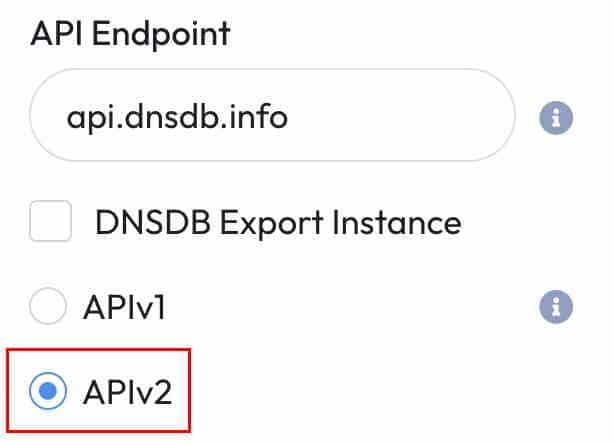
The default for DNSDB Scout is DNSDB API Version 2. This means that most DNSDB Scout users will not need to take any action whatsoever in order to use DNSDB API version 2 because you’re already doing so (see how easy that was?)
However, if you did ever want to check and confirm your API settings in DNSDB Scout, you can go to the orange “Gear” icon (in the upper right corner of the opening DNSDB Scout web page), then select Options –> Advanced. Scroll to the bottom of the Advanced panel. APIv2 setting will normally be pre-selected, as shown here:
	DNSDB_SERVER="https://api.dnsdb.info"
	APIKEY="your_APIkey_here"
	DNSDBQ_SYSTEM="dnsdb2"
If you want to subsequently confirm that you’re really using DNSDB API Version 2, you can use the -d option (debug) with a dnsdbq query:
$ dnsdbq -I -d
debug: qdesc(main)[ ]
debug: qparam(main)[ ]
debug: batching=0, multiple=0
debug: conf found: '[some_filespec_here]/.dnsdb-query.conf'
debug:
pick_system(dnsdb2)
[output continues]
“What If We’re Using Some OTHER Interface to DNSDB API, Such as a 3rd-Party DNSDB Integration? Will IT Be Using APIv2?”
The default version of DNSDB API used by any given 3rd-party DNSDB integration is something that’s independently controlled by each integration. Consult the 3rd-party integration’s documentation (or support channels for that integration) for details around the version of DNSDB API it uses.
“I’m a Developer Updating a 3rd-Party DNSDB API Integration. Where Can I Get Official Documentation About Using DNSDB APIv2?”
DNSDB APIv2 has a user’s guide, as well as several supporting manuals specifically covering the new DNSDB API Streaming Application Framing Protocol and DNSDB Flexible Search API:
- DNSDB API Version 2 Users Guide
- DNSDB SAF (Streaming API Framing Protocol) Programmers Guide
- DNSDB Flexible Search API
If you’re new to Flexible Search, you may also want to review the slides for the company’s introduction to DNSDB Flexible Search webinar, and our DNSDB Farsight Compatible Regular Expressions (FCRE) Reference Guide:
- DNSDB Flexible Search: An Introduction
- DNSDB Farsight Compatible Regular Expressions (FCRE) Reference Guide
You may also be interested in experimenting with the DNSDB Version 2 APIs via Swaggerhub. See:
- Swaggerhub Announcement, “DomainTools APIs Have More Swagger”
- Swaggerhub DomainTools DNSDBv2 (requires active DNSDB API key)
“I’m A Developer Just Looking for a Quick Summary of the Differences Between Classic DNSDB API and DNSDB APIv2 – Can You Help?”
See the formal documentation for official DNSDB APIv2 information. A rough outline of the minimum that’s needed to port a classic DNSDB application to DNSDB API Version 2 looks like the following:
a) If your application previously relied on the ad hoc presentation format for its output, or CSV output, note that JSON Lines is now the only format supported.
b) Adjust the server’s name and endpoint from V1 to V2 as appropriate (this is one example endpoint; other endpoints follow the same basic approach):
    https://api.dnsdb.info/lookup/rrset/name/ + fqdn  -->
    https://api.dnsdb.info/dnsdb/v2/lookup/rrset/name/ + fqdn
b) Adjust the content type (now must explicitly ask for JSON Lines, not just JSON):
    Accept: application/json
    Accept: application/json
l
c) DNSDB API Version 2 SAF output needs to be parsed as (up to) three types of objects:
— 1st type of object, signaling the beginning of output:
{"cond":"begin"}
— 2nd type of objects (formerly the only thing returned), containing the results, which is now wrapped in an “obj”:
{"obj":{resultshere}}
— And a 3rd object signaling the end of the output. This will normally be:
{"cond":"succeeded"}
But can also sometimes be:
{"cond":"limited","msg":"Result limit reached"}
If something goes wrong (such as a timeout or a crash), the end-of-output object will not be received.
If you’re not interested in explicitly dealing with those objects, you may just want to strip them. For example, in Python3-style pseudo code:
content = make_query(fqdn)
sList = list(line for line in content.strip().split("\n"))
if sList[0] == '{"cond":"begin"}':
      sList.pop(0)

   if ((sList[-1] == '{"cond":"succeeded"}') or
       (sList[-1] == '{"cond":"limited","msg":"Result limit reached"}')):
      sList.pop()
d) Returned JSON format output elements will parse differently due to the new surrounding obj element.
For example (old Python3-ish pseudo code):
 myrecord_json_format = json.loads(myrecord)
 extract_bit = myrecord_json_format['rrname']
now becomes:
 myrecord_json_format = json.loads(myrecord)
extract_bit = myrecord_json_format['obj']['rrname']
— If there are NO results, that will now look like this:
{"cond":"begin"}
   {"cond":"succeeded"}
– There are also new numeric error codes you may want to ensure your code handles properly, see the official documentation for details.
Conclusion
We think 2023 is finally the year of DNSDB APIv2. First announced in 2020, DNSDB API Version 2 provides notable improvements over Version 1, including the use of the Streaming API Framing protocol to get more records than can be included in one API call,” to “including explicit signaling that additional results can be requested with a follow on query using offset. With this improved API, you can now fully unleash the power of DNSDB to power your organization’s security applications and passive DNS needs.
If you still have questions, or if you want to try out DNSDB, feel free to contact us , we’d love to help!


