

Understanding IPFS: Decentralized Storage in the Web3 Era


IPFS (“InterPlanetary File System”) is a key technology in the design and implementation of “Web3,” also known as the “decentralized web.” IPFS is a distributed file system that allows users to store and share files in a peer-to-peer network. It uses a content-addressed storage system, where each file is identified by a unique hash. When a file is added to the IPFS network, it is automatically distributed across nodes in the network, and users can retrieve the file from any node that has a copy. By design, IPFS is more resilient to censorship and network failures than traditional centralized file storage solutions.
Benefits and Risks of IPFS
IPFS has many unique properties, and it’s been attracting attention recently, both good and bad. Below is a table that highlights some of these pros and cons:
Some innovative IPFS projects can be seen at https://awesome.ipfs.tech/. However, some recent IPFS-related articles from the security press have been less enthusiastic:
- “The InterPlanetary Storm: New Malware in Wild Using InterPlanetary File System’s (IPFS) p2p network” (June 11th, 2022)
- “IPFS: The New Hotbed of Phishing” (July 28th, 2022)
- “Threat Spotlight: Cyber Criminal Adoption of IPFS for Phishing, Malware Campaigns” (November 9th, 2022)
- “IPFS: A New Data Frontier or a New Cybercriminal Hideout?” (March 16th, 2023)
If you haven’t heard of IPFS until now, you may wonder “Why would miscreants like IPFS?” The answer is simple: content, including phishing sites or malware, hosted on IPFS addresses will normally be “takedown resistant.”
Accessing Existing IPFS Objects
There are two primary ways to access IPFS. IPFS can be directly accessed via a local IPFS node (e.g., via a native IPFS desktop client that knows how to reach IPFS content). This option also allows you to create and publish new content into the IPFS gateway. However, running your own client consumes resources on your local system and resharing what you’ve published or downloaded has privacy implications.
If you don’t run your own client, IPFS objects (named with a CID or “Content IDentifier”) can also be reached via a public gateway, a sort of proxy server bridging IPFS to the world wide web. There are several such gateways available, such as https://cloudflare-ipfs.com and https://ipfs.io.
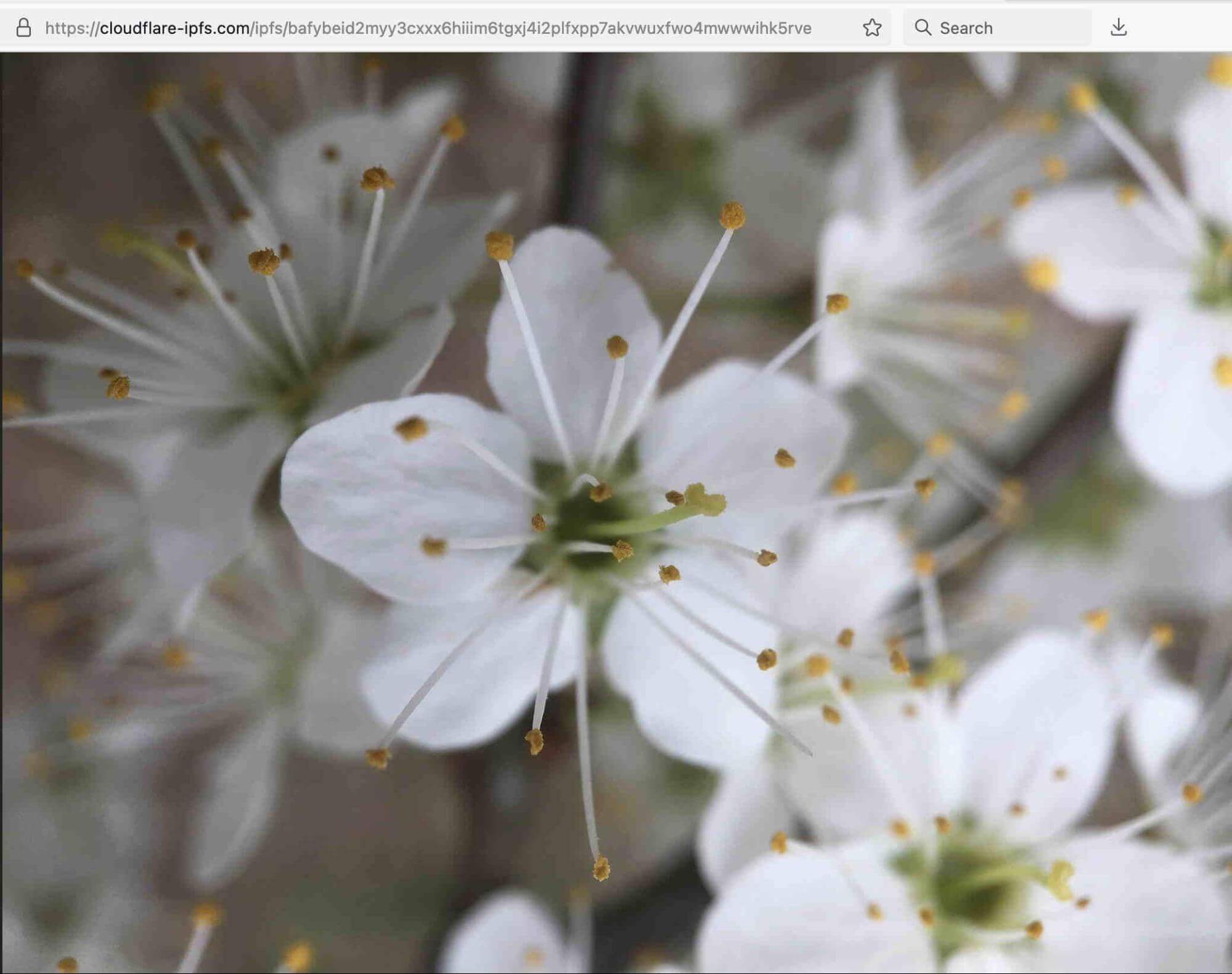
For example, to access the picture of a flower at
ipfs://bafybeid2myy3cxxx6hiiim6tgxj4i2plfxpp7akvwuxfwo4mwwwihk5rve
you could use your regular browser with the cloudflare-ipfs.com public gateway:
https://cloudflare-ipfs.com/ipfs/bafybeid2myy3cxxx6hiiim6tgxj4i2plfxpp7akvwuxfwo4mwwwihk5rve
Or if you were to visit https://cloudflare-ipfs.com/ipfs/bafybeiaysi4s6lnjev27ln5icwm6tueaw2vdykrtjkwiphwekaywqhcjze/wiki/ from your browser, you’d see Wikipedia, even if the “regular” Wikipedia is censored in your country:
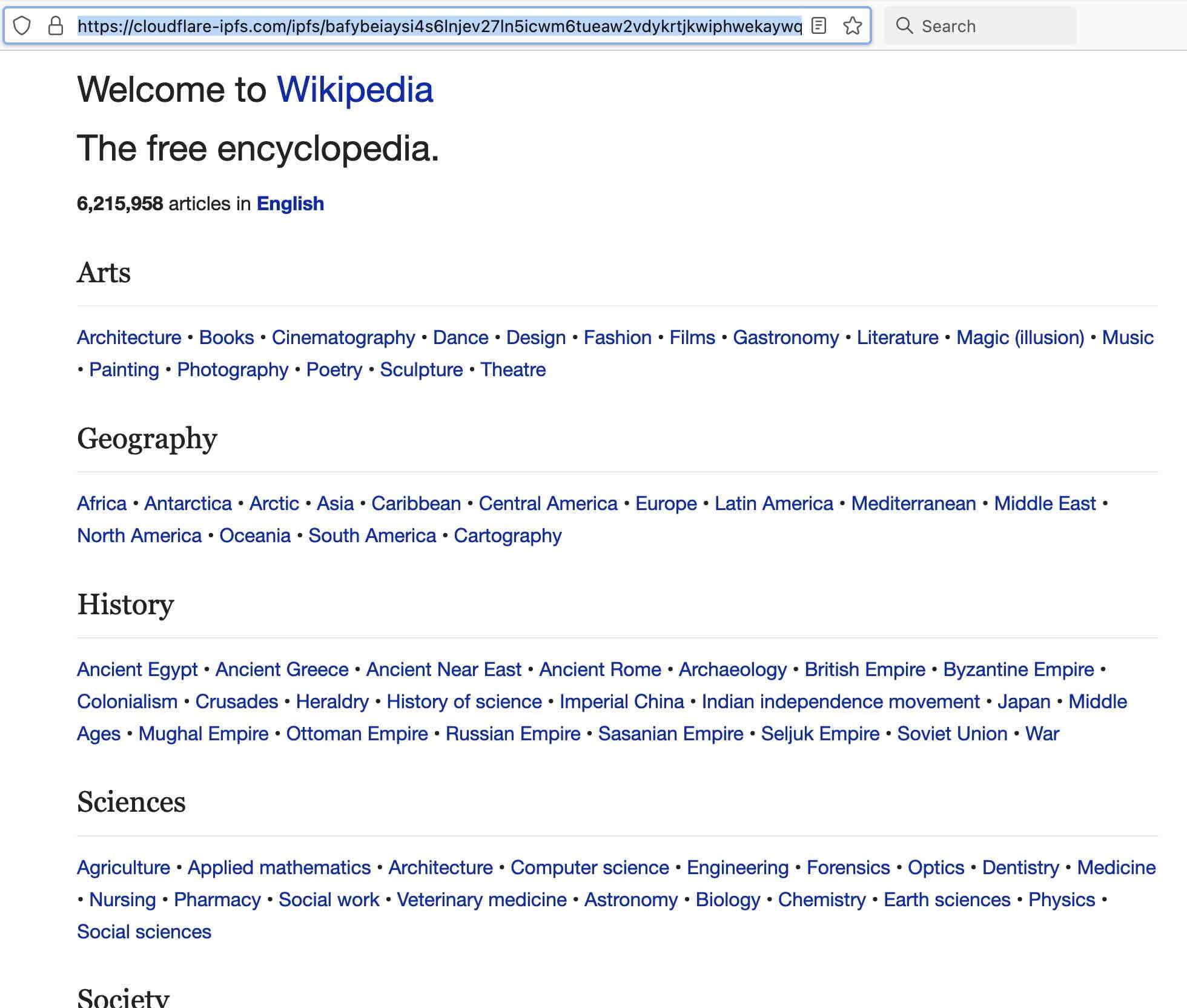
This capability has an important implication: public IPFS gateways mean that IPFS objects are readily accessible by “regular Internet users” – the IPFS CID just needs to be augmented with/accessed via a public gateway. These results can be good, neutral, or bad – but they ARE accessible to regular users with no extra software required.
Multiple IPFS public gateways exist. One list of such sites is at https://ipfs.github.io/public-gateway-checker/ but there are likely additional unlisted gateways that could also be exploited:
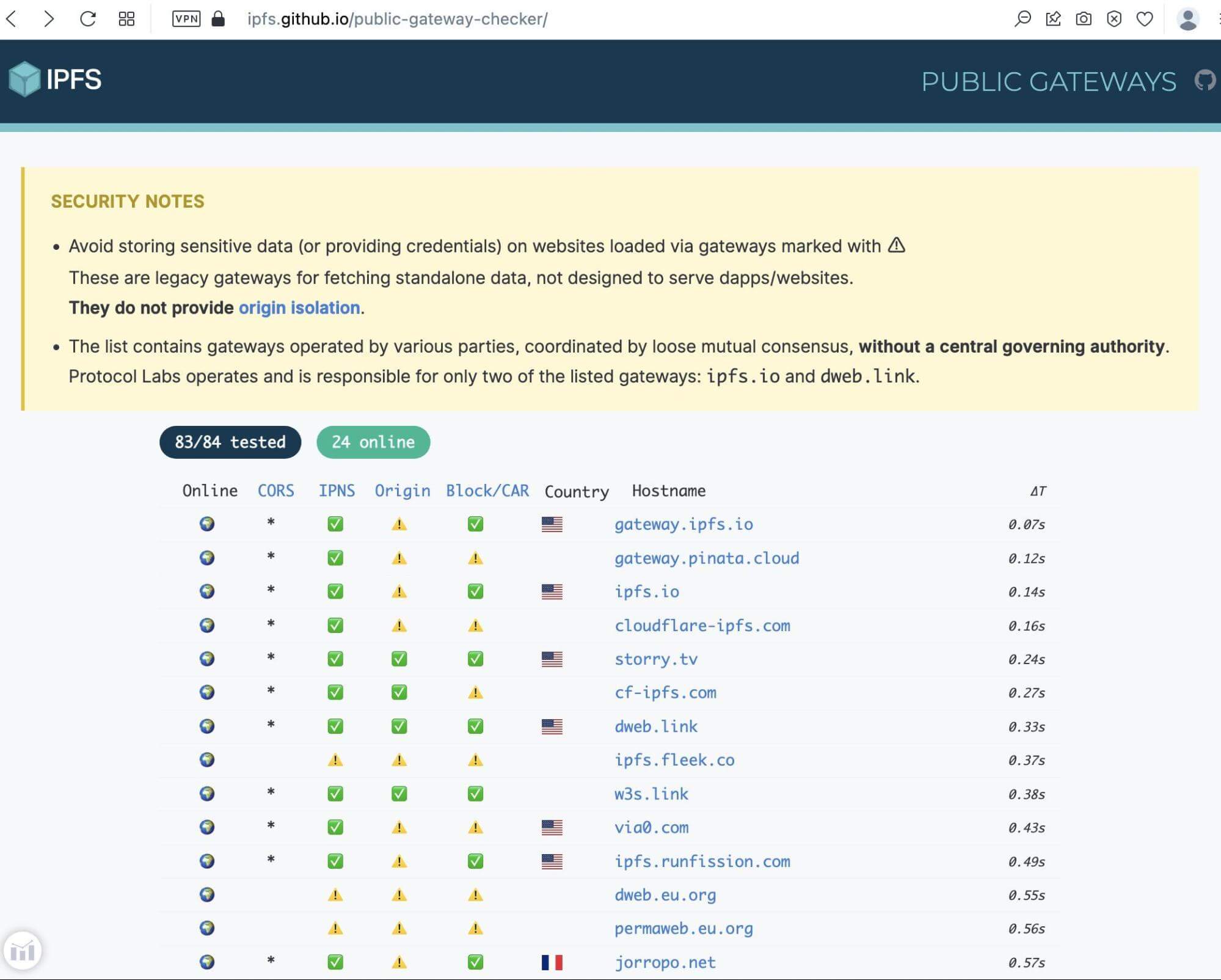
Public IPFS gateways normally do not filter what IPFS content is accessible via their gateway service. Some IPFS gateway operators, however, may filter some types of content, see for example “Cloudflare Disables Access to ‘Pirated’ Content on its IPFS Gateway.”
Others have expressed concerns about privacy/security issues associated with gateway use, e.g., the traffic monitoring (and potential content manipulation risk) associated with gateway use, e.g., see Daniel Stenberg’s “IPFS and Their Gateways.” Quoting the conclusion of one section of Stenberg’s piece, “Make sure you trust the [IPFS] gateway you use.”
The Role of “Pinning” Services
We’ve talked so far about accessing existing IPFS objects – but how do new files get added to IPFS? Before talking about that, let’s review some key properties of IPFS objects:
- IPFS is decentralized, not anonymous (see
ipfs dht findprovs <hash>andipfs dht findpeer <nodeID>) - IPFS objects are public (anyone can access them if they know or can discover the object’s CID)
- The object will be persistent (you won’t be able to assuredly delete an object once you’ve added it to IPFS)
- IPFS routinely performs garbage collection. Unless pinned, objects might potentially become unavailable. If you run a node on your own system, you can pin objects locally, but that presumes your system is always on, reachable, and able to service all potential requests, at least initially.
How can users be sure that the files they store will always be available, and will download quickly? This is where “Pinning” services come in. Think of a pinning service as a node that promises to keep your content in their node, ensuring it remains available for access. The pinning service agrees to perform this function (tying up some of their disk space, system capacity and network bandwidth) in exchange for cash or cryptocurrency. Pinning services usually leverage Filecoin to “incentivize” storage providers to retain a copy of IPFS content. A list of pinning services can be found at https://docs.ipfs.tech/concepts/persistence/#long-term-storage.
Particularly large storage requirements (between 100TiB and 5PiB) may be coordinated & curated. An example of this would be the National Library of Medicine (NLM)’s plan to store and share up to 5 PiB of Covid-19 sequencing data.
IPFS Gateway Node Objects in Farsight DNSDB
Although IPFS doesn’t rely on the traditional domain name system, IPFS-related objects do appear in the DNS, and our passive DNS sensors certainly do see them. In particular, IPFS gateway node addresses are seen in DNSDB, and we can get a general sense of usage (modulo things like sensor coverage and TTL impacts) from reviewing those entries.
We’ll check for CloudFlare IPFS gateway entries in DNSDB using a series of dnsdbq commands such as:
$ dnsdbq -r \*.cloudflare-ipfs.com -l0 -A90d -j -T datefix -V summarize
Decoded, that command means:
Results from this particular IPFS gateway run look like:
{"count":75408305,"num_results":309,"time_first":"2018-07-05 19:09:29","time_last":"2023-04-10 16:20:38","zone_time_first":"2020-08-05 22:51:16","zone_time_last":"2023-04-07 22:50:21"}
The fields in that JSON Lines output are:
Compiling, simplifying and sorting the results from checking all the IPFS gateway nodes in “-V summarize” mode, limiting results to just those seen at least sometime during the last 90 days, and showing only those which returned at least 500,000 cache-misses we see:
[remainder have a cache miss count of less than 500,000]
If you wondered about the specific set of results that DNSDB found and aggregated, they included entries such as the following. (We obtained these by rerunning our dnsdbq command for \*.cloudflare-ipfs.com without the -V summarize):
{"count":40076999,"time_first":"2021-01-19 18:42:58","time_last":"2023-04-10 14:01:14", "rrname":"cloudflare-ipfs.com.","rrtype":"A","bailiwick":"cloudflare-ipfs.com.", "rdata":["104.17.64.14","104.17.96.13"]}
{"count":18354774,"time_first":"2021-01-19 18:43:02","time_last":"2023-04-10 14:30:35", "rrname":"cloudflare-ipfs.com.","rrtype":"AAAA","bailiwick":"cloudflare-ipfs.com.", "rdata":["2606:4700::6811:400e","2606:4700::6811:600d"]}
{"count":6562189,"time_first":"2021-01-19 18:43:06","time_last":"2023-03-08 22:50:07", "rrname":"cloudflare-ipfs.com.","rrtype":"HTTPS","bailiwick":"cloudflare-ipfs.com.",
"rdata":["1 . alpn=\"h2\" ipv4hint=104.17.64.14,104.17.96.13 ipv6hint=2606:4700::6811:400e,2606:4700::6811:600d"]}
[etc]
Broken out by the various non-DNSSEC record types, the distribution of RRtypes for the 309 summarized \*.cloudflare-ipfs.com results looked like:
Count RRtype
 98 	SOA
 70 	A
 54 	AAAA
 36 	TXT
 29 	HTTPS
 13 	CNAME
  9 	NS
---
309
The key point here is that there are not a huge number of unique RRnames with embedded CIDs, at least for the \*.cloudflare-ipfs.com IPFS public gateway.
What about the top-ranked gateway when ranking according to the number of unique results? The top gateway for that metric is \*.nftstorage.link — we can see what the top objects from that gateway look like with:
$ dnsdbq -r \*.nftstorage.link -l0 -A90d -j -T datefix -S -k count > temp-nftstorage-link.txt
The distribution of RRtypes for that gateway is rather different:
$ jq -r '.rrtype' < temp-nftstorage-link.txt | sort | uniq -c | sort -nr
266354 A
137469 HTTPS
134829 AAAA
7 SOA
4 HINFO
3 NS
2 CNAME
1 TXT
Let’s look at a few of the most commonly accessed files:
$ jq -r '.rrname' < temp-nftstorage-link.txt | sort | uniq -c | sort -nr > temp-nftstorage-link-sorted.txt
$ wc -l temp-nftstorage-link-sorted.txt
  221478 temp-nftstorage-link-sorted.txt

$
head -6 temp-nftstorage-link-sorted.txt
     26 nftstorage.link.
     15 ipfs.nftstorage.link.
     15 bafybeifjh7veuaeywbclzfswfo5vwplgd5dg6v74d3nt2nu6njgrcaz33m.ipfs.nftstorage.link.
     13 bafybeifevq4r43mibdp6epvzudmdfynalvh6j4nrwbw6i5dpqhlaewrmse.ipfs.nftstorage.link.
     13 bafybeidc6gbvc7hik5ydsq5nabzenuqnhwn6eat7ddryefcfvmnvslbixy.ipfs.nftstorage.link.
     13 bafybeid7wocj65e76n2myaivquleyfi7ehlhw6xjf7cl4rdx7tsnpbbgxi.ipfs.nftstorage.link.
We can inspect the CID portion of each of those links with https://cid.ipfs.tech/ should we have the desire to do so:

That’s helpful, but still doesn’t tell us everything we’d like to know about the file. Let’s retrieve a copy of the file using curl:
$ curl "https://bafybeifjh7veuaeywbclzfswfo5vwplgd5dg6v74d3nt2nu6njgrcaz33m.ipfs.nftstorage.link"
-o temp
And now let's see what type of file we just retrieved:

$
file temp
temp: ISO Media, MP4 v2 [ISO 14496-14]
Assuming that’s a filetype we’re interested in, we might then want to proceed to review the metadata associated with the file using exiftool or an equivalent program:
$ exiftool temp
[…]
MIME Type                       : video/mp4
Major Brand                     : MP4 v2 [ISO 14496-14]
[…]
Duration                        : 8.00 s
[…]
Source Image Width              : 1080
Source Image Height             : 1080
X Resolution                    : 72
Y Resolution                    : 72
[…]
Create Date                     : 2023:03:22 15:59:19Z
[…]
Creator Tool                    : Adobe Premiere Pro 2023.0 (Windows)
[…]
Windows Atom Unc Project Path   : \\?\C:\Users\jt184\Documents\REALM\Video Templates\Adobe Premiere Pro Auto-Save\HOVR.prproj
[…]
You may also want to check the file for potential malware by scanning it with an antivirus program such as clamscan, an on-demand antivirus scanning program that’s part of clamav
(see https://www.clamav.net/):
$ clamscan --no-summary temp
/[…]/temp: OK
DNSlink Names in Farsight DNSDB: Searching RRnames
IPFS Gateway addresses are not the only place IPFS-related entries may show up in DNS. DNSlink names are another common example. DNSLink is “the specification of a format for DNS TXT records that allows the association of arbitrary content paths and identifiers with a domain.” (https://dnslink.io/)
DNSLink records in the DNS are TXT records where the RRname begins with “_dnslink." The Rdata (“right-hand side”) of the TXT record should also contain "dnslink="). We can begin to find records of that sort in DNSDB by making a dnsdbq query that looks like:
$ dnsdbq -r _dnslink.\*/TXT -l0 -A90d -j -T datefix -S -k count > dnslink.jsonl
Decoded, that command says, “using the dnsdbq command line client for DNSDB…”
- Search RRnames (the “left hand side” of DNSDB entries) for entries that begin with
_dnslink - Limit the results returned to just TXT records
- Return up to a million results (
dash ell zerois “shorthand” for-l1000000) - Limit results to just those seen at least sometime during the last 90 days (
-A90d) - Return the results in JSON Lines format (
-j) - Fix the dates so we get dates and times in a human readable format instead of Un*x seconds (
-T datefix) - Sort the results in descending order by the “count” field (
-S -k count) - Put the results into the file
dnslink.jsonl
So how many results did we get from that command? We’ll use the Un*x wc -l command to count the total number of lines:
$ wc -l dnslink.jsonl
2848 dnslink.jsonl
That’s NOT a huge number of potential results, and some of those records may have Rdata that doesn’t even include a dnslink= reference… Let’s check for that now:
$ grep "dnslink=" dnslink.jsonl | wc -l
1161
Hmm.Only (1161/2848*100)=40.7% of the records appear to actually have a “dnslink=” reference in the rdata. What the heck are the rest of all those records that start with “_dnslink” but don’t have “nslink=” in the rdata?
TXT Records Being Used for SPF
After eyeballing the data a little, we noticed that 1,272 of the 2,848 records (44.6% of the records) appear to be SPF-related, rather than dnslink-related per se:
$ grep "v=spf" dnslink.jsonl | wc -l
1272
$
grep "v=spf" dnslink.jsonl | more
{"count":6785,"time_first":"2020-05-05 02:29:19","time_last":"2023-03-29 17:30:15",
"rrname":"_dnslink.polyfill.io.","rrtype":"TXT","bailiwick":"polyfill.io.",
"rdata":["\"v=spf1 -all\""]}
{"count":6665,"time_first":"2020-01-21 03:12:00","time_last":"2023-03-29 17:29:34", "rrname":"_dnslink.discord.com.","rrtype":"TXT","bailiwick":"discord.com.",
"rdata":["\"v=spf1 -all\""]}
[etc]
Excluding those SPF-related records leaves us with just 1,576 remaining records.
$ grep -v "v=spf" dnslink.jsonl > dnslink-2.jsonl
$ wc -l dnslink-2.jsonl
1576 dnslink-2.jsonl
TXT Records Used for Cloud Software Domain-Control-Verification-Related Purposes
Looking at what’s left, let’s just consider one more inapplicable category of “_dnslink” TXT records – TXT records being used for cloud software domain-control-verification-related purposes.[1] Several vendors provide domain verification this way, such as Adobe, AWS, GlobalSign, Google, and Microsoft.
Like the SPF records in the preceding section, these records also don’t appear to be directly dnslink-related:
$ more dnslink-2.jsonl | grep verif | more
{"count":7248,"time_first":"2020-04-07 18:49:36","time_last":"2023-03-29 13:30:07", "rrname":"_dnslink.c.disquscdn.com.","rrtype":"TXT","bailiwick":"disquscdn.com.",
"rdata":["\"_globalsign-domain-verification=16aKJufSrMKbcCAKCXzVC4PbCHEMl2CuparSiVEdN9\""]}
{"count":5835,"time_first":"2020-04-07 18:49:38","time_last":"2023-03-29 13:30:08", "rrname":"_dnslink.a.disquscdn.com.","rrtype":"TXT","bailiwick":"disquscdn.com.",
"rdata":["\"_globalsign-domain-verification=16aKJufSrMKbcCAKCXzVC4PbCHEMl2CuparSiVEdN9\""]}
{"count":2304,"time_first":"2020-07-20 06:19:36","time_last":"2023-03-28 09:57:42", "rrname":"_dnslink.players.brightcove.net.","rrtype":"TXT","bailiwick":"brightcove.net.",
"rdata":["\"_globalsign-domain-verification=KuTfedNZlZCDi3MA1ZCZtSnhiNH5fibCSSBdyBW3hQ\"",
"\"_globalsign-domain-verification=Nq1hJm0dwpFa7EJ7FEmLaLCUHg2H4uwKyJn-QDEHxY\""]}
[etc]
Let’s exclude those, too:
$ grep -v "verif" < dnslink-2.jsonl > dnslink-3.jsonl
$ wc -l dnslink-3.jsonl
1416 dnslink-3.jsonl
Kubernetes ExternalDNS TXT Records
44 of the remaining records relate to Kubernetes ExternalDNS. Each of these records has Rdata with the string “heritage=external-dns”. Let’s “pretty-print” a sample record of this sort using jq (see https://stedolan.github.io/jq/):
$ grep "external-dns" dnslink-3.jsonl | jq '.' | more
{
  "count": 675,
  "time_first": "2021-02-19 04:19:45",
  "time_last": "2023-03-28 15:58:34",
  "rrname": "_dnslink.ad.sxp.smartclip.net.",
  "rrtype": "TXT",
  "bailiwick": "sxp.smartclip.net.",
  "rdata": [
    "\"heritage=external-dns,external-dns/owner=k8s-ew1-2,external-dns/resource=service/sxp-prod/nginx-ingress-controller\""
  ]
}
[etc]
For context, searching all DNSDB Rdata for the last 90 days, we see a total 147,813 Kubernetes ExternalDNS -related records:
$ dnsdbflex --regex "external-dns" -s rdata -A90d -j -l0 > external-dns.jsonl
$ wc -l external-dns.jsonl
147813 external-dns.jsonl
This means that the 44 external-dns records (as seen in nominally “dnslink”-related records) represent a trivial fraction of the total external-dns records seen over those 90 days (just 0.03% of all external-dns records seen during the quarter). We’ll exclude those 44 records as well:
$ grep -v "external-dns" dnslink-3.jsonl > dnslink-4.jsonl
$ wc -l dnslink-4.jsonl
1372 dnslink-4.jsonl
DNSlink Names in DNSDB: Searching Rdata for Entries That Include “dnslink=/ipfs/”
We could keep “picking and poking” at the remaining 1372-1161=211 hits that don’t include “dnslink=” in the Rdata, but let’s pivot and approach this from another direction: what can we find in the way of DNS records with Rdata (“right hand side” DNS record content) that DOES include “dnslink=”?
Let’s use dnsdbflex to find matching records with DNSDB Flexible Search, and then pipe those hits through dnsdbq to get details from DNSDB Standard Search.
$ dnsdbflex --regex "dnslink=/ipfs/" -l0 -A90d -s rdata -t TXT -F | dnsdbq -f -j -l0 -A90d > rdata.jsonl
Decoding that command pipeline:
How many results do we get?
$ wc -l rdata.jsonl8251 rdata.jsonl
Some of those output lines (3956 lines) simply consist of “–“, a separator added between Flexible Search results when running dnsdbq results through dnsdbflex in batch mode. No point in keeping those, they’ll just interfere with running the results through jq.
We’ll exclude those, leaving us with 4,295 entries. Inspecting the remaining 4,295 results, we see 44 entries that have “stub” dnslink entries such as:
[…]
{"count":1,"time_first":1676078485,"time_last":1676078485,"rrname":
"_dmarc.znc.pacbard.duckdns.org.","rrtype":"TXT","rdata":["\"dnslink=/ipfs/\""]}
{"count":2,"time_first":1678898405,"time_last":1679896879,"rrname":
"iuri.neocities.org.","rrtype":"TXT","rdata":["\"dnslink=/ipfs/\""]}
[…]
{"count":1,"time_first":1679797568,"time_last":1679797568,"rrname":
"rusanyacollective.neocities.org.","rrtype":"TXT","rdata":["\"dnslink=/ipfs/\""]}
{"count":1,"time_first":1679830188,"time_last":1679830188,"rrname":
"dry-paper-hammer-bro.neocities.org.","rrtype":"TXT","rdata":["\"dnslink=/ipfs/\""]}
[…]
We’ll also summarily exclude those. Now let’s require that the results have RRnames that begin with “_dnslink“:
$ grep '"rrname":"_dnslink' rdata.jsonl > rdata2.jsonl
$ wc -l rdata2.jsonl
1182
Looking at just RRnames, how many unique fully qualified domain names (FQDNs) are left?
$ jq -r '.rrname' < rdata2.jsonl | sort -u > rdata3.txt
$ wc -l rdata3.txt
256 rdata3.txt
Wow, NOT very many of those. What do those RRnames look like?
_dnslink.2019-ipfs-camp.on.fleek.co.
_dnslink.account.aleph.im.
_dnslink.acycapital.on.fleek.co.
_dnslink.agavefinance.on.fleek.co.
_dnslink.aged-water-7239.on.fleek.co.
_dnslink.aggregatedfinance.on.fleek.co.
_dnslink.api3-dao-dashboard-staging.on.fleek.co.
_dnslink.api3-dao-dashboard.on.fleek.co.
[…]
_dnslink.xangaeav2.on.fleek.co.
_dnslink.yellow-breeze-6233.on.fleek.co.
_dnslink.zero-landing.on.fleek.co.
_dnslink.zodiac.gnosisguild.org.
Hmm. Lots of those look to be fleek.co-related _dnslink names. Let’s condense our 256 entries to just effective 2nd-level domains. Having done so, in fact, we find that 152 of our 256 _dnslink FQDNs (nearly 60% of the unique _dnslink RRnames) are actually under fleek.co; most of the rest have just a few entries.
IPNS Records in Farsight DNSDB?
InterPlanetary Name System (IPNS) records can be of two formats: “path resolution” and “subdomain resolution” format. (see https://docs.ipfs.tech/concepts/ipns/#ipns-in-practice)
Because DNSDB only looks at domain names (and not full URLs), we can only “see” subdomain resolution format IPNS records. We can ask to see relevant records by saying:
$ dnsdbflex --regex "\.ipns\." -l0 -A90d -t TXT -F | dnsdbq -f -j -l0 -A90d > ipns.jsonl
We then deleted any hits that are just “–” separators. This left us with just 25 results for ipns.jsonl, none of which appear to be a “real” IPNS “subdomain resolution” format name – everything’s just DMARC/DomainKeys/BIMI/SPF related, or related to an effective 2nd-level domain that uses “IPNS.”
Does this mean that IPNS isn’t being used at all? Hard for us to say. It may be that DNSlink records are adequately meeting this need, or users who like IPNS may simply prefer “path resolution” to “subdomain resolution,” or our sensors may simply not be seeing the subdomain format IPNS names.
Ethereum Name Service Domains in Farsight DNSDB?
Another option for decentralized content addressing in the Web3 world is using a “dot eth” (Ethereum Name Service) domain, perhaps in conjunction with Infura (this is the approach that the Brave web browser employs). If you try visiting a dot eth domain in Brave, that browser will ask you to confirm how you’d like to proceed:

If you tell Brave to proceed, you’ll be taken to the fleekhq.eth site. However, if you look for dot eth domains in DNSDB, you won’t find any. Why? Well, dot eth (and all the other decentralized “blockchain domains”) is not an ICANN-recognized TLD. DNSDB follows “ICP-3: A Unique, Authoritative Root for the DNS.“
Conclusion
IPFS is an important component of Web3, as it provides a decentralized and resilient way to store and share files. It is being used in a growing number of applications, including decentralized social networks, file sharing, and content delivery networks as well as by bad actors looking to host malicious content. We hope you’ve found this an interesting and enlightening “peek” at the reality behind some of the news you may have been hearing about IPFS.
Is IPFS an intriguing and powerful new environment? Absolutely. Has it sometimes been abused? Based on reports in the media, again, certainly. But are we currently seeing it getting used at huge volumes for any purpose? No, not really, at least not yet. This is still an early and developmental technology that hasn’t really achieved widespread uptake relative to the “regular world wide web.” We encourage you to keep an eye on it, and manage access to IPFS gateways as you deem appropriate for corporate network security requirements, but in our opinion, it isn’t currently likely to cause the EOTWAWKI (“End Of The World As We Know It”).
Acknowledgements
The author would like to thank Dr Sean McNee, Mr Aaron Gee-Clough, Ms Kelsey LaBelle, and Ms Kali Fencl and the team at DomainTools for their helpful comments and suggestions. Any remaining issues are solely the responsibility of the author.
[1] For example, see:
— Adobe: “Verify ownership of a domain,”
https://helpx.adobe.com/enterprise/using/verify-domain-ownership.html
— AWS: “Verifying Domains,”
https://docs.aws.amazon.com/workmail/latest/adminguide/domain_verification.html
— GlobalSign: “Improved Domain Validation Process for GlobalSign OV/EV TLS Certificates,”
https://support.globalsign.com/ssl/ssl-certificates-life-cycle/improved-domain-validation-process-globalsign-ovev-tls-certificates
— Google: “Verify your domain with a TXT record,”
https://support.google.com/a/answer/183895?hl=en
— Microsoft: “Add DNS records to connect your domain,”
https://learn.microsoft.com/en-us/microsoft-365/admin/get-help-with-domains/create-dns-records-at-any-dns-hosting-provider


