

Introducing the DomainTools “Recipe Book” Project


Going back many years in the history of DomainTools, we have spent a lot of time learning about the various ways in which practitioners can put the data we provide into practical action in their environments. After all, while we might think that pivoting around adversary infrastructure is an interesting pastime in and of itself (yes, we’re those kinds of nerds), the reason companies become DomainTools customers is because the information they glean from our products and data make a real difference in their operations. However, for the most part, DomainTools supplies the “raw materials” in the form of the data and tools that practitioners then integrate into their ecosystem and workflows to bring the power of the data to life in securing their environments.
Many security teams are of sufficient maturity that all they really need from DomainTools is to understand what data we provide and how we deliver it. From there, they plug right into their tools and processes. But what works for one organization might not work for others, and even the very “lean-forward” shops may be unaware of some of the myriad ways in which the data can be put to practical use. Our objective with this project is to deliver a set of “recipes” that enable specific capabilities that many practitioners have found valuable.
What We’ll Deliver
In each entry of this series, we describe one or more objectives and share some tools and procedures needed to accomplish that objective. Most of these involve automation technologies of one kind or another, and—of course—at least one DomainTools product. Each entry will contain links to resources you can use to try these recipes out in your own environment if you wish. And even if you don’t have the specific tool set illustrated in a given entry, the concepts may be very transferable to the tools that you do use. The recipes in general will be of three types:
- Automated enrichment, pivoting, or enforcement SOAR-style playbooks, sometimes using a traditional SOAR platform, or other times using a low-code or no-code automation system
- Streamlined (but not automated) interactive workflows using common productivity tools such as Slack
- Pre-made Iris Investigate queries that address a specific use case
Each recipe will follow a specific structure:
- Overview—what use case the recipe solves, often with some background information about the use case
- Ingredients: what services, applications, etc. are required to execute the recipe
- Procedure: a high-level description of how to set up and run the recipe
- (Sometimes) Serving suggestions: ideas for modifying or augmenting the recipe
Important notes:
- These recipes aren’t a complete technical manual for each item—in most of them, you will need to refer to additional documentation for DomainTools products, third-party applications, or both. The Procedure section is a summary to give you an overview of what is involved.
- Because third parties will evolve their products over time, some of these procedures may become obsolete at some point.
YouRE Welcome to Hack—and Reverse Engineer!
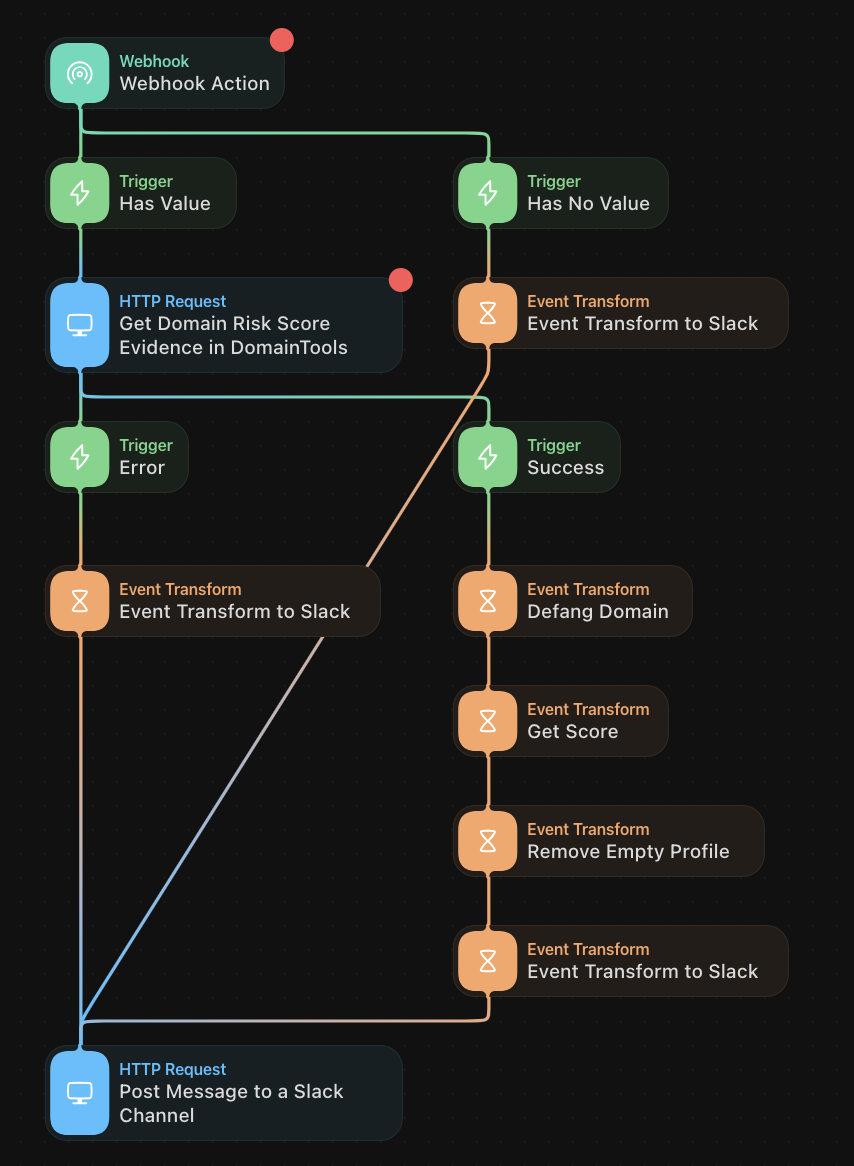
Even if you don’t wish to use the exact recipes we’re sharing, by reverse-engineering them, you may well come up with your own playbooks or recipes inspired by these. In Tines, for example, you can click into the various components of the stories to see how the data is being used, how the APIs are being called, etc.
And now…on to our first set of recipes. Bon appetit!
<iframe allowfullscreen="" frameborder="0" height="100%" src="https://gifer.com/embed/FnA8" style="position:absolute;top:0;left:0;" width="100%"></iframe>
Recipe 1: Type a Domain, Get a Risk Score – in Slack
This recipe uses the Tines no-code automation platform, in concert with Slack, to enable a simple but powerful use case: type a domain into Slack, receive its DomainTools Risk Score. A growing number of security professionals are adopting various Slack integrations as part of their routines. This recipe lets an analyst quickly assess the risk of a domain of interest, without having to open a DomainTools UI (or other application, such as our App for Splunk). The very nature of “SlackOps” is continuous, quick operations.
![A DomainTools Recipe Book Risk Score report for "rtfkt[.]live" shows: Overall Score 79, Threat Profile: phishing, Phishing 79, Malware 61, Spam 65, Proximity 25. Find more connections using Iris Investigate.](https://cdn.prod.website-files.com/6914bc46af7a937a5c07eea3/69401cf78b9857953a5f74f2_693c8421875375c51cedebb1_Figure-1-5.png)
Required Components
- A Tines tenant (Note: Tines offers a free Community Edition)
- Slack, with Slack Chatbot (or “Slackbot”) configured
- Note: you need to have admin privileges in the Slack workspace where you’ll install this (or any) app
- DomainTools Risk Evidence API endpoint (and corresponding API username and key)
Procedure
- Ensure that you have access to the DomainTools Risk Evidence API and that your API key is readily available (If you have purchased access to this API but need help with your key, contact us at [email protected])
- Slack actions
- Go to Apps -> Create new App
- Choose Slash Command
- Choose your command name and syntax (e.g. “dtriskscore” and “enter a domain”)
- Import Request URL from Tines (you can find this in the first Webhook block in the story)
- Install the App to your workspace
- Tines actions
- Instantiate a tenant (free)
- Navigate to this story
- Enter resource: DomainTools API username
- Enter credential: DomainTools API key
- Copy Webhook URL (to paste into Slack app)
- If the credentials/resources in Tines are correct, you should now be able to run your command from Slack!
Recipe 2: Block Look-Alike Domains with a DNS Firewall
This recipe also uses Tines (yes, we spent some quality tines working on these recipes) but in a different way: in conjunction with DomainTools Iris Detect and a DNS firewall called NextDNS, the recipe allows you to set up a semi-automated way to block newly-created domains that spoof keywords of your choosing. It is “semi-automated” because it uses the Block function in Iris Detect, which is set interactively by the user. This is the case because not all domains matching your keywords in Detect are necessarily malicious—indeed, sometimes they may be of your own company’s making. But for those you deem malicious, simply selecting them for the Block action sets the stage for NextDNS to take care of the rest, mediated by a Tines story that calls the Iris Detect API.
While we don’t expect that most enterprises will use NextDNS at scale, the principles of this story can be applied and modified to create a blocking or alerting rule in many other security controls.
Ingredients:
- Iris Detect, with monitored keywords configured (User Guide)
- A Tines tenant
- NextDNS (there is a free version available)
Procedure:
This recipe uses the Iris Detect API (API guide) in conjunction with interactive use of the UI. As a user of Iris Detect, you will typically review the newly-discovered domains matching your keywords, and for those you deem malicious or suspicious enough to merit blocking, you designate them for that action in the UI. The instructions below assume that you have monitors configured and that you have an API key for Detect.
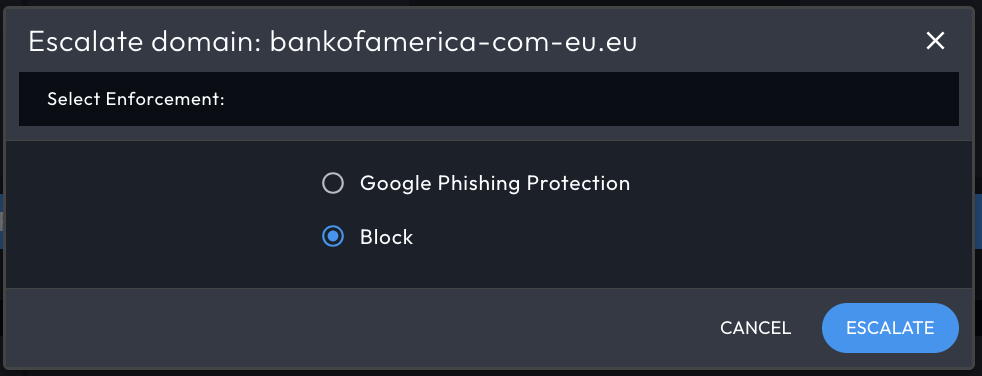
- DomainTools Iris Detect Actions
- Configure monitored terms
- Retrieve API username/key
- Triage domains in UI – select items to block
- NextDNS Actions
- Create (free) account
- Retrieve API username/key
- Select DNS enforcement method (via browser, via router, etc, but note that the story as written is for the browser method)
- Tines Actions
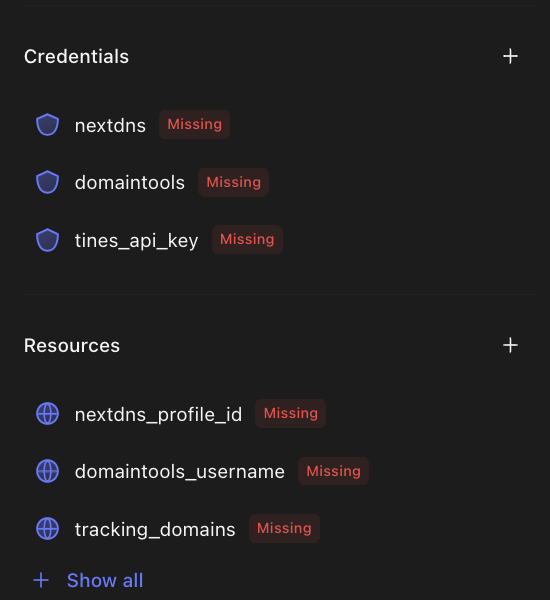
- Enter NextDNS, Tines, and DomainTools credentials (API keys)
- Enter NextDNS and DomainTools resources (usernames)
Recipe 3: Find Likely Phishing Domains in Iris Investigate
This recipe is an example of the premade-search-hash category, and it makes good use of the First Seen field in Iris Investigate (introduced in mid-2023) as well as other operators you can use in the Advanced Search function of Investigate—in this case, to find domains that begin or end with terms associated with multifactor authentication spoofs. It also uses the query hash function of Investigate, which is a very handy way to manage, share, or automate queries into Investigate. The query hash function works in both the UI and the API of Iris Investigate.
Ingredient (just one!):
- Iris Investigate
Procedure:
- Log in to Iris Investigate
- Create or open an investigation
- Enter the search hash below into the search box
- Run the query
U2FsdGVkX18nllP6a1KEkoLbyYAkpK4vyB/7N8HBz6t+HG/exErw1eyeUomDLtJMH+3i4tUUtSWNro6djk4ss1dlvdj6sIl2ZTO3UiahXWRX1My0OO+YzTcX60yCEjT9e48nk20mgJL4AxdqWfDZJN24ijb26QFs2UJmQtxvowlu6UJMDlCLUSYVp055J6A0Bm63fCXgiHJgEzNXqluOTPEv7cKA5L4TCBXNfbU2kNV0Ahn6+bAgkaK6RbXPED4/Ut3gmCSipAh+ACtW5WSJlqLS4utr7N6nZ9Lb/YAJvAFMqApKzo9RlKjMwhmY9zgd8IVLz2RzoNEYCo8/mZ99bHg9GXakxzAEctNScLqREa2gSSdMS5WoIieWCBZkKYY4h1lrnGWQ/FH0Na4k2J+7nydoBfSnUGYB/e83GCb4hylmJynXnovk/suND8DAxNr/fn6pDjZk8S2CUOkTLoBCc6qbb7XWpbjsfopDR1GqFHRwfhqY25if5ZoKDAtrQPPnvmrga1Gqe8CsscBvP+ZEKQD+626bT30xEKgRHAe/n41W64yleO19gVLs3kHuKuzaM08RwgcVHY5LoLMiODJsAIy5ZmUBwNPAY6T31jTW1zrHu3u7XtuT8SjWsK7fHHXzS7AlxfYxrOk6uDzhP0DRMwblP8sVdNFaa2jKRu9qWw2eZGHO1WlMwjPHDEL+qLJrnYZNIig/AlSnFn9/kWfC1uHZMy136ekqlupVIYqPri8UuRIdtpU6cuI0+yNUYDeTpmPbltVoZ6xHrDWphKmpL2AWhGMttIgHwZ8PdeCllLreph0R4oL9nktEgpV9WqHTxDXk7TlohMus2QFkrYiQ9bB5uLzHJOJTBVPTFD0EKRPgDARmrS5aO9lozatFRxywHP6/aXRP+skBTR8k9upf3CMra2qmwDWLIkx8sJiRsc+wmKWCQINS4IWdMwmJVcJbSeAyfxonOfxcroYOr+sFPnWL+VUC1O1MeDVuQhSMs6bCssKfKZlZUpd4c2wx6bduAbtmOTrIU2G8QMsQ1/g2Z0ItBCE1/F+ROLWsH2pUh76nW3X6LcEGU6zxF/UFHV/bZypWOw1FMgxst9fCwnJMkAa40dnzRktVk8lyhpgbvv1zrC2+gjJ/r7/i80CprYSj2VgYI8B5uTdZZp4NExOSjXYE02tEo+Q3O0Iaj0x2FyoxOdEY3yfW4AlNtO87N7SIei5evdiNck+sNw4b1/sBZJj/nlKwEHxw7c1KfWDyaeR4R/qQVa/gjGjvonUMfH4VKwAGm4+D4SxdcOJZMUK3kYiW588Yvkzy/uxIpE4AaYYylzYevcPJVRgsTUuWZWE49UX2l93huHWznav+ruR7OeKUdohk3JvYzSlXwq58P1OHFmllDVZ/FJhDMmb/PaY1YzZ9DlBb8r8fsUnpZGnmaz5uGvdxg91uCQJDLTmpnmC/oItVki3j+fZSKpedhilvFGICWY+LVirHMZfYKHz73h4dlcTYLyjetnfLFErcwV+Pw+zHcS6R7p3sg9u/Kri3fhUdXhRzOjCe4YJ7RFfN0qwxiwfjCW0iT34UzZsq5fyG9rDIKbGuKDucC6QxeTbRmdC++pPNp6ifRYQdie/ojyZs5+AKqK7Z3WRaHkpbeOPpbBMA7A46KHX3egsXspw+jQfQP3FaRX3Pe0LZVgYZ1qbadS6rPtCPCkWdp9otIhUgFR8Bxh2AeVZskpiYJQq+bUW9G0UfEt7eKY2c9ii/U+4nnCadaLlJ700BtLgWquoyJRByqd5n1EMBdfodmPf8pc35t0Gi3MRd0vf11RrgeUJAvxXtZSAuq1xTermPkeJOAw/utJi3i5+GUnStxmsPHW2xovYaBRk54/XoBv8/Kv7k6PXgRyqOA5J/6YW6PtUU3a0Mir02IO5ohxwqg8jv+OTUz77S94KWLTNQkI2bTxpTnP9CXLSJbbYByKWbWGHx3fbgtiwKI2yJwSz4uyeqcWpvpbxBLj9hcFjMIKH1S3VySCyumLsJE75YDWEmDYuv0NHgCQKsa/eXofM4l9AoQXZN1asv+spek3+DYdtadf2vS21gyASFZ25swSyW/TlwFooEiXBBbkN+4ovqlhzSwlcMeH1AkdehulgcmsjvtZVNrarJ9wUVR6jps/Yezq4Q1/vWuShfYKzyOc31yuq+ou+klg2KpO4+Y5swA8Yfq+Zc8H8vrp+6TBycCKU9wmIsABR4MjbXLCUnXU+luKmJYgRPqZ968YepC0/mVcYaww==
Serving Suggestions:
With the query imported, open Advanced Search. Here you can see the way the query was built, so you can make adjustments as desired. In our example, the query finds domains matching the begins with/ends with criteria first seen within the last day. To see a wider scope of domains, you can adjust the First Seen value to a larger span, or you can designate a specific starting date. You can also adjust the syntax of the keywords to search for.
Conclusion: Season to Taste!
These recipes are examples of just a few ways in which you can apply DomainTools data to solve specific use cases in streamlined ways. They are just a starting point—for us, because we’ll be releasing more of them regularly—and for you, because we expect that folks who are interested in this kind of application will take the ideas in new and innovative directions.
If you’d like to see these recipes, or any other application(s) of our data, drop us a line and sign up for a personalized session with us. Happy hunting!


