

Passive DNS and SIE File Formats


I. Introduction
When working with DNSDB passive DNS data files or the Security Information Exchange (“SIE”), you may run into three primary file formats:
- MTBL files (usually actually DNSTABLE format MTBL files)
- The immutable sorted string table files that power DNSDB. MTBL format filessupport compression, and tends to be a very space-efficient format.
- NMSG files
- This is the file- and wire-format used for most Security Information Exchange data. It leverages Google Protocol Buffers, and supports different message types via a plugin system. Like MTBL-format files, NMSG-format filesalso support compression.
- JSON Lines format files
- A popular human- and machine-readable key-value format for sharing data. Each observation ends with a newline (unlike regular JSON, which looks like one huge “run-on” line). JSON Lines format files are very verbose relative to MTBL and NMSG format files.
Those three formats can be converted as shown in the following diagram:
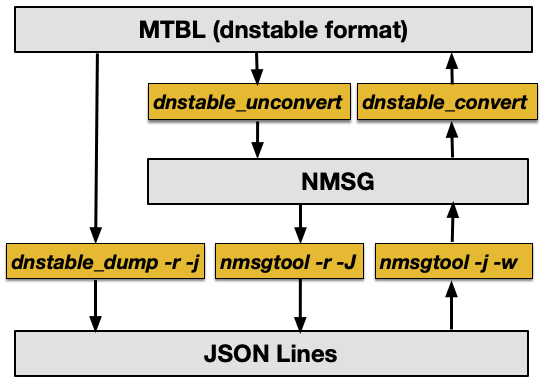
Figure 1. Relationship Between DNSTABLE Format MTBL FIles, NMSG Files, and JSON Lines Files
The above figure shows that:
- dnstable_unconvert can be used to take a DNSTABLE format MTBL file and produce an NMSG format file
- dnstable_convert can take (some) NMSG format files and produce DNSTABLE format MTBL files
- dnstable_dump (with the -r and -j options) can dump a DNSTABLE format MTBL file in JSON Lines format
- nmsgtool (with the -r and -J options) can dump NMSG files in JSON Lines format
- nmsgtool (with -j and -w options) can create NMSG files from JSON Lines format input.
This article will NOT be considering the proprietary file formats supporting DNSDB Flexible Search, nor the process of ingesting raw DNS sensor traffic.
II. DNSTABLE Format MTBL files
We use DNSTABLE format MTBL files to store the main DNS data that powers DNSDB. As such, MTBL format files are very important.
Working with MTBL files requires the mtbl library. To retrieve and build a copy of the mtbl library:
$ git clone https://github.com/farsightsec/mtbl.git
$ cd mtbl
$ sh autogen.sh
$ ./configure
$ make
$ make check
$ sudo make install
$ cd
Note: Some Macs (which often may have installed the snappy compression library via the homebrew package manager) may sometimes be unable to automatically find libsnappy when configuring.
If so, you may first need to adjust your library path, perhaps with:
$ export LDFLAGS="-L/opt/homebrew/opt/curl/lib -L/opt/homebrew/Cellar/snappy/1.1.9/lib"
In addition to installing the mtbl library itself, some mtbl utility programs will also be installed, typically into /usr/local/bin/
Command            Purpose
--
mtbl_dump          print key-value entries from an MTBL file
mtbl_info          display information about an MTBL file
mtbl_merge         merge MTBL data from multiple input files into a single output file
mtbl_verify        verify integrity of an MTBL file's data and index blocks
Each is described in a corresponding man page, which will typically be installed in a subdirectory of /usr/local/share/man/
Some mtbl-related commands may do more than their plain name may imply. For example, the mtbl_merge command is often used to combine multiple mtbl files, as you’d expect from its name and description above, but it can also be used to convert from the mtbl file’s current compression scheme to a new one (supported options are none, snappy, zlib, lz4, lz4hc, and zstd). Using the mtbl_merge command requires that two environment variables be set first. On a typical Mac, those might look like:
$ export MTBL_MERGE_DSO="/usr/local/lib/libdnstable.0.dylib"
$ export MTBL_MERGE_FUNC_PREFIX="dnstable_merge"
Once those have been set, you can then run the mtbl_merge command.
For example, assume you have an mtbl minutely file, such as dns.20211101.1825.m.mtbl, and you’d like to convert that mtbl minutely file to use an alternative compression algorithm, such as Snappy. To do that we’d say:
$ mtbl_merge -c snappy dns.20211101.1825.m.mtbl dns.20211101.1825.m.snappy-mtbl
Some compression algorithms allow various compression levels. To specify a non-default level, use the dash ell option:
$ mtbl_merge -c zstd -l 5 dns.20211101.1825.m.mtbl dns.20211101.1825.m.zstd-5-mtbl
We suspect that many people may be curious to see how the various compression algorithms compare.
While this article is not primarily about mtbl compression, we wanted to at least provide a rough sense of how various compression options look for our sample minutely file. Here are some approximate results run on a Mac M1 laptop with 16GB of memory and no particular optimizations:
File:                                    File Size   Time        Compression Rate
----
dns.20211101.1825.m.mtbl (base file) 79,397,449
dns.20211101.1825.m.zlib-1-mtbl 82,409,127 2.90 sec 1,198,449 ent/sec
dns.20211101.1825.m.zlib-2-mtbl 81,790,534 2.90 1,198,173
dns.20211101.1825.m.zlib-3-mtbl 81,357,511 2.98 1,165,439
dns.20211101.1825.m.zlib-9-mtbl 79,663,682 3.99 870,772
dns.20211101.1825.m.zstd-1-mtbl 85,364,913 2.02 1,724,310
dns.20211101.1825.m.zstd-2-mtbl 82,612,800 2.06 1,683,887
dns.20211101.1825.m.zstd-3-mtbl 81,201,060 2.19 1,584,405
dns.20211101.1825.m.zstd-4-mtbl 80,287,782 2.41 1,440,404
dns.20211101.1825.m.zstd-5-mtbl 79,110,457 2.71 1,281,033
dns.20211101.1825.m.zstd-9-mtbl 78,699,877 4.51 771,417
dns.20211101.1825.m.zstd-19-mtbl 76,488,503 26.02 133,583
dns.20211101.1825.m.zstd-22-mtbl 76,488,374 26.25 132,411
dns.20211101.1825.m.lz4hc-mtbl 97,268,208 2.80 1,243,362
dns.20211101.1825.m.snappy-mtbl 104,020,092 1.68 2,064,586
dns.20211101.1825.m.lz4-mtbl 107,123,435 1.67 2,080,784
dns.20211101.1825.m.none-mtbl 179,084,469 1.84 1,885,218
These values are just an illustration; performance on other mtbl files (or other system configurations) will vary.
For context, Farsight had historically used zlib for MTBL file compression, but we’re moving to zstd -3 since it seems to hit the “sweet spot” when considering the combination of:
- Compressed file size
- Decompression time, and
- Compression time.
III. DNSTABLE Format MTBL Files
You might be tempted to try some of the other mtbl commands, such as perhaps trying the mtbl_dump command to dump the contents of an mtbl files. At least in the case of DNSDB MTBL files (where the data is stored in DNS “wire format”), dnstable_dump is a far better option than mtbl_dumpsince dnstable_dump knows how to properly handle DNS “wire format” data.
You’ll need to install dnstable to be able to use dnstable_dump.
dnstable requires libmtbl (which we’ve just installed), plus yajl and libwdns. On a Mac, you can install yajl with brew:
$ brew install yajl
We’ll install libwdns from source:
$ git clone https://github.com/farsightsec/wdns.git
$ cd wdns
$ sh autogen.sh
$ ./configure
$ make
$ make check
$ sudo make install
$ cd
You should now be ready to build dnstable:
$ git clone https://github.com/farsightsec/dnstable.git
$ cd dnstable
$ sh autogen.sh
$ ./configure
$ make
$ make check
$ sudo make install
$ cd
You can then try dumping records from our sample dnstable format mtbl file by saying:
$ dnstable_dump --rrset_full dns.20211101.1825.m.mtbl | more
;; bailiwick: sn.ac.
;; count: 1
;; first seen: 2021-11-01 18:24:02 -0000
;; last seen: 2021-11-01 18:24:02 -0000
sn.ac. IN A 193.223.78.230
;; bailiwick: ac.
;; count: 1
;; first seen: 2021-11-01 18:23:59 -0000
;; last seen: 2021-11-01 18:23:59 -0000
sn.ac. IN NS l1.ns.divido.org.
sn.ac. IN NS l2.ns.divido.org.
[etc]
The results shown above are in presentation format. If you’d rather have JSON Lines format output, just add a dash lowercase jay option to the command:
$ dnstable_dump --rrset_full dns.20211101.1825.m.mtbl -j > temp.jsonl
$ more temp.jsonl
{"count":1,"time_first":1635791042,"time_last":1635791042,"rrname":"sn.ac.","rrtype":"A","bailiwick":"sn.ac.","rdata":["193.223.78.230"]}
{"count":1,"time_first":1635791039,"time_last":1635791039,"rrname":"sn.ac.","rrtype":"NS","bailiwick":"ac.","rdata":["l1.ns.divido.org.","l2.ns.divido.org."]}
{"count":1,"time_first":1635791042,"time_last":1635791042,"rrname":"sn.ac.","rrtype":"NS","bailiwick":"sn.ac.","rdata":["l1.ns.divido.org.","l2.ns.divido.org."]}
[etc]
You can also use the dnstable_lookup command to search MTBL files for specific entries.
You can search either a single mtbl file, or a set of mtbl files. Set either:
- The
DNSTABLE_FNAMEenvironment variable (to search just a single file) or - The
DNSTABLE_SETFILEenvironment variable (to search a fileset).
Do not attempt to set both at the same time.
To look at just a single file, such as our sample minutely file, you’d say:
$ unset DNSTABLE_SETFILE <-- shouldn't normally be already defined, but "just in case"
$ export DNSTABLE_FNAME="dns.20211101.1825.m.mtbl"
$ dnstable_lookup rrset www.google.com
[...]
;;  bailiwick: google.com.
;;      count: 78
;; first seen: 2021-11-01 02:24:13 -0000
;;  last seen: 2021-11-01 15:18:13 -0000
www.google.com. IN AAAA 2a00:1450:4010:c02::63
www.google.com. IN AAAA 2a00:1450:4010:c02::68
www.google.com. IN AAAA 2a00:1450:4010:c02::6a
www.google.com. IN AAAA 2a00:1450:4010:c02::93
;;; Dumped 2 entries.
If you want to look at data from a set of mtbl files, first put the names of those files into a text file. For example:
$ cat fileset.txt
dns.20211111.0000.m.mtbl
dns.20211111.0001.m.mtbl
dns.20211111.0002.m.mtbl
dns.20211111.0003.m.mtbl
dns.20211111.0004.m.mtbl
dns.20211111.0005.m.mtbl
dns.20211111.0006.m.mtbl
dns.20211111.0007.m.mtbl
dns.20211111.0008.m.mtbl
dns.20211111.0009.m.mtbl
Then try:
$ unset DNSTABLE_FNAME <-- just in case that's still defined from our earlier run
$ export DNSTABLE_SETFILE="fileset.txt"
$ dnstable_lookup rrset www.google.com
[...]
;;  bailiwick: google.com.
;;      count: 683
;; first seen: 2021-11-10 05:07:17 -0000
;;  last seen: 2021-11-10 14:44:12 -0000
www.google.com. IN A 74.125.205.99
www.google.com. IN A 74.125.205.103
www.google.com. IN A 74.125.205.104
www.google.com. IN A 74.125.205.105
www.google.com. IN A 74.125.205.106
www.google.com. IN A 74.125.205.147
[...]
See $ man dnstable_lookup for more on dnstable_lookup options, orthe classic article athttps://www.farsightsecurity.com/blog/txt-record/realtime-dnsdb-20151028/for a more detailed example
IV. Converting MTBL Files to NMSG Files
nmsg format files are another type of file you may run into when working with DNSDB or the Security Information Exchange (SIE). nmsg files are described at https://www.farsightsecurity.com/blog/txt-record/intro-20150128/
Assuming you have an mtbl file, you can convert it to nmsg format using dnstable_unconvert. dnstable_unconvert is available as part of dnstable-convert, which is a separately installed package.
In addition to the libraries we’ve already installed, dnstable-convert requires libnmsg (see https://github.com/farsightsec/nmsg) and sie-nmsg, a plugin that’s needed for libnmsg to understand SIE data (see https://github.com/farsightsec/sie-nmsg). Those libraries have dependencies of their own.
On the Mac, begin by installing the pre-requisites needed for libnmsg and sie-nmsg with brew:
$ brew install libpcap
$ brew install protobuf
$ brew install protobuf-c
$ brew install zeromq
$ brew install zlib
We assume that you’ve already installed wdns and yajl as described in a previous section of this handout. You should then be ready to build libnmsg:
$ git clone https://github.com/farsightsec/nmsg.git
$ cd nmsg
$ sh autogen.sh
$ ./configure
$ make
$ make check
$ sudo make install
$ cd
Now you’re also ready to install the also-required sie-nmsg package:
$ git clone https://github.com/farsightsec/sie-nmsg.git
$ cd sie-nmsg
$ sh autogen.sh
$ ./configure
$ make
$ make check
$ sudo make install
$ cd
And finally, we’re now ready to build dnstable-convert:
$ git clone https://github.com/farsightsec/dnstable-convert.git
$ cd dnstable-convert
$ sh autogen.sh
$ ./configure
$ make
$ sudo make install
$ cd
Once you have the dnstable-convert package installed, you could run dnstable_unconvert by saying, for example:
$ dnstable_unconvert dns.20211101.1825.m.mtbl dns.20211101.1825.m.nmsg
Reading RRSets from dns.20211101.1825.m.mtbl into nmsg file dns.20211101.1825.m.nmsg
processed 969807 RRSets in 1.82 sec, 532604 rrsets/sec
To go the “other direction,” you’d use dnstable_convert.
As normally used in DNSDB, DNS data is normally split into two parts:
- Records with DNS RRtypes and
- Records with DNSSEC RRtypes
The two two types of records are normally saved in separate mtbl files. Because an nmsg file might have either DNS or DNSSEC RRtypes, or both, we need to nominate output filenames for both DNS and DNSSEC resource record mtbl files. If either filename isn’t needed, that file will be automatically unlinked as highlighted below for this article:
$ dnstable_convert dns.20211101.1825.m.nmsg dns.20211101.1825.m.mtbl-demo \
dnssec.20211101.1825.m.mtbl-demo
dnstable_convert: reading input data
processed 969,807 messages, 5,542,135 DNS entries, 0 DNSSEC entries, 0 merged in 1.13 sec, 861,334 msg/sec, 4,922,246 ent/sec
dnstable_convert: writing tables
wrote 5 entries in 0.00 sec, 43,103 ent/sec [dnssec]
dnstable_convert: finished writing table [dnssec]
wrote 1,000,000 entries in 1.24 sec, 803,238 ent/sec [dns]
wrote 2,000,000 entries in 1.80 sec, 1,109,094 ent/sec [dns]
wrote 3,000,000 entries in 2.57 sec, 1,166,101 ent/sec [dns]
wrote 3,485,419 entries in 2.98 sec, 1,170,134 ent/sec [dns]
dnstable_convert: finished writing table [dns]
processed 969,807 messages, 5,542,135 DNS entries, 0 DNSSEC entries, 2,056,721 merged in 6.46 sec, 150,064 msg/sec, 857,573 ent/sec
no DNSSEC entries generated, unlinking dnssec.20211101.1825.m.mtbl-demo
V. Dumping NMSG Format Files in JSON Lines Format
The standard tool for accessing NMSG format files is nmsgtool, one of the commands you got when you built libnmsg in section IV.
Let’s now try using nmsgtool to read the nmsg file we previously produced above:
$ nmsgtool -r dns.20211101.1825.m.nmsg
[45] [2021-11-10 01:28:21.314749000] [2:1 SIE dnsdedupe] [00000000] [] []
type: INSERTION
count: 0
time_first: 2021-11-01 18:24:02
time_last: 2021-11-01 18:24:02
bailiwick: sn.ac.
rrname: sn.ac.
rrclass: IN (1)
rrtype: A (1)
rdata: 193.223.78.230
[76] [2021-11-10 01:28:21.315025000] [2:1 SIE dnsdedupe] [00000000] [] []
type: INSERTION
count: 0
time_first: 2021-11-01 18:23:59
time_last: 2021-11-01 18:23:59
bailiwick: ac.
rrname: sn.ac.
rrclass: IN (1)
rrtype: NS (2)
rdata: l1.ns.divido.org.
rdata: l2.ns.divido.org.
[etc]
If we prefer JSON Lines format output, we can simply add dash capital J and a filename (sample output wrapped for display in this article):
$ nmsgtool -r dns.20211101.1825.m.nmsg -J dns.20211101.1825.m.jsonl
$ more dns.20211101.1825.m.jsonl
{"time":"2021-11-10 01:28:21.314749000","vname":"SIE","mname":"dnsdedupe",
"message":{"type":"INSERTION","count":0,"time_first":"2021-11-01 18:24:02",
"time_last":"2021-11-01 18:24:02","bailiwick":"sn.ac.","rrname":"sn.ac.",
"rrclass":"IN","rrtype":"A","rdata":["193.223.78.230"]}}
{"time":"2021-11-10 01:28:21.315025000","vname":"SIE","mname":"dnsdedupe",
"message":{"type":"INSERTION","count":0,"time_first":"2021-11-01 18:23:59",
"time_last":"2021-11-01 18:23:59","bailiwick":"ac.","rrname":"sn.ac.",
"rrclass":"IN","rrtype":"NS","rdata":["l1.ns.divido.org.","l2.ns.divido.org."]}}
[etc]
Just to “close the loop,” if you’ve got a JSON Lines file and you want to create an nmsg file, nmsgtool can handle that conversion as well:
$ nmsgtool -j dns.20211101.1825.m.jsonl -w dns.20211101.1825.m.nmsg-2
VI. An Applied Example: Creating MTBL Files from SIE Channel 208
DNSDB data comes from a global network of sensors into the Security Information Exchange (SIE). At the SIE, observations flow through a waterfall process as shown in Figure 2:
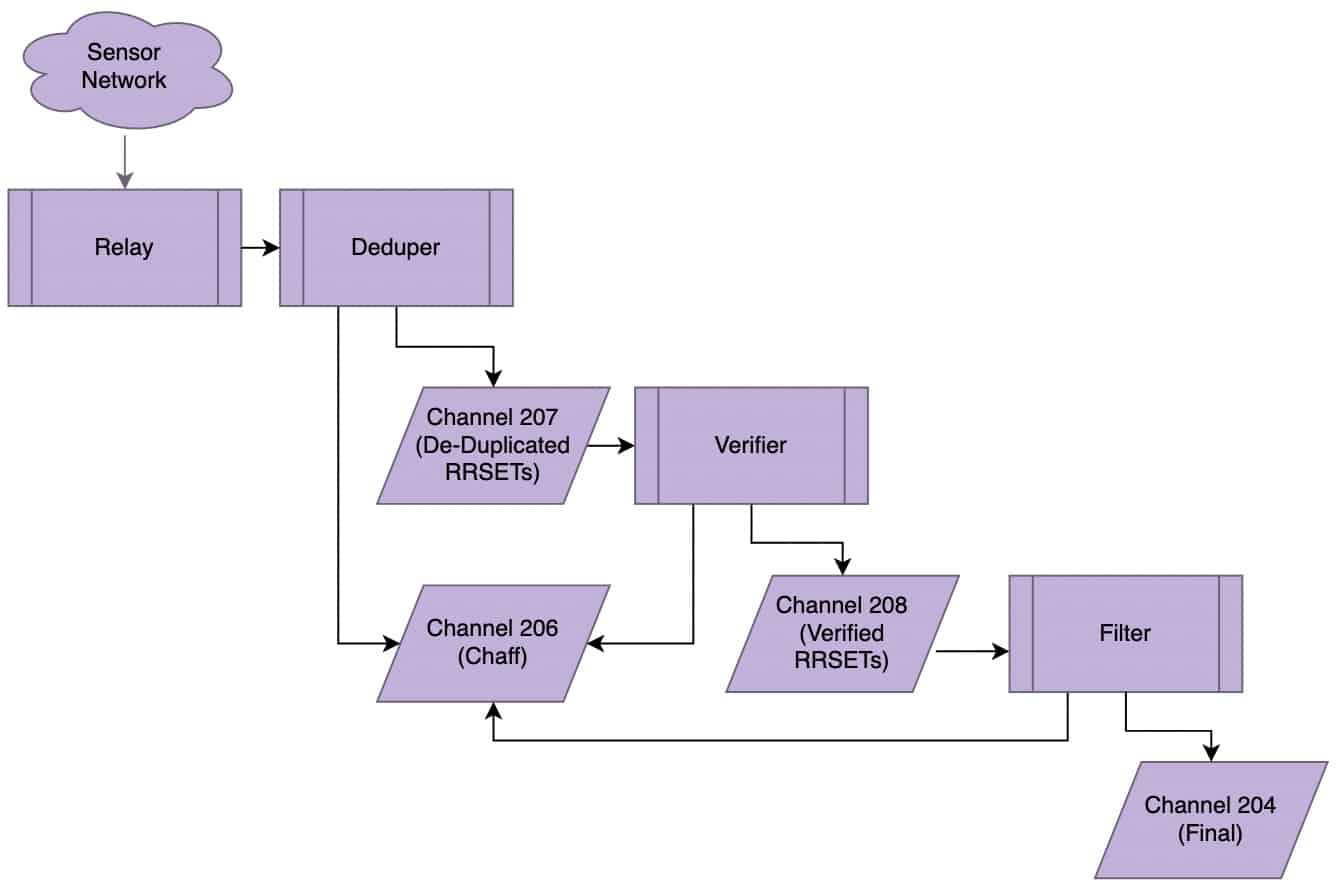
Figure 2. SIE Waterfall Diagram.
Normally, DNSDB is fed from Ch204 (after deduplication, bailiwick verification, and filtering), and contains all RRtypes.
However, let’s assume we want to make DNSDB-like queries against the non-filtered Ch208 traffic, and just for an enumerated subset of RRtypes. We can use the tools we’ve just described to sketch out such an application. Actually deploying such a system would normally use different mechanisms and have many details that would need to be considered and addressed — this is just a notional/”by way of demonstration” example.
The first thing we need for this project is some data.
We’ll begin by capturing a few minutes of data from Ch208 on a leased blade server at the SIE using nmsgtool.
We’ll use the -t 60 -k '' options to nmsgtool to “kick out” a new output file once every sixty seconds:
$ nmsgtool -C ch208 -t 60 -k '' -w ch208
Those files will have names beginning with ch208 (since that’s what we supplied with the dash w option), followed by a timestamp. For example:
$ ls -lat *.nmsg
[...] 406099601 Nov 12 00:45 ch208.20211112.0045.1636677900.001817025.nmsg
[...] 464624829 Nov 12 00:44 ch208.20211112.0044.1636677840.002312737.nmsg
[...] 434479578 Nov 12 00:43 ch208.20211112.0043.1636677780.001059399.nmsg
There may be many different resource record types (“RRtypes”) in those files. To allow us to investigate what RRtypes are actually present, and to make it easy for us to filter those files, we’ll begin by converting those files into JSON Lines format. Normally we’d convert those files usinga little script, but since we only have three files, we’ll simply say:
$ nmsgtool -r ch208.20211112.0043.1636677780.001059399.nmsg -J ch208.20211112.0043.1636677780.001059399.jsonl

$ nmsgtool -r ch208.20211112.0044.1636677840.002312737.nmsg -J ch208.20211112.0044.1636677840.002312737.jsonl

$ nmsgtool -r ch208.20211112.0045.1636677900.001817025.nmsg -J ch208.20211112.0045.1636677900.001817025.jsonl

$ wc -l *.jsonl
   2574388 ch208.20211112.0043.1636677780.001059399.jsonl
   2402763 ch208.20211112.0044.1636677840.002312737.jsonl
   2424825 ch208.20211112.0045.1636677900.001817025.jsonl
Now let’s concatenate those JSON Lines files into a single combined file:
$ cat ch208.20211112.004*.jsonl > combined.jsonl

$ wc -l combined.jsonl
7401976 combined.jsonl
We can then check the RRtypes in our combined file by leveraging jq(see https://stedolan.github.io/jq/ ):
$ jq -R 'fromjson? | .message.rrtype' combined.jsonl | sort | uniq -c | sort -nr > rrtypes.txt
The jq 'fromjson? |' element ensures that we only process valid JSON (one line may have had a potentially invalid record — without that “guard” command, we see "parse error: Invalid literal at line 4977152, column 20.")
The .message.rrtype bit extracts just the RRtype field from the combined JSON Lines format records.
We then sort and count those records, and resort them in descending order by their frequency:
$ more rrtypes.txt
2044933 "A"
1602287 "CNAME"
1187361 "RRSIG"
 800411 "AAAA"
 752396 "NS"
 307531 "PTR"
 288695 "SOA"
 120628 "NSEC3"
 105082 "TXT"
  57060 "NSEC"
  45479 "DS"
  41112 "MX"
  36636 "NULL"
   5771 "DNSKEY"
   4881 "<UNKNOWN>"
   1355 "SRV"
    130 "HINFO"
    117 "WKS"
     61 "RP"
     19 "SPF"
     12 "NAPTR"
      8 "TLSA"
      6 "CAA"
      2 "SSHFP"
      1 "NSEC3PARAM"
      1 "DNAME"
We can then sum up the RRtypes we saw — the count we obtain agrees (with the exception of the one unparseable record we previously mentioned):
$ cat rrtypes.txt | awk '{print $1}' | paste -sd+ | bc
7401975
We’re now ready to filter by RRtype. Let’s assume we only care about "A"records, "CNAME" records, and "AAAA" records (obviously we could specify whatever subset of records we might want here):
$ egrep '"rrtype":("A"|"CNAME"|"AAAA")' combined.jsonl > combined2.jsonl
$ wc -l combined2.jsonl
4447632 combined2.jsonl <-- significantly smaller file (just 60% of our original line count)
We’ll now flop the filtered results back to nmsg format:
$ nmsgtool -j combined2.jsonl -w combined2.nmsg
And finally, we’ll convert that nmsg file into a DNSTABLE format MTBL file for search purposes:
$ dnstable_convert combined2.nmsg dns.combined2.mtbl dnssec.combined2.mtbl
dnstable_convert: reading input data
processed 1,000,000 messages, 5,273,446 entries (0 DNSSEC, 0 merged) in 1.80 sec, 555,610 msg/sec, 2,929,982 ent/sec
processed 2,000,000 messages, 10,665,465 entries (0 DNSSEC, 0 merged) in 3.68 sec, 543,621 msg/sec, 2,898,987 ent/sec
processed 3,000,000 messages, 16,002,201 entries (0 DNSSEC, 0 merged) in 5.49 sec, 546,607 msg/sec, 2,915,639 ent/sec
processed 4,000,000 messages, 21,355,399 entries (0 DNSSEC, 0 merged) in 7.33 sec, 545,725 msg/sec, 2,913,547 ent/sec
processed 4,447,631 messages, 23,720,967 entries (0 DNSSEC, 0 merged) in 8.14 sec, 546,166 msg/sec, 2,912,918 ent/sec
dnstable_convert: writing tables
wrote 0 entries in 0.00 sec, 0 ent/sec [dnssec]
dnstable_convert: finished writing table [dnssec]
wrote 1,000,000 entries in 3.77 sec, 265,352 ent/sec [dns]
wrote 2,000,000 entries in 4.98 sec, 401,550 ent/sec [dns]
wrote 3,000,000 entries in 6.17 sec, 486,219 ent/sec [dns]
wrote 4,000,000 entries in 7.44 sec, 537,836 ent/sec [dns]
wrote 5,000,000 entries in 8.35 sec, 599,028 ent/sec [dns]
wrote 6,000,000 entries in 8.82 sec, 680,248 ent/sec [dns]
wrote 7,000,000 entries in 9.65 sec, 725,472 ent/sec [dns]
wrote 8,000,000 entries in 10.56 sec, 757,914 ent/sec [dns]
wrote 9,000,000 entries in 11.63 sec, 773,687 ent/sec [dns]
wrote 10,000,000 entries in 12.65 sec, 790,572 ent/sec [dns]
wrote 11,000,000 entries in 13.80 sec, 797,266 ent/sec [dns]
wrote 12,000,000 entries in 14.95 sec, 802,853 ent/sec [dns]
wrote 13,000,000 entries in 15.83 sec, 821,336 ent/sec [dns]
wrote 14,000,000 entries in 16.75 sec, 835,883 ent/sec [dns]
wrote 14,359,850 entries in 17.08 sec, 840,985 ent/sec [dns]
dnstable_convert: finished writing table [dns]
processed 4,447,631 messages, 23,720,967 entries (0 DNSSEC, 9,361,117 merged) in 53.87 sec, 82,569 msg/sec, 440,374 ent/sec
no DNSSEC entries generated, unlinking dnssec.combined2.mtbl
At this point we’re ready to try doing a sample search. We’ve got just a single combined mtbl file, so we’ll just say:
$ export DNSTABLE_FNAME="dns.combined2.mtbl"
$ dnstable_lookup rrset www.google.com
;;  bailiwick: google.com.
;;      count: 1
;; first seen: 2021-11-11 16:01:17 -0000
;;  last seen: 2021-11-11 20:41:23 -0000
www.google.com. IN A 142.250.186.164

;;  bailiwick: google.com.
;;      count: 7,651
;; first seen: 2021-11-11 08:44:46 -0000
;;  last seen: 2021-11-11 21:55:26 -0000
www.google.com. IN A 142.250.188.4
[...]

;;  bailiwick: google.com.
;;      count: 81
;; first seen: 2021-11-11 12:42:43 -0000
;;  last seen: 2021-11-11 23:04:43 -0000
www.google.com. IN AAAA 2a00:1450:4010:c0a::63
www.google.com. IN AAAA 2a00:1450:4010:c0a::67
www.google.com. IN AAAA 2a00:1450:4010:c0a::69
www.google.com. IN AAAA 2a00:1450:4010:c0a::6a

;;; Dumped 17 entries.
Some might wonder, “Why bother using dnstable_lookup given that you’ve got JSON Lines format data you could just search with grep instead?” There are many potential motivations for using dnstable_lookup, including:
- Speed: Forward and reverse indexing of the data makes using
dnstable_lookupmuch faster than just linearly searching the data. - Aggregation:
dnstable_lookupwill automatically aggregate results across multiple files in a fileset, a tremendous convenience - Complex Queries:
dnstable_lookupsupports a wide range of queries, including things like CIDR queries and IP address range queries. - “Pretty Printed” Datetime Stamps:
dnstable_lookupallows the user to get nicely-converted human-readable output for things like datetime stamps, which might otherwise appear in raw Un*x ticks (number of seconds that have elapsed since Jan 1, 1970).
The dnstable_convert command we demonstrated in this example for Ch208 traffic will NOT work for traffic from some other SIE channels. For example, if you tried to use that command with SIE Ch202, Ch206, or Ch207,you’d see:
- Ch202: Assertion `vid == NMSG_VENDOR_SIE_ID’ failed.
(Needs to use SIE/dnsdedupe schema, but doesn’t).
- Ch206: Assertion `vid == NMSG_VENDOR_SIE_ID’ failed.
(Needs to use SIE/dnsdedupe schema, but doesn’t).
- Ch207: Assertion `dns->has_bailiwick’ failed.
(Bailiwick validation hasn’t been done as of Ch207)
On the other hand:
- Ch204: Ch204 is downstream of Ch208, and works fine (like the Ch208 example we showed).
VII. Conclusion
You’ve now had a “whirlwind tour” of some of the file formats used by DNSDB and at the Security Information Exchange. You’ve learned about the tools that are available to convert files between these formats, and even saw a little example of how you can construct a custom MTBL you can query. We hope you’ve found this introduction to DNSDB and SIE file formats to be helpful!
Acknowledgements
Thanks to Ben April, Dan Nunes, David Waitzman and Eric Ziegast for their helpful suggestions on a draft of this article.
Any remaining issues are solely the responsibility of the author.
Updates
- 11/22/2021 Corrected dependency ordering in Section IV and added explanation of compression objectives plus other miscellaneous updates.


