

The Only Thing That's Constant Is Change: The DNS Changes Channel (SIE Channel 214)


I. Introduction
The online world is constantly changing. New domains are continually being created. Existing domains frequently get modified. If you subscribe to Farsight Security’s DNS Changes channel, you’ll have the power to know what’s happening. You’ll have near-real-time visibility into changes to the DNS, the infrastructure that underlies everything that happens on the Internet. Imagine the power to know, literally on a host-by-host basis….
- Whenever a new domain name is created and used:
- — New domain name registered and used? You’ll know
- — New hostname (“fully qualified domain name”) created and used? You’ll know
- Whenever an existing domain name’s configuration changes:
- — Existing hostname moves to a new IP address? You’ll know
- — Existing domain now using different name servers? You’ll know
- — Existing domain now using a new mail exchanger? You’ll know
- — Existing domain suddenly using IPv6? You’ll know
Farsight’s DNS Changes channel gives you the near-real-time insights you need to tackle today’s malware, phishing, scams, spams and other online threats.
II. Sample Operational Use Cases for DNS Changes Channel
DNS Changes isn’t some abstract research tool; instead, it’s a power tool that meets real operational needs:
- Brand Protection/Anti-Phishing: Wish you could see infringing/phishing host names as they come up? Now you can
- Domain Hijacking/Unexpected DNS Changes: Your company’s online presence depends on the integrity of its DNS. Shouldn’t you be monitoring your DNS worldwide, on the alert for unauthorized changes, whether due to attack or simple operational errors? Now you can
- Situational Awareness for Security Sensitive Environments: Most organizations have at least a few internal hosts that should never be interacting with the Internet. Imagine having the ability to know when someone has discovered those hosts, and is resolving them out on the Internet…. Now you can
- DNS Monitoring for Business Intelligence: Wish you could tell when a competitor creates and begins to broadly use a new host? Now you can
III. “When Do Observations Get Written to The DNS Changes Channel?”
An entry gets written to the DNS Changes Channel whenever:
- A new domain is observed
- A new RRname (aka “hostname” or “FQDN”) is observed
- A new RRtype is observed for an RRname (for example, perhaps a site adds a AAAA record for an IPv6-connected host). [One exception to this: all DNSSEC-related record types are ignored for the DNS Changes Channel, as well as Farsight’s Newly Observed Domains and Newly Observed Hosts]
- A new Resource Record is observed (perhaps a hostname gets moved to a new IP address)
- A new RRset is observed (for example, perhaps an additional name server is added to the set of nameservers returned for a given domain)
IV. Accessing Channel 214
Users access Channel 214 via the Security Information Exchange, or “SIE.” When you subscribe to Channel 214, or any SIE channel, you can choose from three different access methods:
- You can access the channel remotely via an SIE Remote Access (SRA) encrypted tunnel
- You can access the channel via a leased Farsight blade server directly connected to the Farsight SIE switch, or
- You can get a network cross connect between the Farsight SIE Ethernet switch and your own server.
Once your connection to SIE has been plumbed, you can request observations from Channel 214 by using nmsgtool. For example, to stream a continual series of observations from Ch214 you’d enter:
$ nmsgtool -C ch214 -o -
A sample observation from DNS Changes looks like:
[90] [2018-07-30 16:20:31.955964088] [2:5 SIE newdomain] [a1ba02cf] [] []
domain: faceb00k.work.
time_seen: 2018-07-30 16:19:43
bailiwick: faceb00k.work.
rrname: srrbba.faceb00k.work.
rrclass: IN (1)
rrtype: A (1)
rdata: 61.14.210.110
new_domain: False
new_rrname: True
new_rrtype: True
new_rr: True
new_rrset: True
Decoding that sample message from Ch214:
Field Explanation
[90]: This is the message size in bytes
[2018-07-30 16:20:31.955964088]: This is the UTC timestamp with nanosecond resolution
[2:5 SIE newdomain]: This is the vendor and message ID, vendor and message type
[a1ba02cf]: Source identifier (optional)
[]: The operator code (optional)
[]: The group code (optional)
domain: faceb00k.work. The effective 2nd-level domain (see https://publicsuffix.org/))
time_seen: 2018-07-30 16:19:43 Time the observation was seen (UTC)
bailiwick: faceb00k.work. ( www.farsightsecurity.com/2017/03/21/stsauver-what-is-a-bailiwick/ )
rrname: srrbba.faceb00k.work. The fully qualified domain name (FQDN)/"hostname"
rrclass: IN (1) Will always be "IN (1)" [RRs from any other classes, if seen, get dropped]
rrtype: A (1) Resource record type (an "A" record maps a FQDN to an IPv4 IP address)
rdata: 61.14.210.110 The right hand side data (in this case, the IPv4 address)
new_domain: False Is the effective 2nd-level domain new? No...
new_rrname: True Is the FQDN new? YES
new_rrtype: True Is the FQDN's RRtype new? YES
new_rr: True Is the entire Resource Record new? YES
new_rrset: True Is the Resource Record Set new? YES
Note that if you have a more complex DNS response, some fields (typically the rdata and new_rr fields) will be repeated:
[195] [2018-07-30 17:41:59.224320888] [2:5 SIE newdomain] [a1ba02cf] [] []
domain: netflixdnstest6.com.
time_seen: 2018-07-30 17:40:21
bailiwick: netflixdnstest6.com.
rrname: acf46veqahsahgr6atsgs.netflixdnstest6.com.
rrclass: IN (1)
rrtype: A (1)
rdata: 18.204.98.127
rdata: 18.208.13.229
rdata: 34.195.113.199
rdata: 34.246.149.52
rdata: 34.246.216.245
rdata: 35.155.247.161
rdata: 35.160.186.158
rdata: 52.10.217.81
rdata: 54.72.212.34
new_domain: False
new_rrname: True
new_rrtype: True
new_rr: True		(corresponds to 18.204.98.127, above)
new_rr: True		(corresponds to 18.208.13.229, above)
new_rr: True		(etc.)
new_rr: True
new_rr: True
new_rr: True
new_rr: True
new_rr: True
new_rr: True
new_rrset: True
nmsgtool can also write its output in JSON Lines format, instead of presentation format, just use -J instead of -o. For example:
$ nmsgtool -C ch214 -J -
Programmers can also use our API to access the content of that channel from their own custom code.
V. A Cascading Hierarchy of Newness
The other thing you should note about the DNS Changes channel is that there’s a hierarchical relationship to the elements in the “new” element display:
- If new_domain is true, new_rrname, new_rrtype, new_rr, and new_rrset will normally ALSO be true, too
- If new_rrname is true, new_rrtype, new_rr, and new_rrset will normally ALSO be true, too
- If new_rrtype is true, new_rr, and new_rrset will normally ALSO be true, too
- If at least one new_rr is true, new_rrset will normally ALSO be true, too
VI. The Relationship Between Channel 214 (DNS Changes) and Channel 212 (NOD)/Channel 213 (NOH)
If you review Farsight’s SIE Channel Guide, you may notice that in addition to Channel 214, we also offer Channel 212 (Newly Observed Domains) and Channel 213 (Newly Observed Hostnames). You may wonder, given that those channels are numerically adjacent, are those three channels related? Why yes, yes they are.
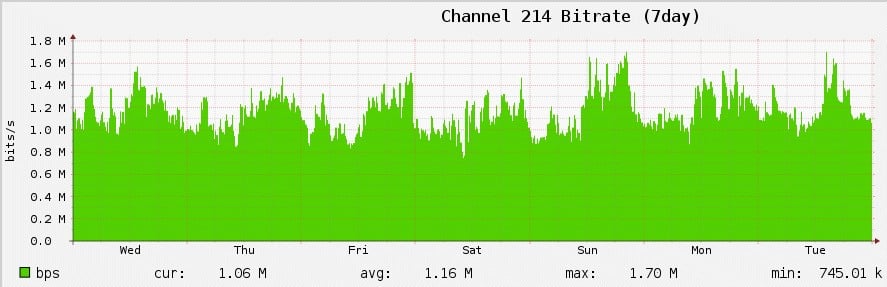
You can think of Channel 214 as being the “master channel that’s all about what’s new.” Not surprisingly, it is the busiest of the three channels. We can measure each channel’s busy-ness two ways:
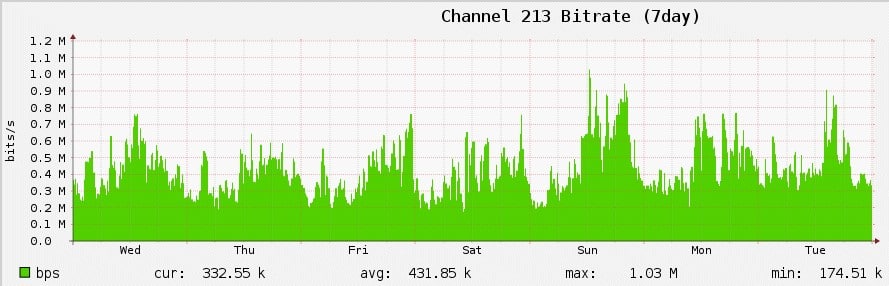
- Bitrate, or Bandwidth Used: That is, how much network capacity does the channel require?
- Payload Rate: How many observations per unit time would I, the coder, need to process?
Let’s take a closer look at these metrics for each of the three SIE channels:
Channel 214
First, let’s look at its bitrate, or “bandwidth used:”
Now, let’s see it’s payload rate:
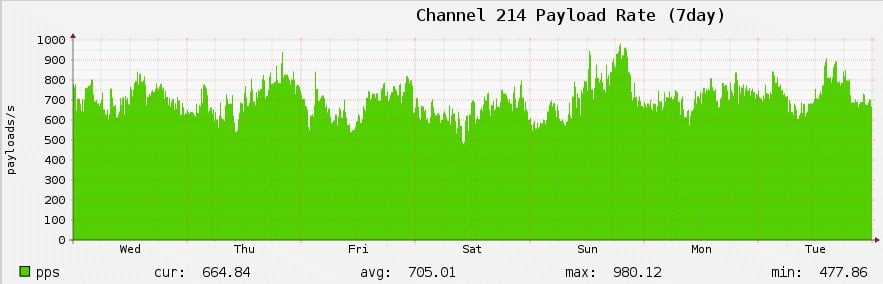
Clearly, Channel 214 has significant ongoing volume — over 700 payloads per second!
Channel 213
This Newly Observed Hostnames channel focuses on just the new_rrname data from DNS Changes. It is the 2nd most-busy channel of the three.
Bitrate:
Payload rate:
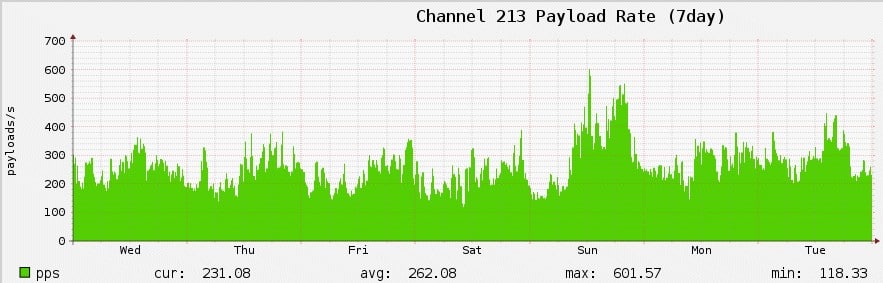
Channel 213 is far lower volume, only running a little over 250 payloads per second.
Channel 212
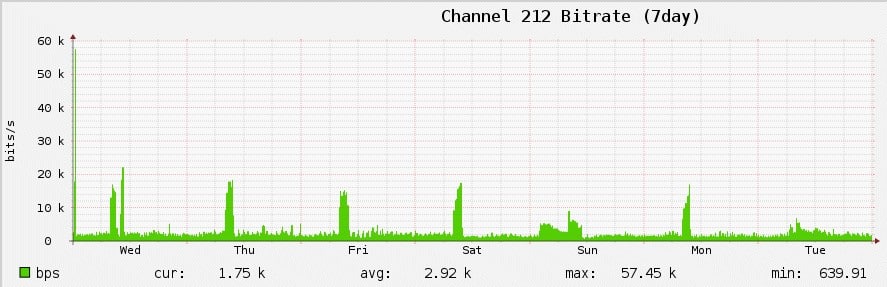
This Newly Observed Domains channel focuses just on the new_domain (e.g., new delegation point) data from DNS Changes. It’s the lowest volume channel of the three, although it is subject to occasional volume spikes.
Bitrate:
Payload rate:
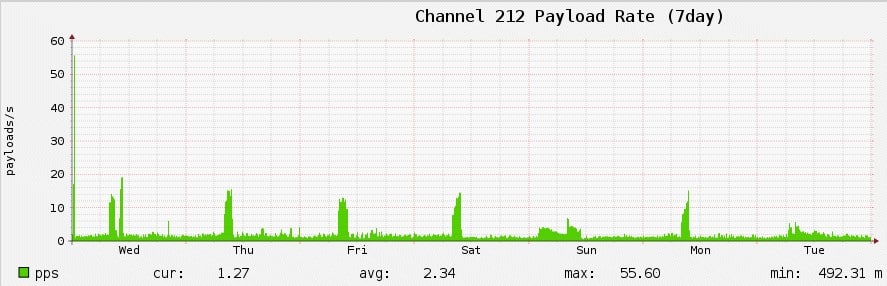
Finally, Channel 212 is the lowest volume of the three, with just over two neweffective 2nd-level domains per second.
Depending on your requirements, NOD or NOH may be all you need. NOD and NOH are obviously lower volume (and thus easier to process) alternatives, but DNS Changes is the channel that “has it all” if you need it.
VII. Conclusion
We hope you’ve found our description of the SIE DNS Changes channel to be intriguing. If you’d like more information about DNS changes and how it can rock your DNS-related operations, please contact Farsight Security at [email protected].
Joe St Sauver Ph.D. is a Distinguished Scientist for Farsight Security, Inc.


