

Using DNSDB With openssl s_client To Scan A List of Hosts For Expired SSL/TLS Certificates


I. Introduction
A typical company may have dozens or hundreds of hosts with SSL/TLS certificates, the crucial bit of glue that enables encrypted (“https”) connections to web servers that may be running on those hosts.
Unfortunately, sometimes there can be problems with SSL/TLS certificates. One of the most common issues is for a certificate to expire before it gets renewed. When that (or other issues) arise with a cert, web browsers such as
Chrome
or
Firefox
won’t trust those hosts, typically throwing up a scary-looking warning message. For example:
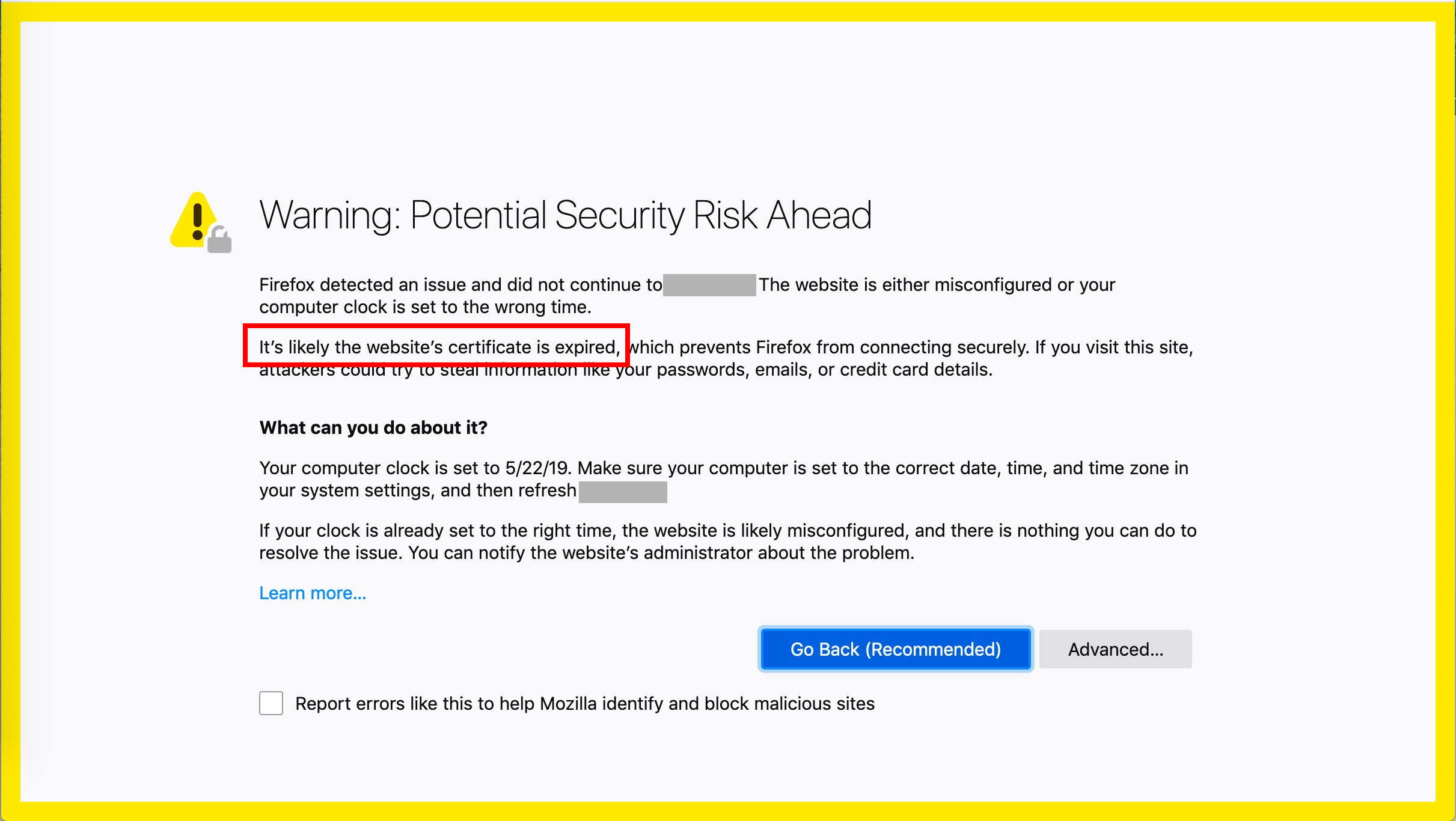
Figure 1. Sample Firefox Warning When Encountering An Expired Cert
If you want to do a thorough check of a web site’s crypto and cert usage, Qualys SSL Labs provides a nice free web-based tester (see Qualys SSL Labs )
That Qualys SSL Labs testing tool is truly brilliant!
Sometimes, though, you may just want to do a ‘quick-and-dirty’ check of all the hosts under a domain for a particular issue (such as expired certs). For that, the Qualys tester may be overkill, sort of like swatting a mosquito with a sledge hammer.
For a straightforward jobs like checking for expired certs, we’ll just check it directly ourselves — describing how to do it takes longer than actually just doing it.
The first thing we’ll need is a list of publicly-visible hosts for the domain name of interest.
II. Getting A List Of Publicly Visible Hosts Under a Domain
DNSDB can be used to provide a list of all recently-seen publicly-visible hosts for a given delegation point. For example the following command will return a list of
farsightsecurity.com
hosts:
$ dnsdbq -r \*.farsightsecurity.com -A90d -j | jq -r '.rrname' | sort -u | sed 's/\.$//' > temp.txt
Decoding that command pipeline:
dnsdbq
-r \*.farsightsecurity.com
- means “please show us all the owner names (fully qualified domain names) that end in
.farsightsecurity.com
- “
-A90d
- means “limit results to those seen in the last 90 days”
-j
- means “please provide the output in JSON Lines format” (see http://jsonlines.org/ )
|
- “pipes” the output from the preceding command to the next command in the pipeline
jq
- — jq is a JSON “Swiss Army knife,” see https://github.com/stedolan/jq
-r
- means “tell jq to send its output in raw format, e.g., without enclosing double quote marks”
'.rrname'
- specifies the field we want to select
sort -u
- sorts and uniquifies the data, eliminating duplicate observations
sed 's/\.$//'
- will strip the trailing dot from each name
> temp.txt
- writes the output to the temporary file temp.txt
The output in
temp.txt
then looks like:
_spf.farsightsecurity.com
archive.farsightsecurity.com
back.farsightsecurity.com
dl.farsightsecurity.com
dl.iad1.farsightsecurity.com
farsightsecurity.com
front-update.farsightsecurity.com
front.farsightsecurity.com
info.farsightsecurity.com
lists.farsightsecurity.com
my.farsightsecurity.com
support.farsightsecurity.com
www-dyn.farsightsecurity.com
www.farsightsecurity.com
So now we have a list of hosts we can test for expired certs.
But how can we actually test them? Let’s try the
openssl s_client
command.
III. The openssl s_client Command
OpenSSL
(see https://www.openssl.org/ ) is a popular cryptographic library that often is used to handle the cryptographic “heavy lifting” for secure web sites. In addition to supporting secure web sites, it also includes some handy command line tools, such as
openssl s_client.
The basic form of the
openssl s_client
command that we’re going to use is:
openssl s_client -connect <hostname>:<portnumber> -servername <hostname>
We’ll need to make two tweaks to that. We need to ensure that we:
- Handle cases where connection doesn’t suceed (we’ll give it 10 seconds to try to connect and then move on if it hasn’t — some sites simply may not have a secure web server running, or if it is running, we may be having trouble reaching it).
We’ll do that by leveraging
GNU Coreutil
- ‘s timeout command (see https://www.gnu.org/software/coreutils/manual/html_node/timeout-invocation.html#timeout-invocation )
- Tell
openssl s_client
- to disconnect after we do successfully connect and get the information we need.
We’ll do that by passing a capital “Q” at the start of a line using bash’s “here string” functionality (see https://www.gnu.org/savannah-checkouts/gnu/bash/manual/bash.html#Here-Strings )
So as a concrete example, if we wanted to just check
www.farsightsecurity.com
on the standard https port (port 443), we’d run:
$ timeout 10 openssl s_client -connect www.farsightsecurity.com:443 -servername www.farsightsecurity.com <<< "Q"
Voluminous output will then follow. Part of that output looks like:
depth=2 C = US, O = DigiCert Inc, OU = www.digicert.com, CN = DigiCert Global Root CA
verify return:1
depth=1 C = US, O = DigiCert Inc, CN = DigiCert SHA2 Secure Server CA
verify return:1
depth=0 C = US, ST = CA, L = San Mateo, O = "Farsight Security, Inc.", CN = farsightsecurity.com
verify return:1
[additional content omitted here]
---
DONE
That output shows that the cert has not expired and in fact, if we “double check” with the Qualys tester, it actually gives the site’s SSL/TLS configuration an A+ evaluation.
Now let’s see what an expired cert would look like.
IV. An Example of An Expired Cert Found With openssl s_client
Sometimes certs are intentionally non-renewed. For example, Farsight has a host that’s slated for decommissioning, so we intentionally haven’t bothered to renew its cert. If we try to connect to that host with
openssl s_client
, we see:
$ timeout 10 openssl s_client -connect <elided>.fsi.io:443 -servername <elided>.fsi.io <<< Q
CONNECTED(00000005)
depth=2 C = US, O = DigiCert Inc, OU = www.digicert.com, CN = DigiCert Global Root CA
verify return:1
depth=1 C = US, O = DigiCert Inc, CN = DigiCert SHA2 Secure Server CA
verify return:1
depth=0 C = US, ST = CA, L = San Mateo, O = "Farsight Security, Inc.", CN = <elided>.fsi.io
verify error:num=10:certificate has expired
notAfter=Apr 16 12:00:00 2019 GMT
verify return:1
[snip]
If we double check that same server on the Qualys site, it receives a
T
(untrusted) rating because the certificate for the site has expired, confirming the results reported by
openssl s_client
V. Applying Our openssl s_client Check To A List of Hosts From DNSDB
Assuming we’ve got a list of hostnames to test in the file
temp.txt
from section II, we could build a little script to read and run tests for the names of interest, but since we only have a handful of names, we can also just build a script to test those hosts by saying:
$ awk '{print "timeout 10 openssl s_client -connect", $1, ":443 -servername ", $1, "<<< Q"}' < temp.txt | sed 's/ :/:/' > temp2.txt
Decoding that command pipeline:
awk
- is GNU awk, a popular Unix text manipulation tool (see https://www.gnu.org/software/gawk/ )
- the string in the tick marks immediately after the awk command prints some literal text (the stuff in double quote marks), plus the name of the domain (the two places where you see
$1
- )
< temp.txt
- says to take input from the file
temp.txt
|
- is the pipe command, taking the output from one command and piping it to the next command
sed
- is the stream editor, used in this case to remove a pesky space that would otherwise sneak in before the colon
> temp2.txt
- says send the output from this command to the file
temp2.txt
Once we run this command, our command file (temp2.txt) looks like:
timeout 10 openssl s_client -connect _spf.farsightsecurity.com:443 -servername _spf.farsightsecurity.com <<< Q
timeout 10 openssl s_client -connect archive.farsightsecurity.com:443 -servername archive.farsightsecurity.com <<< Q
timeout 10 openssl s_client -connect back.farsightsecurity.com:443 -servername back.farsightsecurity.com <<< Q
[etc]
All-in-all, there were 14 lines in that file:
$ wc -l temp2.txt
      14 temp2.txt
We’ll then run the commands in
temp2.txt
by saying:
$ bash temp2.txt &> temp3.txt
When we look at the output in
temp3.txt
, ten of those hosts had certs:
$ grep "BEGIN CERTIFICATE" temp3.txt | wc -l
      10
Reviewing the
temp3.txt
output file in an editor, we can confirm that none of the certs were in fact expired (search that file for
expired
).
VI. Conclusion
You’ve now seen how you can use DNSDB in conjunction with the
openssl s_client
tool to find expired SSL/TLS certificates for hosts under a given domain.
Isn’t it time you got access to DNSDB, so you can check your domains at scale, too?
For more information about DNSDB, contact Farsight Sales at
.
Joe St Sauver Ph.D. is a Distinguished Scientist with Farsight Security®, Inc.


