

Using DomainTools Iris to Enhance Classic Whois and RDAP


How Iris Internet Intelligence Enhances Whois and RDAP Lookups
For over 20 years, DomainTools has helped our customers stay ahead of emerging cyber threats through our comprehensive coverage of the Internet. While our mission hasn’t changed, we’ve developed new solutions over the years to enhance the collection, analysis, and presentation of the data we gather. Our flagship solution is our Iris Internet Intelligence Platform, which can be used not only to recreate, but enhance workflows that were previously done using our classic tools. Today, we’ll focus on how Iris enhances classic Whois and RDAP lookups (note: check out this blog if you need some background on RDAP and its relation to Whois).
If you’re a user of the Iris Internet Intelligence Platform, but need a refresher on some of its capabilities, you’ve come to the right place. This blog will provide a brief overview of Iris, a comparison table for quick reference, then step-by-step instructions on how to query and retrieve Whois and RDAP information within the platform.
Iris Internet Intelligence Platform Overview
Comprised of Detect, Enrich, and Investigate, Iris is our Internet intelligence solution that enables analysts to quickly discover and assess risk in order to make confident decisions on domain indicators. Below is a brief overview of each part of the Iris Internet Intelligence Platform:
- Detect – near real-time Internet infrastructure discovery, monitoring, and enforcement platform and API to identify look-alike domains and other malicious activity
- Enrich – robust API including Whois, DNS, SSL certificate, and risk scoring elements to enrich indicators at scale
- Investigate – investigative platform and API with domain intelligence, risk scoring, and industry-leading passive DNS data
The Iris Intelligence Platform enables your team to tackle critical use cases such as phishing and fraud prevention, threat hunting, brand protection, incident response, and more. Now that you’re acquainted with the platform, let’s explore how Iris can enhance classic Whois investigations.
DomainTools Iris UI and API Comparison Tables
These tables, one for UI and one for API, provide a reference guide for recreating findings from classic tools in Iris. We’ll provide more thorough explanations below, but think of the tables as a cheat sheet for any quick wins.
User Interface (UI)
API
Next, we’ll look at each product use case and detail how you can use Iris to enhance investigations that were traditionally performed in classic tools.
Enhance Investigations Using Whois and RDAP Lookups
UI
To perform a Whois or RDAP lookup, you can use the Pivot Engine and other data panels within Iris Investigate. Start by performing a search using a domain name:

Next, scroll across the Pivot Engine to display parsed registration data:
Right click on domain registration data points to view which record the data belongs to:
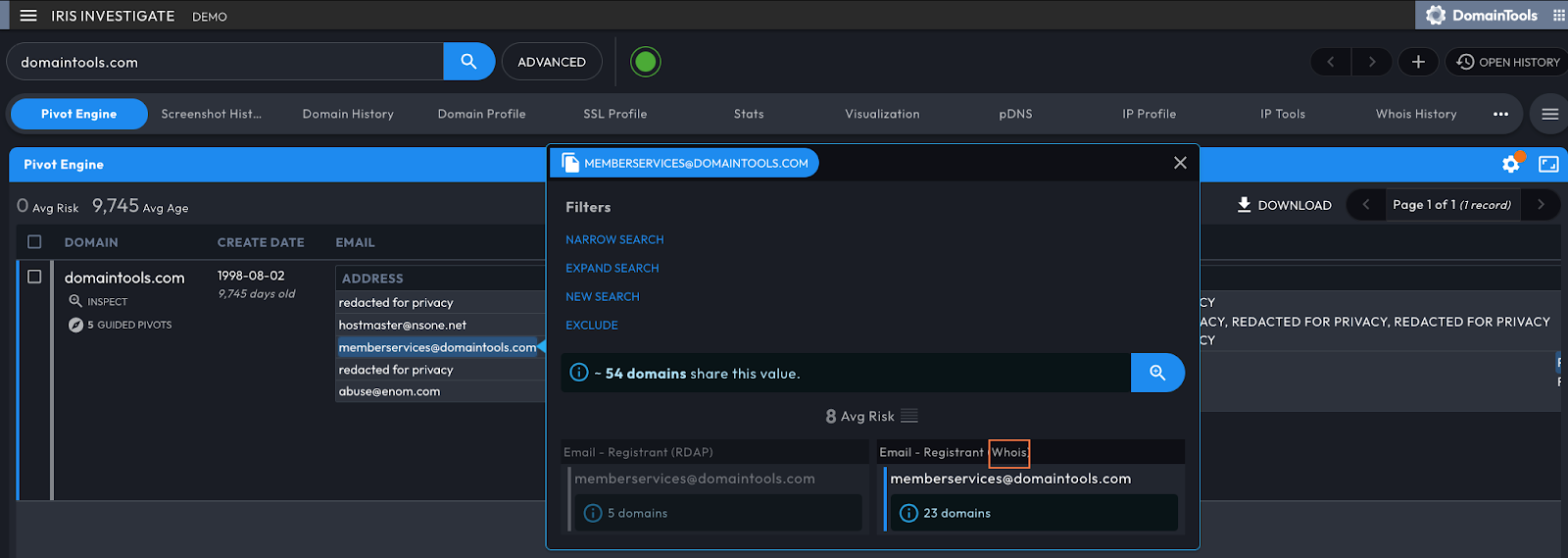
Raw Whois records can also be viewed. After selecting a domain from the Pivot Engine, the Domain Profile data panel will display the raw Whois record at the bottom, as shown below:

The Domain Profile will also show parsed RDAP data in the same data panel. Iris Investigate will autoselect whichever record (RDAP or Whois) has the most data by default unless one record is significantly older than the other, but both data types can be viewed if you need to compare and contrast:

API
The classic Whois API is still available but to ensure that you are retrieving the most comprehensive registration information, our recommendation would be to use the Iris Investigate or Enrich API. An alternative would be to use the Parsed RDAP and Parsed Whois API with post-processing logic to select which record to parse data from.
Whois History
UI
Accessing Whois History through Iris Investigate is simple – first, select a domain from the Pivot Engine:

You can then view historical Whois records in the Whois History Data Panel, both parsed and raw:

You can also compare one record with another, with Iris highlighting the differences for you:

API
As with the classic Whois API, the Whois History API is still available but currently lacks the inclusion of RDAP data. However, we are working on an RDAP History API to ensure you aren’t missing any critical registration data – stay tuned.
Reverse Whois/RDAP
UI
We turn again to Iris Investigate for Reverse Whois/RDAP functionality. First, open the Advanced Search window by clicking on “Advanced” next to the search bar:

Then, select a specific data field from the first drop-down menu. For this example, we’ll select Whois, but you could choose any field related to the record of interest such as email address or phone number:

You can also expand your search to add or exclude different data fields or identifiers in your record, as shown below:

API
While you can still use the classic Reverse Whois API for this specific function, the Iris Investigate API can provide similar output. To do this, add specific registration data fields to your request. This will return domains where the value for that specific data field is present. In the example below, a list of domains with “DomainTools, LLC” listed as the registrant_org is returned from the Iris Investigate API:
[curl] -X 'GET' \
'https://api.domaintools.com/v1/iris-investigate/[?]registrant_org=DomainTools%2C%20LLC&app_partner=SwaggerHub&app_name=DomainTools_APIs&app_version=1.4&format=json' \
  -H 'accept: application/json' \
  -H 'X-API-Key: YOUR_API_KEY'
Bulk Parsed Whois/RDAP
UI
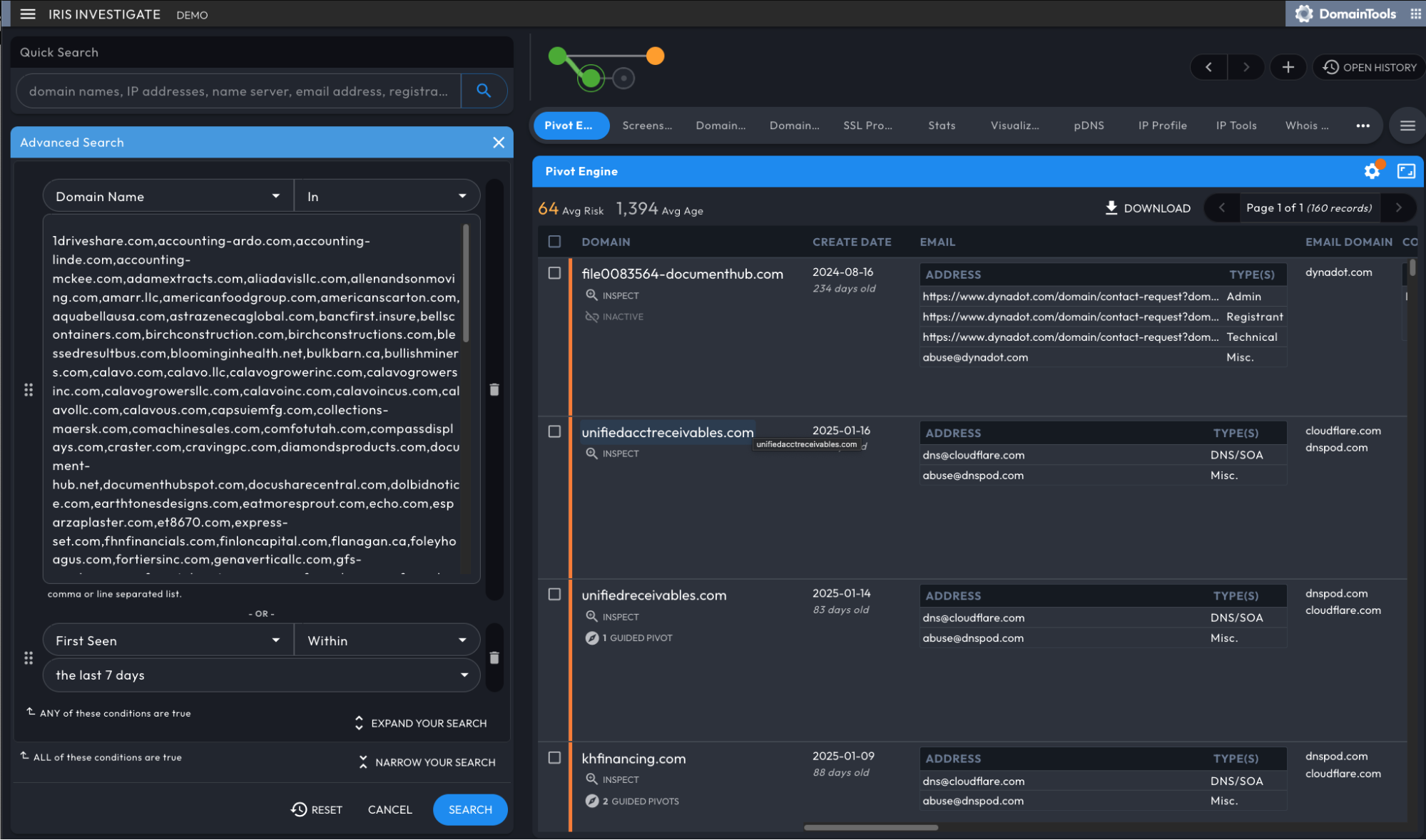
You can retrieve thousands of domains using just one query in Iris Investigate. Once you’ve navigated to the Advanced Search window with your Whois record in mind, use the “in” operator to retrieve all domains matching that criteria. You can link additional domain filters to further enhance your search:
API
Performing bulk queries to view Whois and RDAP data is possible within both Iris Investigate and Enrich. Both APIs allow up to 100 comma-separated domains per call, though Iris Investigate also allows up to 100 comma-separated IP addresses per call.
Example Iris Request
Example Enrich Request
If both a Whois and RDAP record exists for a given domain, Iris will by default return data using the freshest record as the source of truth.
Domain Report
All of the information that would typically appear in a Domain Report can be viewed within Iris Investigate, albeit not in a report format. This includes:
- Recent and historical website screenshots
- Each distinct Historic Whois record we’ve captured
- Registration dates and status codes
- Network name and IP location
- Reverse IP and name server connections
This information can be found in the Pivot Engine and/or by looking at specific data panels within Iris Investigate.
Registrant Monitor
Like the traditional Registrant Monitor, Iris Investigate can reverse search on data points found within registration records to uncover domains tied to specific organizations, threat actors, and/or campaigns. Additionally, the Domain History panel will show specific registration data points for a domain that has evolved over time. Executing your reverse search with the Iris Investigate API integrates your search into a specific workflow and creates regular checks to see if any new domains have been created that match your search criteria.
Conclusion
We hope this blog has been helpful in highlighting the many ways that our Iris Internet Intelligence Platform can enhance Whois and RDAP. Still have questions for our team? Schedule a demo for more information.


