

Volume-Over-Time Data From DNSDB Export MTBL Files (Part Two of Three-Part Series)


1. Introduction
In Part One of this series (“Finding Top FQDNs Per Day in DNSDB Export MTBL Files”), we looked at how you can:
- Extract Fully Qualified Domain Names (FQDNs) and/or effective 2nd-level domains from DNSDB Export MTBL files
- Process that data with Perl to find the top FQDNs (and/or top effective 2nd-level domains)
In this part of the series, our focus will look at how DNSDB count/volume-over-time data can be accessed and visualized, including how DNSDB Export customers can use Perl and GNUplot to graph volume-over-time data. We will also dig in a little on a couple of particularly busy
k12.az.us
domains that were identified in part one of this series.
2. DNSDB API Count Data
Recall that DNSDB API reports the
time_first_seen, time_last_seen
and
count
for each unique combination of (resource record name, record type, bailiwick and resource record data values) for the entire time that Farsight has seen that data. For example, checking DNSDB for www.yahoo.com CNAME records from the yahoo.com bailiwick with dnsdbq we see:
$ dnsdbq -r www.yahoo.com/cname/yahoo.com -S -k last

;; record times: 2018-08-14 21:43:57 .. 2018-12-03 20:06:54
;;
count: 13927967; bailiwick: yahoo.com.
www.yahoo.com. CNAME atsv2-fp-shed.wg1.b.yahoo.com.
;; record times: 2017-05-16 23:35:00 .. 2018-08-14 21:46:38
;; count: 15841537; bailiwick: yahoo.com.
www.yahoo.com. CNAME atsv2-fp.wg1.b.yahoo.com.
[etc]
That example shows two different CNAMEs used by
www.yahoo.com
, each with counts in the 10’s of million range (large, but not unexpected given the fact that Yahoo is a fairly popular site).There are other similar DNSDB
www.yahoo.com/cname/yahoo.com
results going back to 2010 that we’ve intentionally omitted here in the interest of space. The reported counts cover the ENTIRE time from time_first_seen to time_last_seen in each case, but there’s NO indication provided of HOW the counts were distributed WITHIN that period of time.
3. Digging Out Count Values From DNSDB Yearly Files
Fortunately, if you’re a DNSDB Export customer, you have access to additional volume-over-time data. Specifically, you can dig out count data from the MTBL files you have at your site, such as MTBL “yearly,” “monthly,” “daily,” etc., files.
For example, arbitrarily picking the DNSDB 2015 yearly file, we find one entry for
www.yahoo.com/cname/yahoo.com
:
$ export DNSTABLE_FNAME="/path-to-mtbl-files/dns.2015.Y.mtbl"
$ dnstable_lookup rrset www.yahoo.com CNAME yahoo.com
;;  bailiwick: yahoo.com.
;;      count:
35,359,634
;; first seen: 2014-12-31 07:26:34 -0000
;; last seen: 2015-12-31 23:01:35 -0000
www.yahoo.com. IN CNAME fd-fp3.wg1.b.yahoo.com.
That file is showing the count solely for 2015 data for that RRset. We can repeat that process for additional DNSDB yearly files we’ve got, and then graph the values we’ve extracted using Excel or another program:
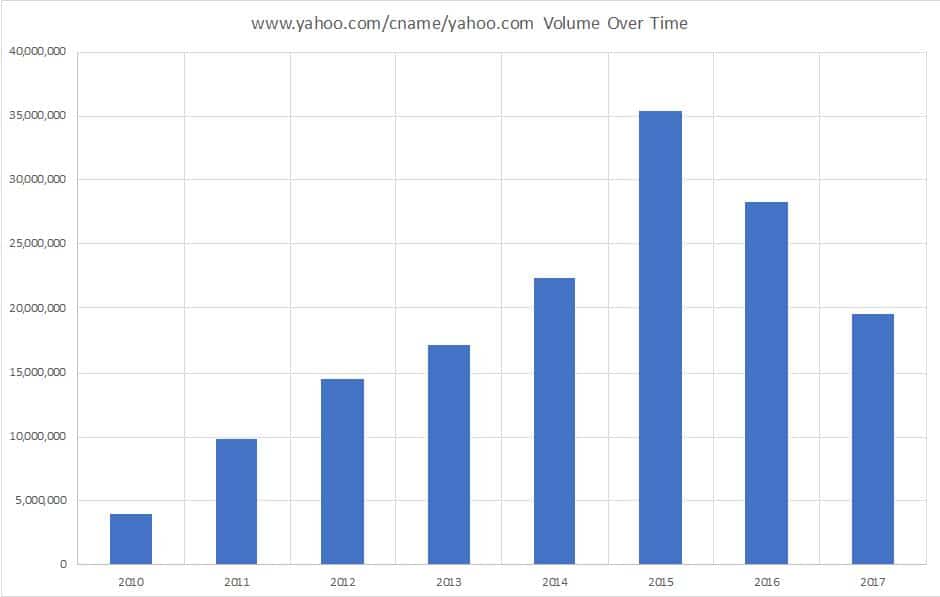
Figure 1. DNSDB count data for www.yahoo.com/cname/yahoo.com by year
4. Digging Out Count Values From A Set of DNSDB Daily Files
Conceptually, now imagine performing a similar process over a range of daily MTBL files, saving just the starting date and the count for each file. We can do this (“quick-and-dirty”-style) with a somewhat arcane Unix command pipeline:
$ export LOOK_FOR="www.yahoo.com cname yahoo.com" ; ls -l /path-to-mtbl-files/dns\.*D* | awk '{print $9}' | awk '{print "export DNSTABLE_FNAME=" $1 " ; dnstable_lookup -j rrset $LOOK_FOR "}' | bash | jq --unbuffered -r '"\(.time_first|todate) \(.count)"' | sed -u 's/T..:..:..Z//' | sed -u 's/\-//g'
Decoding that command pipeline:
- Define the domain we want to look for:
export LOOK_FOR=" www.yahoo.com/cname/yahoo.com" - Get a list of available daily MTBL files:
ls -l /path-to-mtbl-files/dns\.*D* - Print just filenames:
awk '{print $9}' - Build the commands to be run:
awk '{print "export DNSTABLE_FNAME=" $1 " ; dnstable_lookup -j rrset $LOOK_FOR"}' - Process the commands just built:
bash - Extract date & count from the output:
jq --unbuffered -r '"\(.time_first|todate) \(.count)"' - Strip off the time part:
sed -u 's/T..:..:..Z//' - Strip the dashes out of the date:
sed -u 's/\-//g'
Having run that command, we can get a set of dates and counts that we can display in an Excel graph:
20181031 30779
20181101 24464
20181102 29553
20181103 20790
20181104 31577
20181105 26500
20181106 30638
20181107 29298
20181108 30591
20181109 21037
20181110 28302
20181111 28388
20181112 27235
20181113 28350
20181114 26326
20181115 24542
20181116 31130
20181117 26718
20181118 23614
20181119 31338
20181120 24308
20181121 27419
20181122 28067
20181123 22076
20181124 23211
20181125 29751
20181126 22494
20181127 30519
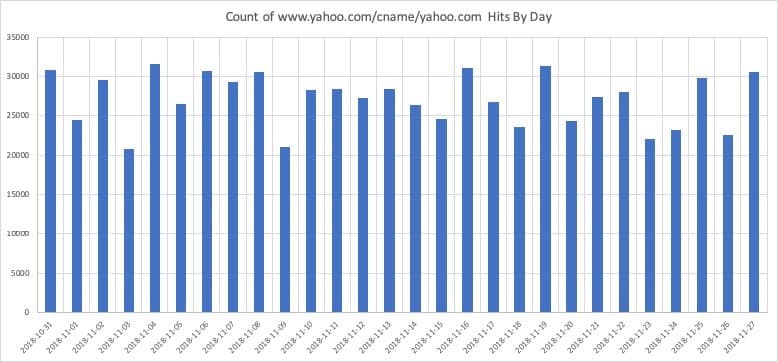
Figure 2. Volume over time data for www.yahoo.com/cname/yahoo.com
5. laveeneld.k12.az.us
Recall that in part one of this series, we noticed a couple of
k12.az.us
domains that ranked unusually highly in our list of highest-volume non-infrastructural 2nd-level domains. For just one day’s worth of traffic we saw:
Rank     	Count			Domain

8	      3,402,660 		laveeneld.k12.az.us
16	      2,634,318 		gesd.k12.az.us
[...]
Those were (and are) VERY high counts for K12 domains.
Checking the web, there’s nothing that immediately jumps out as being very unusual about laveeneld.k12.az.us.
For example, Laveen ELD isn’t huge — it’s just an elementary school district of around 7,200 students in Phoenix, Arizona. For comparison, the Portland (Oregon) Public Schools has 48,345 students and the Salem-Keizer (Oregon) School District has 41,120 students.
One potentially interesting/relevant thing we did notice about this elementary school district: we noticed that they are now using http://www.laveeneld.org/ for their web site, NOT http://www.laveeneld.k12.az.us/ (even though laveeneld.k12.az.us is the “hot running” K12 domain we’d noticed.)
What do we see if we check the live DNS for laveeneld.k12.az.us?
- Checking with dig, the parent domain, k12.az.us, exists (as we’d expect), and has the nameservers:
$ dig k12.az.us ns
[...]
k12.az.us.		7200	IN	NS	ns-933.awsdns-52.net.
k12.az.us.		7200	IN	NS	ns-1716.awsdns-22.co.uk.
k12.az.us.		7200	IN	NS	ns-1364.awsdns-42.org.
k12.az.us.		7200	IN	NS	ns-88.awsdns-11.com.
- The SOA for k12.az.us looks like:
$ dig k12.az.us soa
k12.az.us.		900	IN	SOA	ns-933.awsdns-52.net. postmaster.email.state.az.us. 2013090501 7200 900 1209600 10800
The serial number of that SOA record (if in common YYYYMMDD format) seems rather oddly old —2013/09/05?
k12.az.us
laveeneld.k12.az.us
- :
$ dig laveeneld.k12.az.us @ns-933.awsdns-52.net
[...]
;; AUTHORITY SECTION:
laveeneld.k12.az.us.	600	IN	NS	dns1.laveeneld.k12.az.us.
laveeneld.k12.az.us.	600	IN	NS	dns2.laveeneld.k12.az.us.

;; ADDITIONAL SECTION:
dns1.laveeneld.k12.az.us. 600	IN	A	63.229.61.147    <-- Centurylink IP
dns2.laveeneld.k12.az.us. 600	IN	A	209.234.221.50   <-- Regus Mgmt Grp
- BUT those name servers won’t answer for
laveeneld.k12.az.usdomains:
$ dig +norecurse laveeneld.k12.az.us SOA @63.229.61.147
[...]
;; connection timed out; no servers could be reached

$ dig +norecurse laveeneld.k12.az.us SOA @209.234.221.50
[...]
;; connection timed out; no servers could be reached
- And laveeneld.k12.az.us doesn’t exist in Whois:
$ whois laveeneld.k12.az.us
No Data Found
[etc]
Checking the SOA record, we see
postmaster.email.state.az.us
as POC.
Checking Whois for
k12.az.us
, we see
Tech Name: [elided]
Tech Organization: Arizona Dept. of Education
Tech Street: 1535 West Jefferson
Tech City: Phoenix
Tech State/Province: AZ
Tech Postal Code: 85007
Tech Country: US
Tech Phone: [elided]
Tech Email:
[email protected]
There is no website at at
www.k12.az.us
, nor at
www.az.us
, but we were able to get in touch with the relevant authorities for
www.k12.az.us
, and shared our findings with them.
6. Digging In Deeper: laveneld.k12.us in DNSDB MTBL daily files (September 2016-end of August 2017)
DNSDB Export customers normally don’t keep daily MTBL files after they’ve been rolled up into monthly files, but Farsight actually has a large internal-only cache of daily MTBL files that we’ve kept for research-related purposes.
We can use that data to get a better picture of how a particular FQDN’s counts have been evolving over a longer period of time. We begin by looking at a year’s worth of daily data for
laveeneld.k12.az.us
, from September 2016 through the end of August 2017.
Because we’re now looking at 365 daily files, let’s replace the arcane Unix command pipeline (plus Excel) used in part 4 of this article with a
and GNUplot program called
vot
(“volume-over-time”). A listing of that program is available in Appendix I, or you can download a copy here.
vot
will let us easily extract the volume-over-time data that’s of interest from hundreds of MTBL files, while also giving us the ability to:
- Smooth the data by computing moving averages
- Generate graphic output in any format supported by GNUplot (e.g., jpeg, Postscript, PDF, etc.), and
- Save a copy of the {date, count, moving average} values we’ve extracted/created for archiving or additional processing.
Ensure you’ve got:
- Perl and GNUplot installed
- Any required Perl modules installed, including:
- Date::Manip
- DateTime
- File::Temp
- Getopt::Long
- List::MoreUtils
- and
- List::Util
- The
votcode tailored to look in the right directory for our MTBL files
Copy the
vot
program to /usr/local/bin and make it executable:
# cp vot.pl /usr/local/bin/vot
# chmod a+rx /usr/local/bin/vot
We can then see a summary of
vot
command options by saying:
$ vot --help
Usage:
$ vot --fqdn FQDN [--rectype RECTYPE] [--bailiwick BAILIWICK]
[--granularity {Y|M|D|H}] [--smooth INTEGER]
[--notable] [--tableout FILENAME] [--jsonl] [--tabledir DIR]]
[--plot [--plottype {POINT|LINE|VBAR}]
[--plotdev GNUPLOTDEVICE] [--plotout FILENAME] [--plotdir DIR]
[--title 'TITLE'] [--noplotraw] [--plotsmoothed]]
[--start DATE] [--stop DATE] [--daysback INTEGER]
[--mtbldir] [--version] [--help]
fqdn: fully qualified domain name to be graphed (REQUIRED)
aliases: name|rrset|rrname|r
rectype: ONE rectype (a, aaaa, cname, etc.) (def: non-DNSSEC types)
aliases: rrtype|t
bailiwick: for www.abc.com, either abc.com or com (def: use both)
alias: b
granularity: Y(ear), M(onth), D(ay), H(our) (def: D)
aliases: unit|timeperiod|u
smooth: moving average period (def: no smoothing done)
aliases: ma|m
notable: supress tabular output (def: tabular output)
aliases: quiet|q
tableout: file for tabular output (def: generated filename)
aliases: output|outfile
jsonl: produce table in json lines format (def: CSV)
aliases: json|j
[etc]
A sample run of the
vot
program (from a system with access to the relevant MTBL files) looks like:
$ vot --fqdn laveeneld.k12.az.us --ma 14 --plot --plotma --device postscript
--start 20160901 --stop 20170831
Processing: dns.20160901.D.mtbl
[...]
Processing: dns.20170901.D.mtbl
Table output file: ./laveeneld.k12.az.us.20181226656.txt
Plot output file:  ./laveeneld.k12.az.us.20181226656.postscript
The data file output from running
vot
(e.g.,
laveeneld.k12.az.us.20181226656.txt
) looks like:
20160901 1094 NaN
[...]
20160914 1189 1401.78571428571
[...]
20170831 1424 1426.85714285714
Graphic output from that vot run looks like:
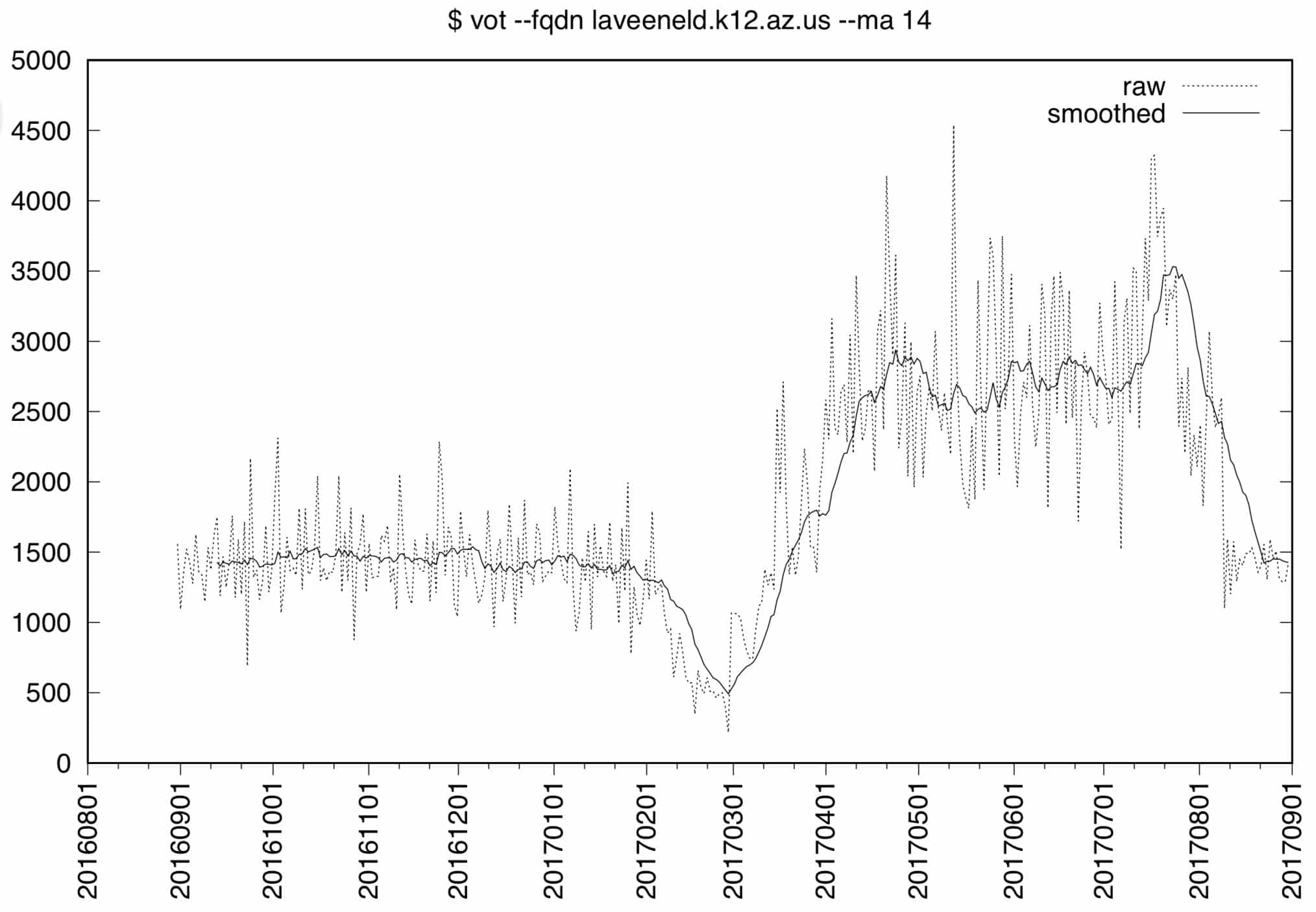
Figure 3. laveeneld.k12.az.us DNSDB volume over time, 2016/09/01–2017/08/31
Note that there are two data sets displayed on that graph:
- The raw data, shown on the graph as a dashed line, and
- The smoothed data, created by averaging 14 values as a moving average. For time t, we compute:
ma14(t) = (count(t) + count(t-1) + count (t-2) + ... + count (t-13)) / 14
- Other notes:
- The
first-seen_timein a given file’s data may actually be the day before the date of the filename itself - This graph is for just a year’s worth of data; earlier and later daily data is available from our research archive.
- For the first 13 observations, there’s insufficient data to compute a moving average; NaN (“Not a Number”) will be used to signal that those values are missing.
- Use of a moving average of period 14 is a matter of analyst judgement (conceptually, 2 days, 3 days, 7 days, 21 days, 28 days, or some other moving average period may be “better” depending on the need for responsiveness vs. the desire to see smoothed trends, etc.)
- The Y axis (“Counts”) tops out below 5,000 in this case
- The
Looking at Figure 3, we can see multiple distinct regions over the course of the yearlong period:
- From 2016/09 thru 2017/02, queries ran pretty consistently just under 1500 queries per day (QPD)
- From 2017/02 through 2017/03, there was a noticeable “trough,” dropping all the way down to 500 QPD
- After that, traffic seemed to ramp up to a new level that was about 2X the pre-February levels, and variablility appeared to increase (notice the range of the dashed lines)
- Finally, traffic spiked in mid-September before dropping back back to original query levels (e.g., 1500/day).
7. REALLY Digging In: laveeneld.k12.az.us in DNSDB MTBL daily files (July 2016-Date)
What do we see if look at
laveeneld.k12.az.us
over the full range of dates for which we have data available?
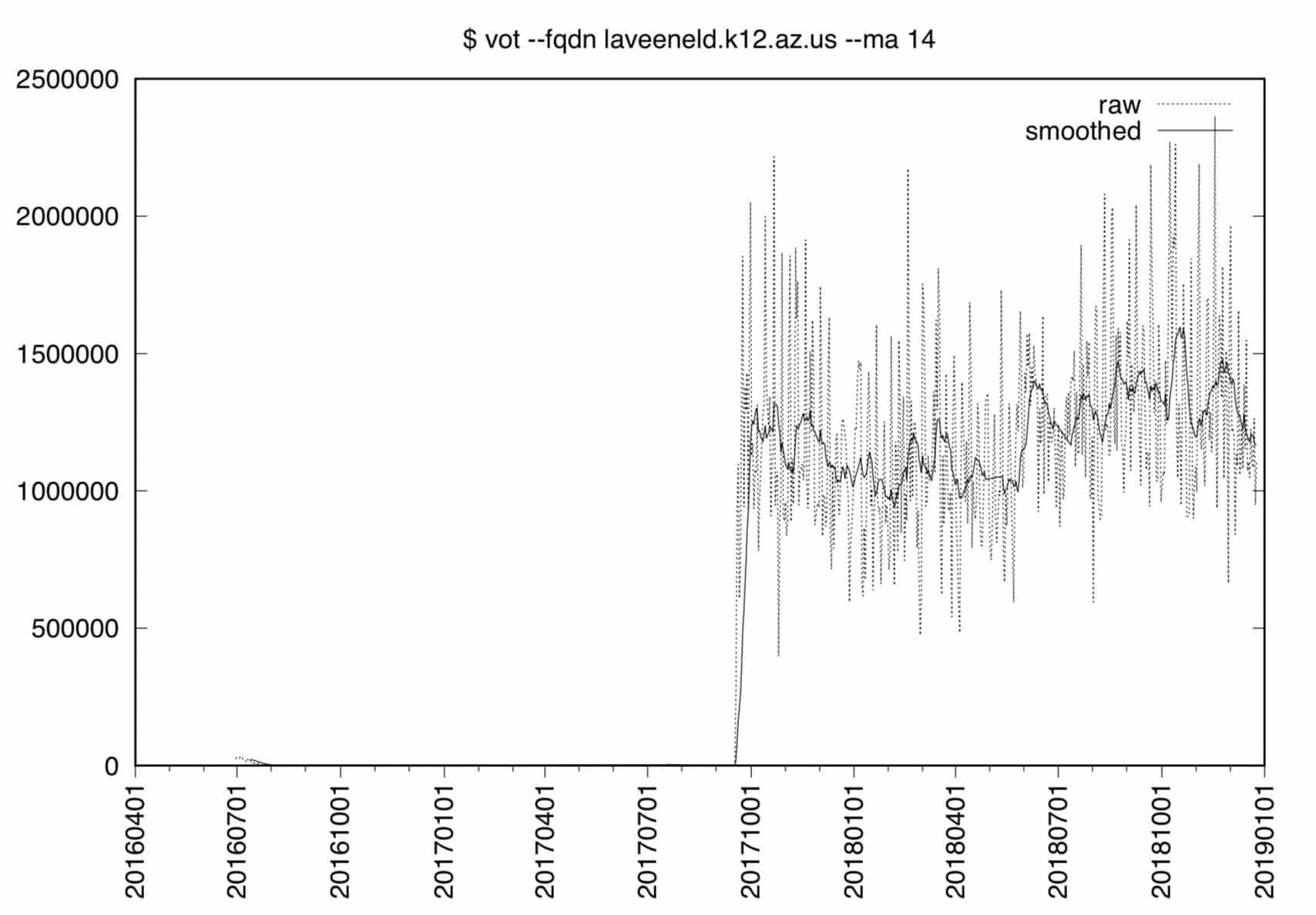
Figure 4. laveeneld.k12.az.us DNSDB volume over time, full range
Notes:
- Figure 4 obviously looks a lot different than Figure 3. The Y axis range now tops out at 2,500,000 (vs. 5,000 for the earlier year’s worth of data).
- In this new graph, it looks as if our data “began” sometime around the middle of September 2017, while in fact, the data actually goes all the way back to July 2016. So why don’t we see much before the middle of September 2017? Well, the early data is negligible relative to the magnitude of the later data, so much so that the early data that we previously looked at gets almost totally “lost in down in the weeds” when the linear Y axis is expanded to accommodate the higher count values seen on the later dates.
- Variability (the range of values seen) also changes dramatically between the pre-mid-September 2017 period and the post-mid-September 2017 period, evidence of substantial heteroskedasticity.
8. Our Other Unusually Busy K12 domain: gesd.k12.az.us
What about
gesd.k12.az.us
? (You may recall that this was the other
k12.az.us
domain that was also noted as running particularly hot.)
Again, this is not a particularly huge school district, reportedly serving over 11,000 students.
Like Laveen Elementary School District, Glendale Elementary School District has moved to a non-k12.az.us domain for its web presence, in this case now using
https://portals.gesd40.org/
The pattern we see in live DNS data is similar to the pattern we previously saw for
laveeneld.k12.az.us
:
- The
gesd.k12.az.usdomain still has name server records defined at the
k12.az.us
- name servers:
$ dig gesd.k12.az.us @ns-933.awsdns-52.net
[...]
;; AUTHORITY SECTION:
gesd.k12.az.us.		600	IN	NS	dns1.gesd.k12.az.us.
gesd.k12.az.us.		600	IN	NS	dns2.gesd.k12.az.us.

;; ADDITIONAL SECTION:
dns1.gesd.k12.az.us.	600	IN	A	12.159.64.132   <-- Oneneck IT
dns2.gesd.k12.az.us.	600	IN	A	12.159.65.138   <-- Oneneck IT
- But those name servers won’t answer for
gesd.k12.az.us:
$ dig +norecurse gesd.k12.az.us @12.159.64.132
[...]
;; ->>HEADER<<- opcode: QUERY, status: REFUSED, id: 30741
[...]

$ `dig +norecurse gesd.k12.az.us @12.159.65.138`
[...]
;; ->>HEADER<<- opcode: QUERY, status: REFUSED, id: 54633
[...]
- Checking Whois, we again see the
gesd.k12.az.usdomain doesn’t exist.
$ whois gesd.k12.az.us
No Data Found
[etc]
Let’s look at the daily data from DNSDB MTBL files for their legacy
k12.az.us
domain:
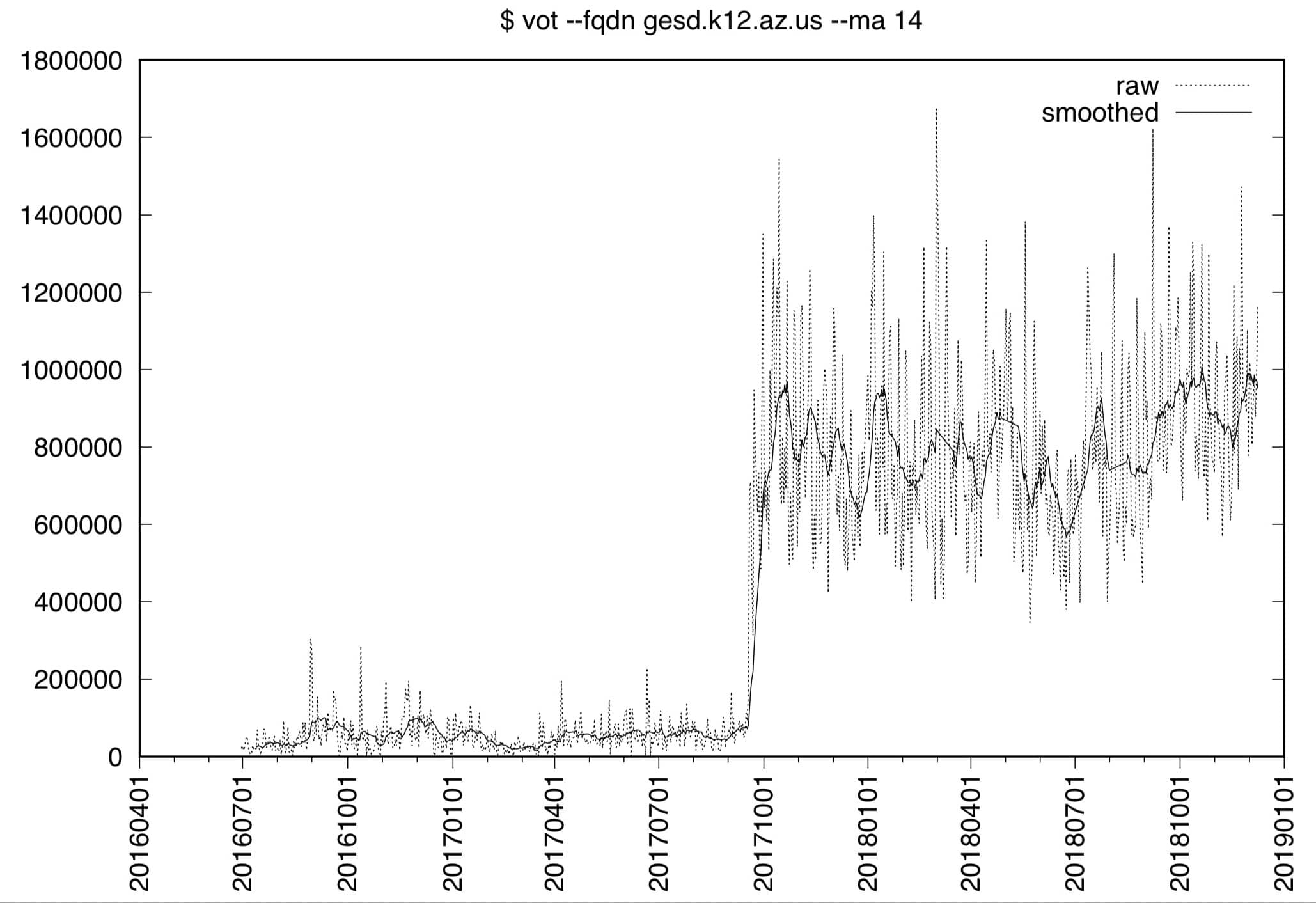
Figure 5.
gesd.k12.az.us
DNSDB volume over time, full range
That graph is not quite as extreme as the
laveeneld.k12.az.us
data from section 7 (the Y axis for GESD “only” goes to counts of 1,800,000 vs. 2,500,000 for Laveen), but it does exhibit what’s rapidly becoming a very familiar macroscopic pattern: the domain’s data is normally “down in the weeds,” but jumps dramatically (and stays elevated at a new, far-higher, level) as of mid-September 2017, while also exhibiting high levels of heteroskedasticity.
Did anything significant happen in September to dot US? Well, as noted in the US Monthly Progress Report for September 2017, there was substantial publicity (including on social media) around the future of the dot us TLD. It’s possible that at least some K12 sites (such as these in Arizona?) decided to move away from the dot us at that time.
We also note that technical issues with delegated dot us domains have been an ongoing concern; see, e.g.,Table 3.4.1a from the (undated) “.US Locality Compliance Report.” At least as of its date of completion, it reported:
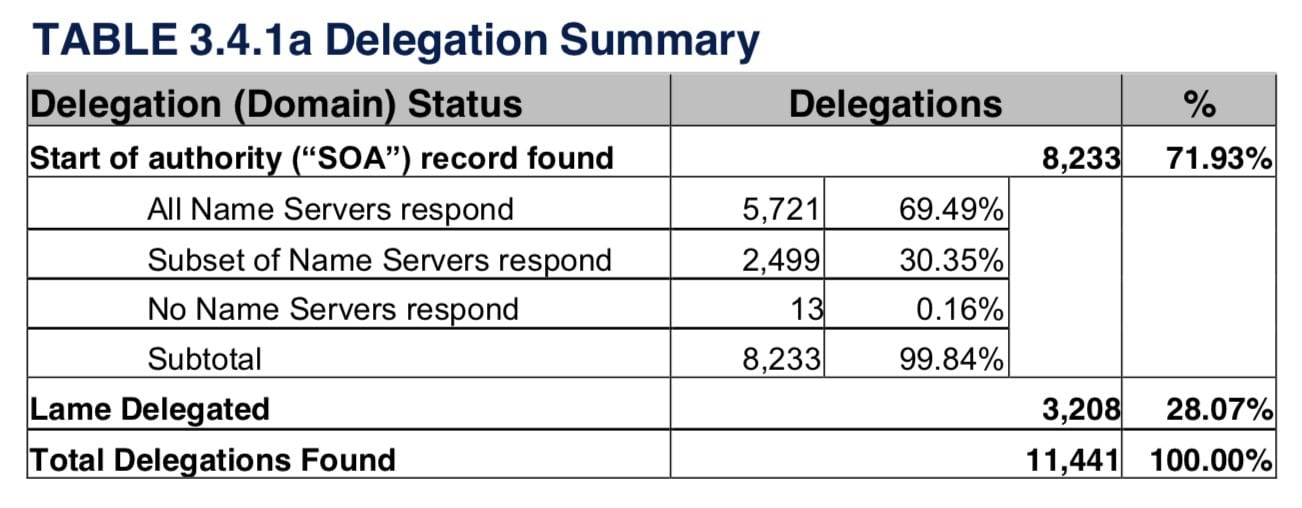
Figure 6. Dot us Domain Health Status
Note the significant “No Name Servers respond” and the “Lame Delegated” levels.
We do not have updated/current data for those measurements at this time.
9. Looking at Live k12.az.us Data In SIE
We’re still intrigued enough by what we’re seeing to want to know more. The DNS data we saw and see in DNSDB (both DNSDB API and DNSDB Export) comes from the Farsight Security Information Exchange, or SIE. The raw data that eventually gets incorporated into DNSDB initially comes in on SIE Channel 202 (“Ch202”). Because of the volume of traffic carried by that channel (over 500Mbps), we’re going to pull a sample of
k12.az.us
data from a locally-attached system that’s configured to listen to that channel over 10Gig Ethernet. To keep this all reasonable, we’ll just keep five data elements from each record:
$ nmsgtool -C ch202 -J - | grep k12.az.us | jq '"\(.message.query_ip) \(.message.response_ip) \(.message.qname) \(.message.qtype) \(.message.type)"' > k12.az.us.txt
[after a few minutes...]
ctrl-C
That file contained 4,220 lines.
Who’s querying
k12.az.us
? Let’s look at the message.query_ip’s, the first of five fields we extracted from our Ch202 JSON output:
$ cat k12.az.us.txt | awk '{print $1}' | sort | uniq -c | sort -nr
We see 5 IPs, all from the same /24 netblock, collectively accounting for 4,208 of the 4,220 observations seen (we’re going to omit those specific IPs here for policy reasons)
Who’s responding to those queries? message.response_ip came from:
$ cat k12.az.us.txt | awk '{print $2}' | sort | uniq -c | sort -nr
805 205.251.197.84 ($ dig -x 205.251.197.84 ==> ns-1364.awsdns-42.org)
710 205.251.198.180 (ns-1716.awsdns-22.co.uk)
501 63.229.61.147 (63-229-61-147.dia.static.qwest.net)
482 209.234.221.50 (ns1.hairybuffalo.com)
477 12.159.65.138 (dns02-one.phx1.tdc.oneneck.com)
439 12.159.64.132 (dns01-one.phx1.tdc.oneneck.com)
288 205.251.195.165 (ns-933.awsdns-52.net)
[etc]
Note that these are name servers closely related to the
k12.az.us
domains in general, and
laveeneld.k12.az.us
and
gesd.k12.az.us
in particular:
$ dnsdbq -n ns-1364.awsdns-42.org -j | grep k12
{"count":63920034,"`time_first":1378771509,"time_last":1546118896,"rrname":"k12.az.us.","rrtype":"NS","rdata":"ns-1364.awsdns-42.org."}
[snip]
$ dnsdbq -n ns-1716.awsdns-22.co.uk -j | grep k12
{"count":63920034,"time_first":1378771509,"time_last":1546118896,"rrname":"k12.az.us.","rrtype":"NS","rdata":"ns-1716.awsdns-22.co.uk."}
[snip]
$ dnsdbq -n ns-933.awsdns-52.net -j | grep k12
{"count":63920566,"time_first":1378771509,"time_last":1546118896,"rrname":"k12.az.us.","rrtype":"NS","rdata":"ns-933.awsdns-52.net."}
[snip]
$ dnsdbq -i 63.229.61.147 -j | grep k12
{"count":587066681,"time_first":1277453528,"time_last":1546114733,"rrname":"dns1.laveeneld.k12.az.us.","rrtype":"A","rdata":"63.229.61.147"}
$ dnsdbq -i 209.234.221.50 -j | grep k12
{"count":587058832,"time_first":1277453528,"time_last":1546114733,"rrname":"dns2.laveeneld.k12.az.us.","rrtype":"A","rdata":"209.234.221.50"}
$ dnsdbq -i 12.159.65.138 -j | grep k12
{"count":432520817,"time_first":1277847524,"time_last":1546113057,"rrname":"dns2.gesd.k12.az.us.","rrtype":"A","rdata":"12.159.65.138"}
$ dnsdbq -i 12.159.64.132 -j | grep k12
{"count":432516652,"time_first":1277847524,"time_last":1546113057,"rrname":"dns1.gesd.k12.az.us.","rrtype":"A","rdata":"12.159.64.132"}
What’s being asked for? 4,098 out of 4,220 hits were for laveen, gesd, tempe, or mesa related names:
$ cat k12.az.us.txt | awk '{print $3}' | grep "laveen\|gesd\|tempe\|mesa" | wc -l
4098
Specific message.qname (queried names) per site were:
$ cat k12.az.us.txt | awk '{print $3}' | tr '[:upper:]' '[:lower:]' | sort | uniq -c | sort -nr | grep `laveen`
485 lesd-sccm.laveeneld.k12.az.us.[see footnote 1]
183 _ldap._tcp.00-ldo._sites.dc._msdcs.laveeneld.k12.az.us.[see footnote 2]
178 les.laveeneld.k12.az.us. (possibly Laveen Elementary School)
157 rrs.laveeneld.k12.az.us. (possibly Rogers Ranch School)
153 les-lt-1mdxtp2.laveeneld.k12.az.us. (former purpose of this host is unknown)
127 wpad.laveeneld.k12.az.us. (web proxy auto discovery[see footnote 3]
119 pps.laveeneld.k12.az.us. (possibly Paseo Pointe School)
94 ces.laveeneld.k12.az.us. (possibly Cheatham Elementary School)
93 dme.laveeneld.k12.az.us. (possibly Desert Meadow School)
[all remaining names had 20 or fewer hits]
$ cat k12.az.us.txt | awk '{print $3}' | tr '[:upper:]' '[:lower:]' | sort | uniq -c | sort -nr | grep `gesd`
265 ge000ccms03.do.gesd.k12.az.us.[see footnote 4]
209 ge000prnts01.do.gesd.k12.az.us. (possibly a former print server)
104 gesd.do.gesd.k12.az.us. (possibly district offices server)
96 _ldap._tcp.horizon._sites.dc._msdcs.do.gesd.k12.az.us.[see footnote 5]
86 wpad.do.gesd.k12.az.us. (Web Proxy Auto Discovery)
81 _ldap._tcp.desert-spirit._sites.dc._msdcs.do.gesd.k12.az.us.
79 _ldap._tcp.smith._sites.dc._msdcs.do.gesd.k12.az.us.
75 _ldap._tcp.district-office._sites.dc._msdcs.do.gesd.k12.az.us.
73 _ldap._tcp.dc._msdcs.do.gesd.k12.az.us.
56 _ldap._tcp.landmark._sites.dc._msdcs.do.gesd.k12.az.us.
51 _ldap._tcp.sine._sites.dc._msdcs.do.gesd.k12.az.us.
51 192.168.0.1.do.gesd.k12.az.us.
50 _ldap._tcp.bicentennial-south._sites.dc._msdcs.do.gesd.k12.az.us.
44 _ldap._tcp.burton._sites.dc._msdcs.do.gesd.k12.az.us.
39 _ldap._tcp.sunset-vista._sites.dc._msdcs.do.gesd.k12.az.us.
39 _ldap._tcp.pdc._msdcs.do.gesd.k12.az.us.
38 _ldap._tcp.mensendick._sites.dc._msdcs.do.gesd.k12.az.us.
37 _ldap._tcp.american._sites.dc._msdcs.do.gesd.k12.az.us.
30 _ldap._tcp.coyote-ridge._sites.dc._msdcs.do.gesd.k12.az.us.
[all remaining names had 20 or fewer hits]
$ cat k12.az.us.txt | awk '{print $3}' | tr '[:upper:]' '[:lower:]' | sort | uniq -c | sort -nr | grep `tempe`
127 wpad.tempe3.k12.az.us.
115 _ldap._tcp.tempe3._sites.dc._msdcs.tempe3.k12.az.us.
113 _ldap._tcp.tempe3.k12.az.us.
93 _ldap._tcp.dc._msdcs.tempe3.k12.az.us.
60 _gc._tcp.tempe3.k12.az.us.
56 _ldap._tcp.tempe3._sites.gc._msdcs.tempe3.k12.az.us.
45 td3dns2.tempe3.k12.az.us.
45 dns3.tempe3.k12.az.us.
[all remaining names had 20 or fewer hits]
$ cat k12.az.us.txt | awk '{print $3}' | tr '[:upper:]' '[:lower:]' | sort | uniq -c | sort -nr | grep `mesa`
92 wpad.mesa.k12.az.us.
[all remaining names had 20 or fewer hits]
What type of records were being requested? Let’s look at message.qtype, the fourth field we extracted:
$ k12.az.us.txt | awk '{print $4}' | sort | uniq -c | sort -nr
1739 A
1494 SRV
711 AAAA
269 SOA
[all remaining types had 20 or fewer hits]
Finally, because this is Ch202, we need to remember that we have both queries that were successfully answered, and other queries that went unanswered. This is reflected in the message types we saw:
$ cat k12.az.us.txt | awk '{print $5}' | sort | uniq -c | sort -nr
   2331 UDP_UNANSWERED_QUERY"
   1889 UDP_QUERY_RESPONSE"
The large number of
"UDP_UNANSWERED_QUERY"
results is not unexpected since we know that at least some of the targeted name servers are refusing queries or are simply unreachable.
10. “So What Does This All Mean, Joe???”
Since this is an already-too-long blog post, let’s just finish up with a quick “bullet point” wrap-up:
- We have shown you how DNSDB Export customers can extract volume-over-time data from DNSDB Export MTBL files
- Applying that technology to our unexpectedly busy
k12.az.usdomains, we saw that there was a major shift in traffic volume that happened in mid-September 2017 for several domains - Digging into the DNS for those sites, we found that the
k12.az.usdomains were no longer being used by the school districts in question, but NS records were still being returned for those domains by the
k12.az.us
- authoritative name servers over a year later.
- One or more systems have been continuing to make queries to these now-defunct
k12.az.usdomains; all the query traffic we’re seeing for those domains is coming from one set of five related recursive resolvers. - The names being queried make it likely that some Microsoft product or products is not correctly implementing negative caching, perhaps as a result of following the approach described in these Microsoft support articles. They appear to be continually attempting to contact the now-non-existent domains. This has been going on for over a year.
- While we’d originally assumed that this was some sort of denial of service attack, we’ve subsequently come to believe that this behavior simply underscores the importance of DNS housekeeping:
- Remove NS records from parent zones when the associated child domains no longer exists
- Ensure application servers aren’t configured to try querying non-existent domains.
11. Security Considerations
IMPORTANT: The little demonstration Perl script shown in this blog article is meant to be run only by trusted users for research-related purposes. There has been no attempt to “sanitize” inputs passed to it, and under NO condition should the script be exposed to data from untrustworthy sources (e.g., as a web portal).
12. Want to Learn More About DNSDB Export, or The Security Information Exchange?
Isn’t it time you talked to Farsight Security about what DNSDB Export or the Security Information Exchange can do for you and your business?
Please contact Farsight Security at [email protected].
Footnotes
- https://en.wikipedia.org/wiki/Microsoft_System_Center_Configuration_Manager
- https://social.technet.microsoft.com/Forums/en-US/bb6d9751-8fdf-45fb-8b3f-8eeb948f583f/what-is-the-role-of-msdcs-in-dns?forum=winserverDS
- https://en.wikipedia.org/wiki/Web_Proxy_Auto-Discovery_Protocol
- https://en.wikipedia.org/wiki/Component_content_management_system
- https://en.wikipedia.org/wiki/List_of_LDAP_software#Microsoft_Windows
Appendix I. vot.pl (“volume-over-time”)
#!/usr/bin/perl
use strict;
use warnings;

use Date::Manip;
use DateTime;
use File::Temp qw/ tempfile tempdir /;
use Getopt::Long qw(:config no_ignore_case);
use List::MoreUtils;
use List::Util qw(pairs);

my $bailiwick = '';
my $cmd = '';
my $cutoff = '';
my $daysback = '';
my $dt = '';
my $dt1 = '';
my $dur = '';
my $file = '';
my $filecount = '';
my $filedate = '';
my $myfiledate = '';
my $fqdn = '';
my $fullpattern = '';
my $granularity = 'D';
my $help = '';
my $jsonl = '';
my $key = '';
my $minutesseconds = '';
my $mtbldir = '/export/dnsdb/mtbl/';
my $noplotraw = '';
my $notable = '';
my $now_string = '';
my $now_string_mm_ss = '';
my $plot = '';
my $plotdev = 'postscript';
my $plotdir = '.';
my $plotout = '';
my $plotsmoothed = '';
my $plottype = 'line';
my $rectype = '';
my $roughcutoff = '';
my $roughstart = '';
my $roughstop = '';
my $sizeofresults = '';
my $smooth = '';
my $start = '';
my $start2 = '';
my $stop = '';
my $stop2 = '';
my $tabledir = '.';
my $tableextension ='txt';
my $tableout = '';
my $timefencecheck1 = '';
my $timefencecheck2 = '';
my $timefencecheck3 = '';
my $timefencecheck4 = '';
my $timefencecheck5 = '';
my $title = '';
my $totalresultsfound = '';
my $value = '';

my @keepermtblfiles;
my @mtblfiles;
my @results = '';
my @unsortedfiles;

my %hash = ();
my %smoothedvalues = ();

################### GET AND PROCESS THE ARGUMENTS ##################

GetOptions ('fqdn|name|rrset|rrname|r=s' => \$fqdn,
            'rectype|rrtype|t=s' => \$rectype,
            'bailiwick|b=s' => \$bailiwick,
            'granularity|unit|timeperiod|u=s' => \$granularity,
            'smooth|ma|m=s' => \$smooth,
            'notable|quiet|q' => \$notable,
            'tableout|output|outfile=s' => \$tableout,
            'jsonl|json|j' => \$jsonl,
            'tabledir|reportdir|directory|dir|d=s' => \$tabledir,
            'plot|graph|chart|p' => \$plot,
	    'plottype|graphtype|charttype=s' => \$plottype,
            'plotdev|device=s' => \$plotdev,
            'plotout=s' => \$plotout,
            'plotdir|graphdir=s' => \$plotdir,
            'title|plottitle=s' => \$title,
            'noplotraw' => \$noplotraw,
            'plotsmoothed|plotma' => \$plotsmoothed,
	    'start|first|begin=s' => \$start,
	    'stop|last|end=s' => \$stop,
	    'daysback|days|window=s' => \$daysback,
            'mtbldir|datadir|mtblfiles|mtbl' => \$mtbldir,
	    'help|info|man|manual|usage|h' => \$help,
           );
           # b d h j m p q r t u v

# help report
if (($fqdn eq '') || ($help eq 1))
{
   die "Usage:

       \$ $0 --fqdn FQDN [--rectype RECTYPE] [--bailiwick BAILIWICK]
       [--granularity {Y|M|D|H}] [--smooth INTEGER]
       [--notable] [--tableout FILENAME] [--jsonl] [--tabledir DIR]]
       [--plot [--plottype {POINT|LINE|VBAR}]
         [--plotdev GNUPLOTDEVICE] [--plotout FILENAME] [--plotdir DIR]
         [--title 'TITLE'] [--noplotraw] [--plotsmoothed]]
       [--start DATE] [--stop DATE] [--daysback INTEGER]
       [--mtbldir] [--help]

       fqdn: fully qualified domain name to be graphed (REQUIRED)
             aliases: name|rrset|rrname|r
       rectype: ONE rectype (a, aaaa, cname, etc.) (def: non-DNSSEC types)
             aliases: rrtype|t
       bailiwick: for www.abc.com, either abc.com or com (def: use both)
	     alias: b
       granularity: Y(ear), M(onth), D(ay), H(our) (def: D)
             aliases: unit|timeperiod|u
       smooth: moving average period (def: no smoothing done)
             aliases: ma|m
       notable: supress tabular output (def: tabular output)
             aliases: quiet|q
       tableout: file for tabular output (def: generated filename)
             aliases: output|outfile
       jsonl: produce table in json lines format (def: CSV)
             aliases: json|j
       tabledir: directory for tabular output files (def: current dir)
             aliases: reportdir|directory|dir|d

       plot: request plots (def: no plots output)
             aliases: graph|chart|p
       plottype: type of plot to make? lines, dots, steps, impulses (def: lines)
	     aliases: graphtype|charttype
       plotdev: gnuplot output format (def: postscript)
             aliases: device
       plotout: graphic output filename (def: generated filename )
       plotdir: directory for plot output files (def: current dir)
	     aliases: graphdir
       title: plot title (def: command line string options)
             aliases: plottitle
       noplotraw: no plotting of raw data (def: display raw data)
       plotsmoothed: plot smoothed data (def: omit smoothed data)
             aliases: plotma

       start: show data starting from this date forward (def: all dates)
             aliases: first|begin
       stop: display no data after this date (def: all dates)
	     aliases: last|end
       daysback: only display data for the last N days (def: all dates)
             aliases: days|window

       mtbldir: location of MTBL files to be used (def: /export/dnsdb/mtbl/)
	     aliases: datadir|mtblfiles|mtbl

       help: show this then exit
             aliases: info|man|manual|usage|h

       Examples: \$ $0 --fqdn \"www.reed.edu\"
                 \$ $0 --fqdn \"powells.com\" --smooth 3 --notable\\
                    --plot --graphformat jpg --graphdir mygraphs\\
                    --start 20180101 --stop 20180630\n\n";
}

if ($fqdn eq '') { die "Specify a fully qualified domain name with --fqdn";}

# need current time to construct default filenames for output if not specified
# and for relative time ("daysback") options

# get today's date for the starting time
$dt = DateTime->today;

# convert the date to YYYYMMDD format with no separator between elements
$now_string = $dt->ymd('');

# get the local time and convert it to the component chunks
my ($dsec,$dmin,$dhour,$dmday,$dmon,$dyear,$dwday,$dyday,$disdst) =
localtime(time);

# we're going to use this for the generated filenames (. = concatenate)
$minutesseconds = $dmin . $dsec;
$now_string_mm_ss = $now_string . $minutesseconds;

# need to add one to get correct behavior
if ($daysback ne '') {
$daysback++;
$dur = DateTime::Duration->new( days => $daysback );
$dt1 = $dt - $dur;
$cutoff = $dt1->ymd('');
}

# check for illegal time fencing -- can do daysback or start/stop, not both
if ((($daysback ne '') && ($start ne '')) ||
    (($daysback ne '') && ($stop ne '')))
    { die "Cannot use --daysback AND --start or --stop"; }

# want to plot but no filename: synthasize an output filename for the plot
# example name: www.facebook.com.2018021029.postscript
if (($plot ne '') && ($plotout eq ''))
{ $plotout = "$plotdir/$fqdn\.$now_string_mm_ss\.$plotdev"; }

# if user wants json output format, set the file extension appropriately
if ($jsonl) { $tableextension='jsonl'; }

# set a default title
if ($title eq '') {
  $title = "\$ vot \-\-fqdn $fqdn";
  if ($rectype ne '') { $title = $title   . "\/$rectype"; }
  if ($bailiwick ne '') { $title = $title . "\/$bailiwick"; }
  if ($smooth ne '') { $title = $title    . " \-\-ma $smooth"; }
}

# build the output filename for the table
# example name: www.facebook.com.2018021029.txt
if (($notable eq '') && ($tableout eq ''))
{ $tableout = "$tabledir/$fqdn\.$now_string_mm_ss\.$tableextension";
}

# user wants to produce SOMETHING, right?
if (($notable ne '') && ($plot eq ''))
{ die "No table output? No plot output? Nothing to do!"; }

# typical input MTBL filename: dns.20181125.D.mtbl
# granularity is a single letter: (Y, M, D, H)

if ($granularity eq "D") {
    $fullpattern = $granularity.'.mtbl';
} else {die "granularity must be D only for now, sorry (case sensitive!)";}

# let's get the list of MTBL files (we'll exclude out-of-scope ones later)
opendir DIR, $mtbldir or die "Cannot open mtbldirectory: $mtbldir $!";
@unsortedfiles = readdir DIR;

# the MTBL file array is unsorted, let's tidy that up
@mtblfiles = sort @unsortedfiles;


# do we have at least 1 file to analyze?
$filecount = @mtblfiles;
if ($filecount == 0) {die "no files of requested granularity in $mtbldir $!";}

# we've loaded the MTBL files into the @mtblfiles array, so we can close
# the filehandle
closedir DIR;

# loop over the file array, and just keep the ones (roughly) in scope
# we'll add a one day grace period around the actual time period

# compute the adjusted dates
if ($start ne '')    { $roughstart = DateCalc(ParseDate($start), ParseDateDelta('- 1 days')); }

if ($stop ne '')     { $roughstop = DateCalc(ParseDate($stop), ParseDateDelta('+ 1 days'));
                     }

if ($daysback ne '') { $roughcutoff = $dt1->ymd(''); $roughcutoff = DateCalc(ParseDate($roughcutoff), ParseDateDelta('+ 1 days')); }

foreach $file (@mtblfiles) {

    # make sure the files have the right granularity and aren't an "in process file" starting with a dot
    if ((index($file, $fullpattern) != -1) && (index($file, '^\.') == -1)) {

	# trim the junk from the filename
        $filedate = $file;
	$filedate =~ s/^dns\.//;
	$filedate =~ s/\.D\.mtbl//;

	# convert the date string from the filename to a real DateTime

	$myfiledate = ParseDate($filedate);

        # no time fencing
        $timefencecheck1 =
        (($start eq '') && ($stop eq '') && ($daysback eq ''));

        # just after start
        $timefencecheck2 =
        (($stop  eq '') && ($start ne '') && ($myfiledate ge $roughstart));

        # just before stop
        $timefencecheck3 =
        (($start eq '') && ($stop ne '') && ($myfiledate le $roughstop));

        # after start and before stop
        $timefencecheck4 =
        (($start ne '') && ($stop ne '') &&
        ($filedate ge $roughstart) && ($myfiledate le $roughstop));

        # relative time check...
        $timefencecheck5 =
        (($daysback ne '') && ($myfiledate ge $cutoff));

        if ($timefencecheck1 || $timefencecheck2 || $timefencecheck3
           || $timefencecheck4 || $timefencecheck5) {
 	    push (@keepermtblfiles, $file);
           }
      } # end of granularity check

   } # end for each potential MTBL file

# plan is to tally the counts in a perl hash, keyed by the first seen date
# total results found initially? zero, of course
$totalresultsfound = 0;

foreach $file (@keepermtblfiles) {
        # build the command we need to run...
        $cmd = "export DNSTABLE_FNAME=$mtbldir$file ; dnstable_lookup -j rrset $fqdn $rectype $bailiwick\| jq -r \'\"\\(.time_first\|todate\) \\(.count\)\"\' \| sed \'s\/T\.\* \/ \/\' \| sed \'s\/\-/\/g\' \| sort";

        @results = `$cmd`;
	my $sizeofresults = @results;

        $totalresultsfound = $totalresultsfound + $sizeofresults;

	# now load the results from dnstable_lookup into a perl hash
	my $i = 0;
        while ($i<$sizeofresults)
           {
	       # split out a pair of values (a datestamp and a count)
               ($key, $value) = split(/\s+/,$results[$i]);

	       # double check the time fencing

               $start2 = DateCalc(ParseDate($start), ParseDateDelta('- 2 days'));
	       $stop2 = ParseDate($stop);

	       # no time fencing
	       my $timefencecheck1 =
                 (($start2 eq '') && ($stop2 eq '') && ($daysback eq ''));

	       # just after start
	       my $timefencecheck2 =
                   (($stop2  eq '') && ($start2 ne '') && ($key ge $start2));

	       # just before stop
	       my $timefencecheck3 =
                   (($start2 eq '') && ($stop2 ne '') && ($key le $stop2));

               # after start and before stop
	       my $timefencecheck4 =
		   (($start2 ne '') && ($stop2 ne '') &&
                    ($key ge $start2) && ($key le $stop2));

	       # relative time check...
               my $timefencecheck5 =
                   (($daysback ne '') && ($key ge $cutoff));

               if ($timefencecheck1 || $timefencecheck2 || $timefencecheck3 || $timefencecheck4 || $timefencecheck5)
                   {
                       # print periodic status reports
			 print "Processing: $file\n";
                       # perl doesn't set initial hash values to zero
                       # by default, so we need to avoid doing arithmetic
                       # with UNDEF hash values
  	               if (defined ($hash{$key}))
                       { $hash{$key}  += $value; }
                       else
                       { $hash{$key} = $value; }

                       my $temptally=0;
		       $smoothedvalues{$key} = 'NaN';
                       if ($smooth ne '') {
			  my $validhashvalues=0;
                          for (my $kk=0; $kk < $smooth; $kk++) {
                              my $offset ='- '.$kk.' days';
			      my $checkkey = DateCalc(ParseDate($key), ParseDateDelta($offset));
			      $checkkey =~ s/00:00:00//;

			    if (defined ($hash{$checkkey})) {
                               $validhashvalues++;
		               $temptally=$temptally+$hash{$checkkey};
                               } # end of the valid hash check+tally
			  } # end of the for loop
			  if ($validhashvalues == $smooth){
                                $smoothedvalues{$key} = $temptally/$validhashvalues;
                             } # end of smoothing and value is valid
			   } # end of the "are we smoothing?"
                       } # if in the time fence
	$i++;
        } # while results loop
} # looping over all keeper filenames

if ($totalresultsfound == 0)
   {die "no results found -- typo in FQDN? wrong rectype or bailiwick?\n";}

# we now have a date=>count hash, let's do something with it

########################### TABLE ###############################

# handle the tabular output case, if tabular output hasn't been supressed
if ($notable eq '')
{
   # user wants tabular output, so let's open that table output file

   open (my $tfh, '>', $tableout)
      or die "$0: open $tableout: $!";

   # in printing the following, we have some stuff that's always printed
   # and some stuff that's optionally printed
   # always printed: "$j" (the date) and $hash{$j} (the count)
   # printed if $smooth > 0: $smoothedvalues{$j} (the moving average)
   # printed if $jsonl selected: jsonl formatting cruft
   # The trailing comma is NOT printed if doing $jsonl and it's the last record

   if ($jsonl) {print $tfh '['; }

   my $left= keys %hash;

   foreach my $j (sort keys %hash)
         {
         if ($jsonl) {print $tfh '{"date":"'; }
         print $tfh "$j";
         print "$j ";
         if ($jsonl eq '') {print $tfh ' ';}
         if ($jsonl) {print $tfh '"},{"count":"';}
         print $tfh "$hash{$j}";
         print "$hash{$j}";
         if ($jsonl) {print $tfh '"}';}
         # also print smoothed values?
         if ($smooth ne '') {
            if ($jsonl) {print $tfh ',{"ma":"';}
            if ($jsonl eq '') {print $tfh ' ';
            }
            print $tfh "$smoothedvalues{$j}";
            print " $smoothedvalues{$j}";
            if ($jsonl) {print $tfh '"}';}
         } # end smoothed block

         # no comma on the last obs, need right square bracket instead
         if (($jsonl) && ($left >= 1)) {print $tfh ',';}
         elsif ($jsonl) {print $tfh ']';}

         #everybody gets the newline
         print $tfh "\n";
         print "\n";
	 $left--;
         }

print "Table output file: $tableout\n";

close ($tfh);
} # end of table processing block

####################### PLOT #############################

if ($plot ne '')
{
   $plottype = lc($plottype);

   # three files: one for the plot output, one for the gnuplot commands, and
   # one for a temporary copy of the data

   open (my $pfh, '>', "$plotout")
      || die "$0: open $plotout $!";

   my $tempfilename1 = '';
   my $tempfilename2 = '';

   # temporary file #1 for the gnuplot commands
   (my $tempfh1, $tempfilename1) = tempfile();

   # temporary file #2 for a copy of the data
   (my $tempfh2, $tempfilename2) = tempfile();

   # build the graphic code we'll be running

   my $gnuplotcode = "set term $plotdev size 10in,7in monochrome font 'Helvetica,14'\n";
   print $tempfh1 "$gnuplotcode";
   $gnuplotcode = "set output \"$plotout\"\nset title \"$title\"\n";
   print $tempfh1 "$gnuplotcode";
   $gnuplotcode ="set xdata time\nset timefmt \"\%Y\%m\%d\"\nset format x \"\%Y\%m\%d\"\nset format y '%.0f'\n";
   print $tempfh1 "$gnuplotcode";
   $gnuplotcode ="set xtics rotate by 90 offset 0,-4 out nomirror\nset mxtics\nset style data $plottype\n";
   print $tempfh1 "$gnuplotcode";
   $gnuplotcode ="set datafile missing \"NaN\"\nset xlabel offset 2\nset bmargin 7\nset rmargin 5\nset tmargin 3\n";
   print $tempfh1 "$gnuplotcode";

   if (($noplotraw eq '') && ($plotsmoothed)) {
     # plot raw and smoothed
     my $gnuplotcode2 ="plot '$tempfilename2' using 1:2 with $plottype t 'raw' lt black dt 3, '$tempfilename2' using 1:3 with $plottype t 'smoothed' lt black dt 1\n";
     print $tempfh1 "$gnuplotcode2\n";
   } elsif (($noplotraw ne '') && ($plotsmoothed)) {
     # plot smoothed only
     my $gnuplotcode2 ="plot '$tempfilename2' using 1:3 with $plottype t 'smoothed' lt black dt 1\n";
     print $tempfh1 "$gnuplotcode2\n";
   } else {
     # plot raw only
     my $gnuplotcode2 ="plot '$tempfilename2' using 1:2 with $plottype t 'raw' lt black dt 1\n ";
     print $tempfh1 "$gnuplotcode2\n";
   }

foreach my $j (sort keys %hash)
   {
    print $tempfh2 "$j, $hash{$j}";

    if ($smooth ne '') { print $tempfh2 ", $smoothedvalues{$j}"; }

    print $tempfh2 "\n";
   }

   my $tempcommandline = "gnuplot $tempfilename1 < $tempfilename2\n";
   my $ploterrors = `$tempcommandline`;

   print "$ploterrors";

   close $pfh;

print "Plot output file:  $plotout\n";
}
Joe St Sauver Ph.D. is a Distinguished Scientist with Farsight Security, Inc.
Read the next part in this series: Analyzing DNSDB Volume-Over-Time Time Series Data With R and ggplot2 Graphics (Part Three of a Three-Part Series)


