

Coming up this week on Breaking Badness. Today we discuss: Owl Be Watching You, Microsoft Word on the Street, and our fun new game, two truths and a lie.
Here are a few highlights from each article we discussed:
Owl Be Watching You
- A recently published security analysis has concluded the Meeting Owl Pro device poses an unacceptable risk to the networks they connect to and the personal information of those who register and administer them
- The Meeting Owl Pro is a videoconference device with a 360 degree set of cameras and microphones that video and audio automatically focuses on whoever is speaking
- It enlarges when a person is interrupting the speaker
- It can rotate its head like a real owl
- The weaknesses of this device are many:
- Names, email addresses, IP addresses, and geographic locations of Meeting Owl Pro users are stored in a database that can be accessed by anyone with knowledge of how the system works
- The data can be exploited to map network topologies or socially engineer or dox employees
- Anyone who has access to the device has access to the interprocess communication channel (IPC) and can be exploited by malicious actors or hackers
- There’s no passcode to the bluetooth functionality, but even if there was an option for it, a hacker can disable it without first having to supply it
- Images can be captured of private whiteboard sessions and downloaded by anyone with an understanding of the system
- The details customer enter during enrollment along with recent connections that follow are stored in a database and no password is required to access that information as well
- All that’s needed is a valid Meeting Owl serial number
- The researchers that discovered this developed a script that automatically presented the database with every possible serial number, and the server responded with details for each one that had been registered
- Names, email addresses, IP addresses, and geographic locations of Meeting Owl Pro users are stored in a database that can be accessed by anyone with knowledge of how the system works
- These vulnerabilities were discovered by a Swiss/German firm called modzero, which is a security consultancy that performs pentesting, code analysis, and a variety of other security-type services
- They were doing some analysis of videoconferencing technologies for an unnamed client, and when they put this Owl on the ole examining table, they started seeing these issues
- When the vulnerabilities were discovered, they got in touch with the Owl’s manufacturer in mid-January of this year to report their findings
- Owl Labs, the maker of the Owl Meeting Pro, admitted when the story was originally published, they had fixed nothing
- They said that they would have fixes in June, and this is what they say they’ll be doing:
- RESTful API to retrieve PII data will no longer be possible
- Implement MQTT service restrictions to secure IoT comms
- Removing access to PII from a previous owner in the UI when transferring a device from one account to another
- Limiting access or removing access to switchboard port exposure
- Fix for Wi-Fi AP tethering mode
- As of the time of the podcast recording, we’re unsure which fixes are in place
- They said that they would have fixes in June, and this is what they say they’ll be doing:
- Regarding next steps, the mitigations they listed don’t sound like they’re going to cover all of the vulnerabilities in this device
- In time, it’s possible most or even all of the vulnerabilities may be patched, though it appears more like a “back to the drawing board” moment
Microsoft Word on the Street
- Microsoft has shared mitigation measures to block attacks exploiting a newly discovered Microsoft Office zero-day flaw abused in the wild to execute malicious code remotely
- This bug uses Microsoft Word functions to retrieve a remote HTML file, then uses an internal microsoft diagnostic tool to execute code in the file with whatever rights the user has.
- Hacker House’s Matthew Hickey took it a step further and found an exploitation route through ms-search windows as well
- It originally bypassed Microsoft Defender and other endpoint detection software, though Defender now has signatures for it
- It also bypassed Office’s Protected View
- The flaw is “jokingly called ‘Follina’” which Security pro Kevin Beaumont came up with and is a nod to the reference of “0438” that came up in the initial uploaded sample, and is thusly named as it’s the zip code of Follina, Italy
- The vulnerability was discovered on May 27, 2022, when Nao_sec out of Tokyo spotted an interesting VirusTotal upload from a Belarus IP in April
- The protocol vulnerabilities were actually detailed in a thesis a few years ago by Benjamin Altpeter, but no one really paid attention to them until someone (likely a Chinese APT group) began using them to weaponize word documents
- In terms of workarounds available for this bug, you can disable the MSDT URL protocol by fooling around with registry keys; either manually, or with a script
- If you’re not sure what you’re doing, though, contact an IT pro - messing with registry keys can quickly break things in big ways
- There’s no patch out yet; it’ll be interesting to see if Microsoft releases a patch for this out-of-band or waits until Patch Tuesday, which is June 14th
- Currently, this issue only affects Windows computers, both PC and server, but it’s important to keep in mind, though, that any vulnerability can serve as a pivot point
- As an example, if you have a mac as a work computer, but a PC as your personal computer, and an attacker compromises your PC, they can easily pivot to the mac on the same network and then to the corporate system
- This is one of the places that corporate security often falls short - they fail to teach users that personal compromises can often lead to business ones
- We only have visibility on your work devices, but it’s important to stress how good security practices across your whole digital life are critical
- As an example, if you have a mac as a work computer, but a PC as your personal computer, and an attacker compromises your PC, they can easily pivot to the mac on the same network and then to the corporate system
- At the time of recording (June 6), Microsoft doesn’t consider this a security risk
- It looks like the MSRC worker that investigated the report had trouble replicating it and prematurely closed the issue
- We can only imagine how overworked the MSRC is trying to sort substantial security issues from the haystack, but they definitely missed a big one here
Two Truths and a Lie
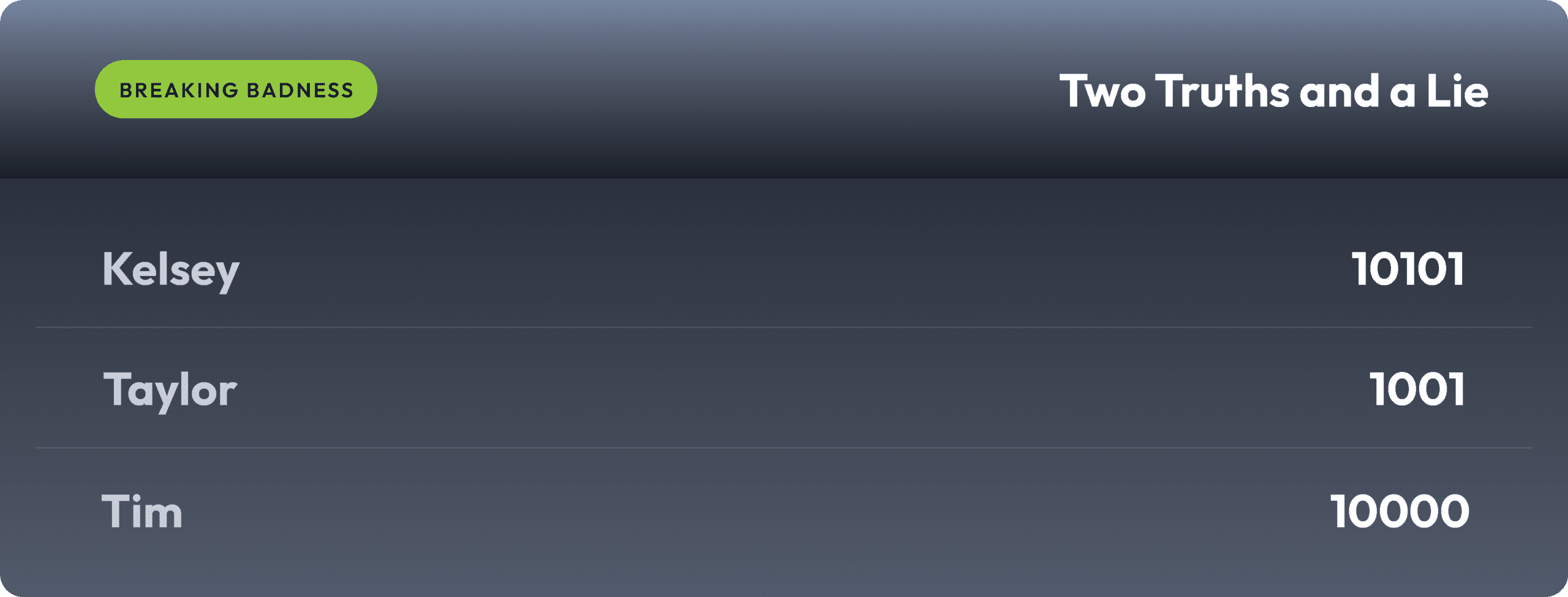
Introducing our newest segment on Breaking Badness. We are going to play a game you are all likely familiar with called two truths and a lie, with a fun twist. Each week, one us with come prepared with three article titles, two of which are real, and one is, you guessed it, A LIE.
You'll have to tune in to find out!
Current Scoreboard
This Week’s Hoodie/Goodie Scale
Owl Be Watching You[Ian]: 9.5/10 Hoodies[Tim]: 10/10 Hoodies
Microsoft Word on the Street[Ian]: 7/10 Hoodies[Tim]: 7/10 Hoodies
That’s about all we have for this week, you can find us on Twitter @domaintools, all of the articles mentioned in our podcast will always be included on our podcast recap. Catch us Wednesdays at 9 AM Pacific time when we publish our next podcast and blog.*A special thanks to John Roderick for our incredible podcast music!