

DNSDB Standard Search's New "Plus Sign" Wildcard: It Matches Exactly One Label


Traditional "Asterisk" (Match Zero-Or-More Label) Wildcards
Farsight DNSDB Standard Search has extensive pattern matching capabilities. For example, making a DNSDB query for *.example.com matches zero or more labels to the left of example.com, hypothetically including domains such as:
example.com
backup.example.com
color-laser-printer.example.com
sponsorships.example.com
www.example.com
eastern-region.example.com
western-region.example.com
sales.eastern-region.example.com
production.western-region.example.com
prototype.production.western-region.example.com
Sometimes an asterisk wildcard matches MORE than you want. Sometimes you just want to be able to match ONE (and ONLY ONE) label as a wildcard. Up until now, doing that in DNSDB Standard Search required postprocessing and didn't always let you get a full set of the results you wanted.
Newly Available "Plus Sign" (Match Exactly One Label) Wildcards
Now, DomainTools has added something new to DNSDB Standard Search: "plus sign" wildcards, which match one and ONLY ONE label. So now if you searched for +.example.com that would (and wouldn't) match the following:
backup.example.com
color-laser-printer.example.com
eastern-region.example.com
sponsorships.example.com
western-region.example.com
www.example.com

example.com (ZERO labels to the left of example.com)
sales.eastern-region.example.com (MORE THAN one label to the left of example.com)
production.western-region.example.com (MORE THAN one label to the left of example.com)
prototype.production.western-region.example.com (MORE THAN one label to the left of example.com)
Plus sign wildcards can be used at most ONCE per domain name, either for the left most label or the right most label.
Examples of ACCEPTABLE usage of plus-sign wildcards:
+.example.com
+.chemistry.example.com
example.+
www.example.+
Some examples of UNACCEPTABLE plus-side wildcard usage:

Using "Plus Sign" Wildcards in dnsdbq
Let's use the new "plus sign" wildcard with strict time fencing to find new two-label A records in dot de:
$ dnsdbq -r +.de/A -l0 -A1d -c -S -k count > new-dot-de.txt
Because that's a relatively long command, let's decode it chunk by chunk:
When we run that command, we see that dot de is a busy domain:
$ wc -l new-dot-de.txt
246379 new-dot-de.txt
Note that because we used default ("presentation format") output, we should NOT interpret the reported 246,379 lines of output as representing that many unique observations. A typical observation might take four or more lines (including the inter-result blank line). Some sample output from that run (in "defanged" presentation format) looks like:
$ more new-dot-de.txt
;; record times: 2024-02-26 06:13:47 .. 2024-02-26 14:14:32 (8h 46s)
;; count: 1015; bailiwick: druckerei-verwaltung[dot]de.
druckerei-verwaltung[dot]de.  A  3.73.245.80
druckerei-verwaltung[dot]de.  A  18.158.27.116
druckerei-verwaltung[dot]de.  A  52.57.24.95

;; record times: 2024-02-26 03:13:28 .. 2024-02-26 09:14:57 (6h 1m 30s)
;; count: 976; bailiwick: westerfeld-service[dot]de.
westerfeld-service[dot]de.  A  84.149.102.155

;; record times: 2024-02-26 02:54:46 .. 2024-02-26 09:04:06 (6h 9m 21s)
;; count: 942; bailiwick: belohnend[dot]de.
belohnend[dot]de.  A  87.149.39.29

;; record times: 2024-02-26 07:24:44 .. 2024-02-26 16:39:00 (9h 14m 17s)
;; count: 736; bailiwick: mypurecloud[dot]de.
mypurecloud[dot]de.  A  3.120.127.136
mypurecloud[dot]de.  A  18.192.133.17
mypurecloud[dot]de.  A  52.28.204.42

;; record times: 2024-02-26 03:05:27 .. 2024-02-26 11:39:59 (8h 34m 33s)
;; count: 706; bailiwick: lookiero[dot]de.
lookiero[dot]de.  A  34.251.222.30
lookiero[dot]de.  A  54.77.60.185
[etc]
Note that all of the reported RRsets have RRnames with only two labels ("something dot de").
Processing JSON Format "Plus Wildcard" Output with jq To Just Get Unique New/Recently Changed "A" Records RRset Names
Sometimes we might want just RRnames without bothering with any of the rest of the details in our results. We can rerun the above query, slightly modified, to get just a list of unique "A" record names associated with new RRsets:
$ dnsdbq -r +.de/A -l0 -A1d -c -S -k count -j | jq -r '.rrname' | sort -u > new-dot-names-only.txt
Decoding just the new bits of that command pipeline:
$ wc -l new-dot-names-only.txt
42740 new-dot-names-only.txt

$
more new-dot-names-only.txt
0-heizenergiehaus[dot]de.
00-travel[dot]de.
01v[dot]de.
03g09[dot]de.
[...]
zypherbyte[dot]de.
zz-mx[dot]de.
Note that an "A" record RRset may be "new" if:
- The RRname itself is one we've just seen for the first time, OR
- At least one of the Rdata values was just newly seen for the first time for that name
This means that some "new" domains may actually be well established names that have just begun to use a new IP.
Another Example of Using a "Plus Wildcard" in dnsdbq: What TLDs Exist in DNSDB?
As another example of the "power of the plus wildcard," let's find all the name servers that are defined for a single label to the left of the "root" domain. We'll then extract and unify the names to find just the TLDs that those name servers serve:
$ dnsdbq -r "+./NS" -l0 -A7d -j | jq -r '.rrname' | sort -u > tlds.txt
$ wc -l tlds.txt
1450 tlds.txt


$
more tlds.txt
aaa.
aarp.
abb.
abbott.
abbvie.
[...]
zm.
zone.
zuerich.
zw.
We're pleased to say that the number of domains we find in DNSDB agrees with the canonical list that IANA maintains.
Exploring "Shy" TLDs
The ICANN CZDS (Centralized Zone Data Service) Program makes zone file data available for all ICANN approved zones. Some TLDs are known for being "reluctant" or "highly selective" participants in the ICANN CZDS zone file access program, granting access to few if any requestors. We can easily identify these TLDs by looking at the monthly password counts by TLD as reported by ICANN.. For example, there are 5,188 parties who can download the dot com zone file, and nearly as many can download the dot net zone file (4,947), but some zone files are far less commonly available for CZDS access, with fifty or fewer credentials granted worldwide:
The "plus sign wildcard" makes it easy to extract details about most of the domains in those TLDs from passive DNS sensor data. This includes things such as the number of registered domain names in those TLDs that we've seen over the last month:
$ dnsdbq -r "+.voting/NS" -l0 -A30d -j | jq -r '.rrname' | sort -u > voting.txt
$ wc -l voting.txt
100 voting.txt
Checking https://www.icann.org/resources/pages/registry-reports, we can see that 191 domains are known to ICANN. This implies that 100/191=52.3% of all the dot voting domains have been seen as active by DomainTools Farsight DNSDB. Some of those results look like:
For completeness' sake, here are some basic stats about the other "shy" TLDs (commas and "seen as" stats added manually):
$ dnsdbq -r "+.xn--g2xx48c/NS" -l0 -A30d -j | jq -r '.rrname' | sort -u > xn--g2xx48c.txt
$ wc -l xn--g2xx48c.txt
3,315 xn--g2xx48c.txt (4,076 known to ICANN, 81.3% seen as active)

$
dnsdbq -r "+.xn--kput3i/NS" -l0 -A30d -j | jq -r '.rrname' | sort -u > xn--kput3i.txt
$ wc -l xn--kput3i.txt
18,121 xn--kput3i.txt (25,987 known to ICANN, 69.7% seen as active)

$
dnsdbq -r "+.xn--czru2d/NS" -l0 -A30d -j | jq -r '.rrname' | sort -u > xn--czru2d.txt
$ wc -l xn--czru2d.txt
24,121 xn--czru2d.txt (16,959 known to ICANN, 142.2% seen as active)

$
dnsdbq -r "+.xn--ses554g/NS" -l0 -A30d -j | jq -r '.rrname' | sort -u > xn--ses554g.txt
$ wc -l xn--ses554g.txt
67,369 xn--ses554g.txt (105,604 known to ICANN, 63.7% seen as active)

$
dnsdbq -r "+.gdn/NS" -l0 -A30d -j | jq -r '.rrname' | sort -u > gdn.txt
$ wc -l gdn.txt
12,217 gdn.txt (12,717 known to ICANN, 96.0% seen as active)

$
dnsdbq -r "+.moscow/NS" -l0 -A30d -j | jq -r '.rrname' | sort -u > moscow.txt
$ wc -l moscow.txt
14,620 moscow.txt (17,440 known to ICANN, 83.8% seen as active)

$
dnsdbq -r "+.shaw/NS" -l0 -A30d -j | jq -r '.rrname' | sort -u > shaw.txt
$ wc -l shaw.txt
1 shaw.txt (2 known to ICANN, 50.0% seen as active)
Because there was only one result for "+.shaw/NS", we were curious about what it was – however, it was just the ICANN-required registry Network Information Center ("NIC") domain:
$ more shaw.txt
nic.shaw.
Note that the basic shaw gTLD (with no 2nd label) may be the other domain that's part of this domain. Because the "plus sign wildcard" requires exactly one label, the bare gTLD itself doesn't match "+.shaw/NS"
The last of the "shy" gTLD domains is xn--80adxhks:
$ dnsdbq -r "+.xn--80adxhks/NS" -l0 -A30d -j | jq -r '.rrname' | sort -u > xn--80adxhks.txt
$ wc -l xn--80adxhks.txt
9,800 xn--80adxhks.txt (12,135 known to ICANN, 80.7% seen as active)
Right Hand Side "Plus Wildcard" RRname Queries:
While all the examples we've just shown used the plus wildcard on the lefthand side of the domain name, we can also use it on the righthand side of the domain name to find matches across multiple top-level domains. For example:
$ dnsdbq -r rolex.+/A -l0 -A30d -S -k count > rolex-A.txt
$ more rolex-A.txt
;; record times: 2019-06-13 08:55:34 .. 2024-02-26 16:48:35 (~4y ~259d)
;; count: 339334; bailiwick: rolex[dot]com.
rolex[dot]com.  A  40.67.195.247

;; record times: 2019-07-22 14:12:49 .. 2024-02-26 21:54:23 (~4y ~220d)
;; count: 144369; bailiwick: rolex[dot]de.
rolex[dot]de.  A  40.67.195.247

;; record times: 2019-07-23 04:26:36 .. 2024-02-26 16:18:31 (~4y ~219d)
;; count: 15421; bailiwick: rolex[dot]org.
rolex[dot]org.  A  40.67.195.247

;; record times: 2019-07-22 14:12:52 .. 2024-02-26 09:55:40 (~4y ~219d)
;; count: 9145; bailiwick: rolex[dot]cn.
rolex[dot]cn.  A  40.67.195.247

;; record times: 2019-01-01 10:58:38 .. 2024-02-26 11:47:29 (~5y ~57d)
;; count: 8808; bailiwick: rolex[dot]ru.
rolex[dot]ru.  A  31.31.205.163

;; record times: 2023-03-02 13:33:07 .. 2024-02-26 09:55:40 (~360d 20h 22m)
;; count: 1352; bailiwick: rolex[dot]ch.
rolex[dot]ch.  A  35.216.171.99
[etc]
"Plus Sign" Wildcards Are Also Available To You in DNSDB Scout
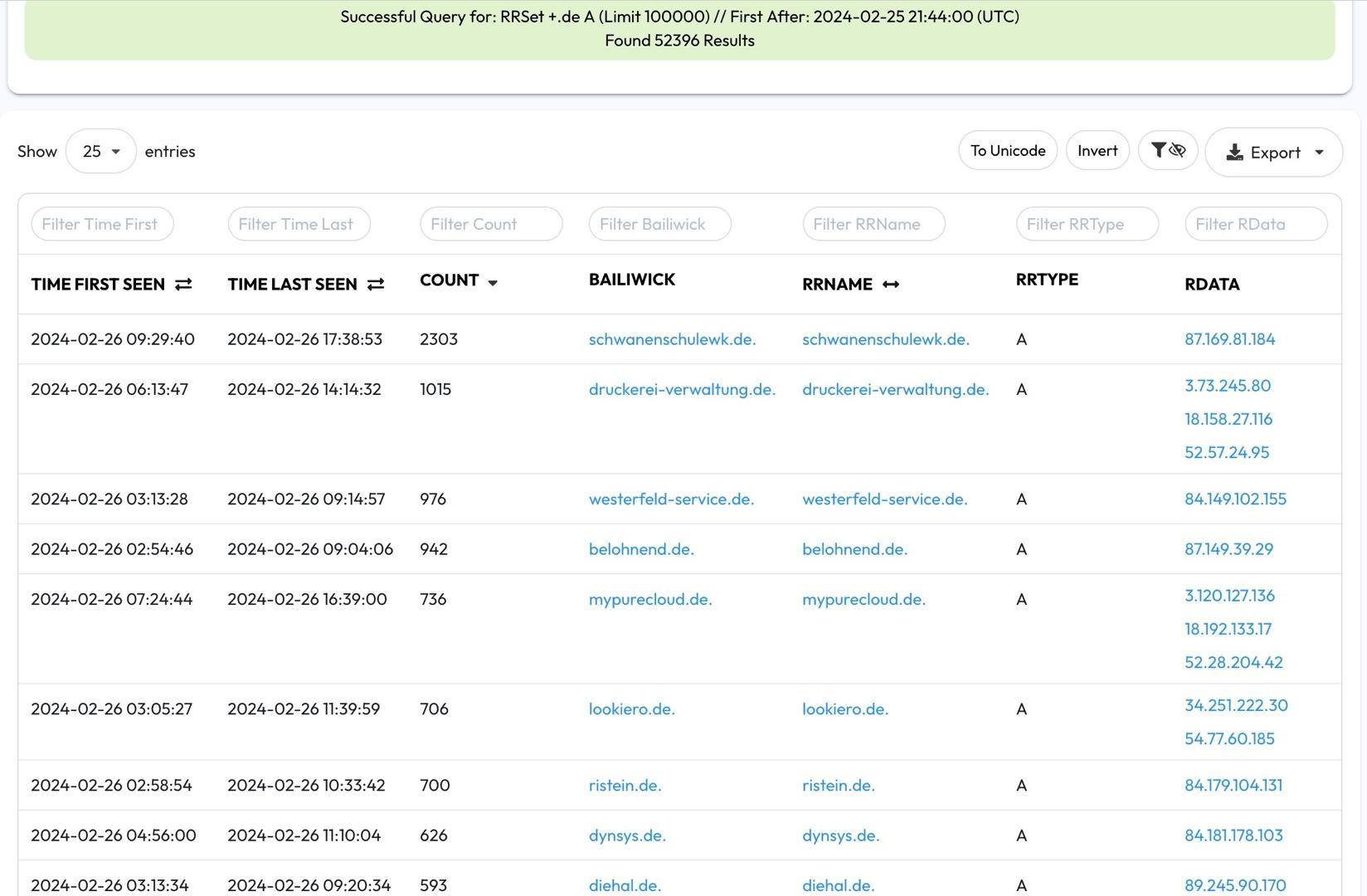
Using a "plus sign" wildcard in DNSDB Scout Standard Search is very similar to using a regular asterisk wildcard. Repeating our first dot de query in DNSDB Scout (as originally tried in dnsdbq):

"What If I Try Using the New Plus Sign As A Wildcard in DNSDB Flexible Search?"
The new "plus sign wildcard" is a DNSDB Standard Search feature and does NOT work as a single label wildcard in DNSDB Flexible Search.
DNSDB Farsight Compatible Regular Expressions (FCRE) Reference GuideIn DNSDB Flexible Search regular expressions, the + sign means "Match the previous character, character class, or subpattern at least once," as explained in our user guide.
In DNSDB Flexible Search glob expressions, the + sign is a literal character. The + character is normally seen only in TXT record Rdata.
If you did want to find "plus-sign-wildcard-like" single wildcards, you could try the (admittedly somewhat complex) patterns such as:
$ dnsdbflex --regex '^[^.]+\.uoregon\.edu\.$'
{"rrname":"cs.uoregon.edu.","rrtype":"NS"}
{"rrname":"dh.uoregon.edu.","rrtype":"CNAME"}
{"rrname":"ns.uoregon.edu.","rrtype":"CNAME"}
{"rrname":"oa.uoregon.edu.","rrtype":"CNAME"}
{"rrname":"aaa.uoregon.edu.","rrtype":"A"}
{"rrname":"aec.uoregon.edu.","rrtype":"CNAME"}
{"rrname":"aim.uoregon.edu.","rrtype":"CNAME"}
{"rrname":"art.uoregon.edu.","rrtype":"CNAME"}
{"rrname":"cas.uoregon.edu.","rrtype":"A"}
{"rrname":"coe.uoregon.edu.","rrtype":"A"}
{"rrname":"csc.uoregon.edu.","rrtype":"CNAME"}
{"rrname":"ctl.uoregon.edu.","rrtype":"CNAME"}
{"rrname":"ctn.uoregon.edu.","rrtype":"CNAME"}
{"rrname":"ctw.uoregon.edu.","rrtype":"CNAME"}
{"rrname":"ecs.uoregon.edu.","rrtype":"CNAME"}
{"rrname":"emu.uoregon.edu.","rrtype":"CNAME"}
[etc]

$
dnsdbflex --regex '^rolex.[^.]+\.$'
{"rrname":"rolex.at.","rrtype":"NS"}
{"rrname":"rolex.at.","rrtype":"A"}
{"rrname":"rolex.at.","rrtype":"SOA"}
{"rrname":"rolex.au.","rrtype":"NS"}
{"rrname":"rolex.aw.","rrtype":"NS"}
{"rrname":"rolex.aw.","rrtype":"SOA"}
{"rrname":"rolex.ax.","rrtype":"SOA"}
{"rrname":"rolex.be.","rrtype":"A"}
{"rrname":"rolex.be.","rrtype":"NS"}
{"rrname":"rolex.bi.","rrtype":"NS"}
{"rrname":"rolex.by.","rrtype":"NS"}
[etc]
We hope you've enjoyed learning a little about the new "plus sign wildcard" in DNSDB Standard Search. We think it will open up some powerful new queries for you and your investigations!
The "plus sign wildcard" is now available for DNSDB API users.
DNSDB Export users will need to update dnstable to version 0.14.0 (or later).
If you'd like to learn more on this topic, please click below to schedule a demo:


